52
AUTOMATIC CONTROL UNIT, OMD800
Counters
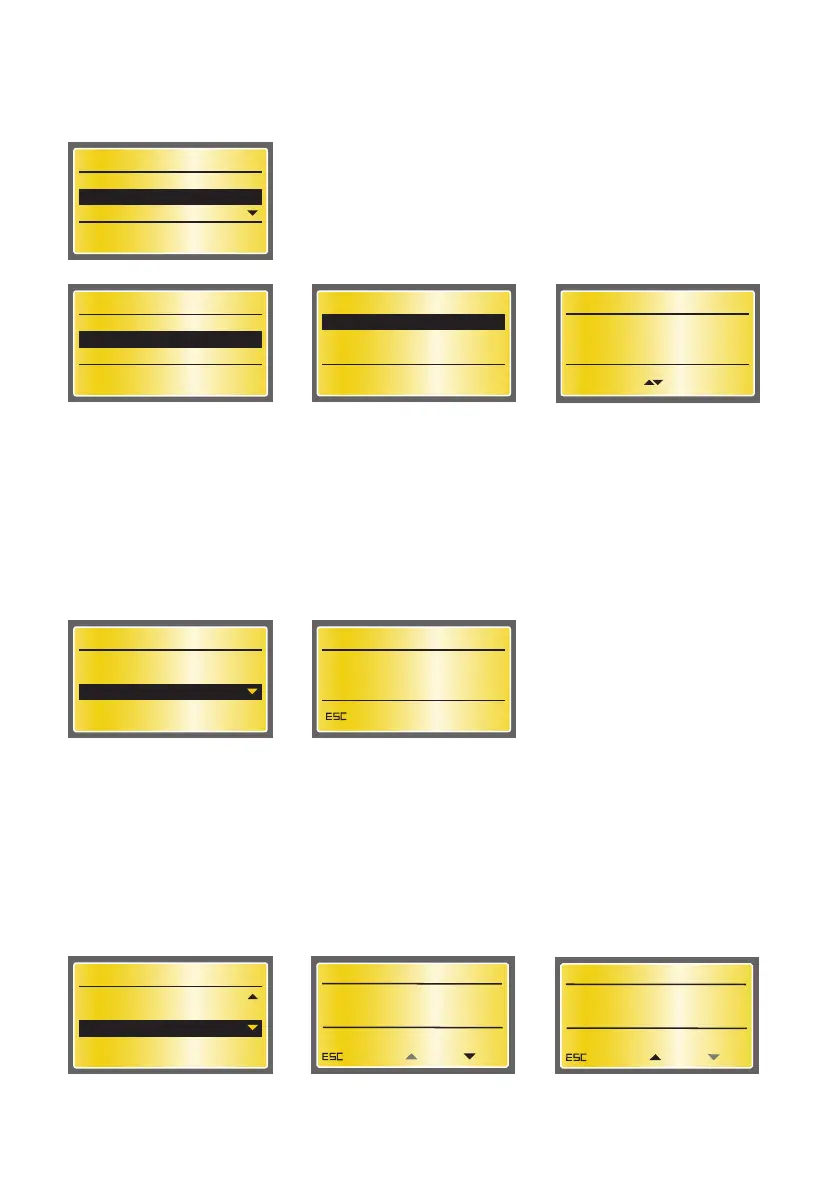
On this page the summary of switching operations is shown. One operation is from I to O or from II to O
or from O to I or from O to II, eg. the total summary of the operations from I to II is two operations. Re-
turn back to Diagnostics menu by pushing the ESC key.
Diagnostics
Measured Values
Alarm/Event Log
Counters
2/6
SW: 2A1 SN: 0
Alarm/Event Log
View Log
Clear Log
1/2
Alarm/Event Log
(0)
BrowseReturn
Alarm/Event Log
View Log
Clear Log
2/2
Figure 7.49 Alarm/Event Log: View Log will show 50 latest alarms and events, Clear Log will
empty the log
Diagnostics
Measured Values
Alarm/Event Log
Counters
3/6
SW: 2A1 SN: 0
Counters
OPERATIONS: 0
Return
Figure 7.50 Counters page will show the summary of operations
Generator Control
On this page the user can start or stop the generator if generator is in use (see the selection of
“Generator Usage” in Section 7.2.2.3). Start and Stop commands are given with UP and DOWN arrow
keys. OMD800 must be on Manual mode when starting the generator manually.
Return back to Diagnostics menu by pushing the ESC key.
Diagnostics
Alarm/Event Log
Counters
Generator Control
4/6
SW: 2A1 SN: 0
Figure 7.51 Generator Control if generator is in use
GENERATOR STOPPED
Return
Stop
Generator Control
KA00399
Start
GENERATOR STARTED
Return
Stop
Generator Control
KA00400
Start
Clear log does not have its own page. The log is cleared when Clear Log is chosen and the Enter key is
pressed. Alarms must be reset when clearing alarms/events.


 To Next Page