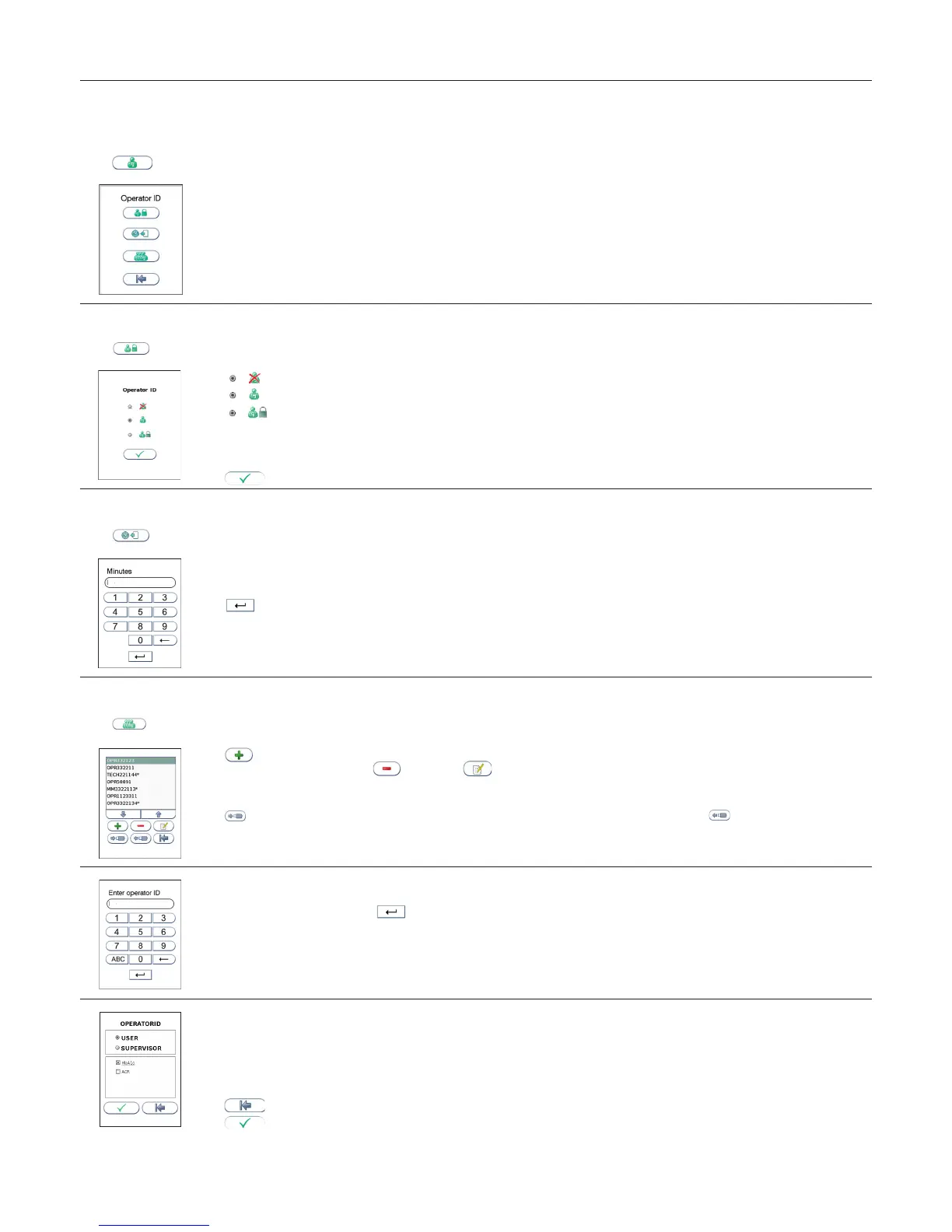
Conguration
Operator conguration
The operator ID function is disabled as a default setting by the manufacturer.
Touch
in the Conguration menu to enter the Operator conguration menu.
Operator ID enable/disable
Touch
in Operator conguration menu to enable/disable operator ID.
Select to disable the operator ID function.
Select to enable operator ID. Any operator ID is accepted.
Select to enable operator ID with verication.
· To enable this function at least one supervisor is required to be present in the operator list.
· When operator ID with verication is enabled, analyzer conguration will only be available to the supervisors.
· To log in, the operator ID entered is required to be present in the operator list. See “Operator list management”, page 14.
Touch to accept and return to the Conguration menu.
Operator login expiration
Touch
in the Operator conguration menu to set automatic logout of the operator.
Enter the number of minutes before automatic logout of operator.
The operator will automatically be logged out after the congured number of minutes after ended test.
Touch to conrm and return to previous view.
Operator list management
Touch
in Operator conguration menu
to enter operator list.
1
Touch to add new operator.
Touch desired operator ID and touch to delete or to edit the highlighted operator.
Copy operator list
It is possible to copy an existing operator lists between analyzers using a USB ash drive. Insert USB ash in the analyzer USB port.
Touch to export operator list from instrument to USB ash. Move USB to the new analyzer and touch
to import operator list. Any
existing operator list on the analyzer will be deleted.
2
Enter new/edit operator ID
Enter new/edit operator ID and touch to enter. Both letters and numbers can be entered (maximum 16 characters).
If a barcode reader is connected to the analyzer, a barcoded operator ID can be entered.
3
Congure the operator level
Select USER to congure user access.
Select SUPERVISOR to congure supervisor access.
Congure tests accessible:
Select the test accessible for this operator.
Touch to return and edit the operator ID.
Touch to accept and store new operator in the operator list. The operator list can store 1000 operator IDs.
Supervisors will be marked with * in the operator list. When analyzer is congured to Operator ID with verication, conguration of the
analyzer will only be available to the supervisors.



 To Next Page