US | 15
Conguration
Choosing language
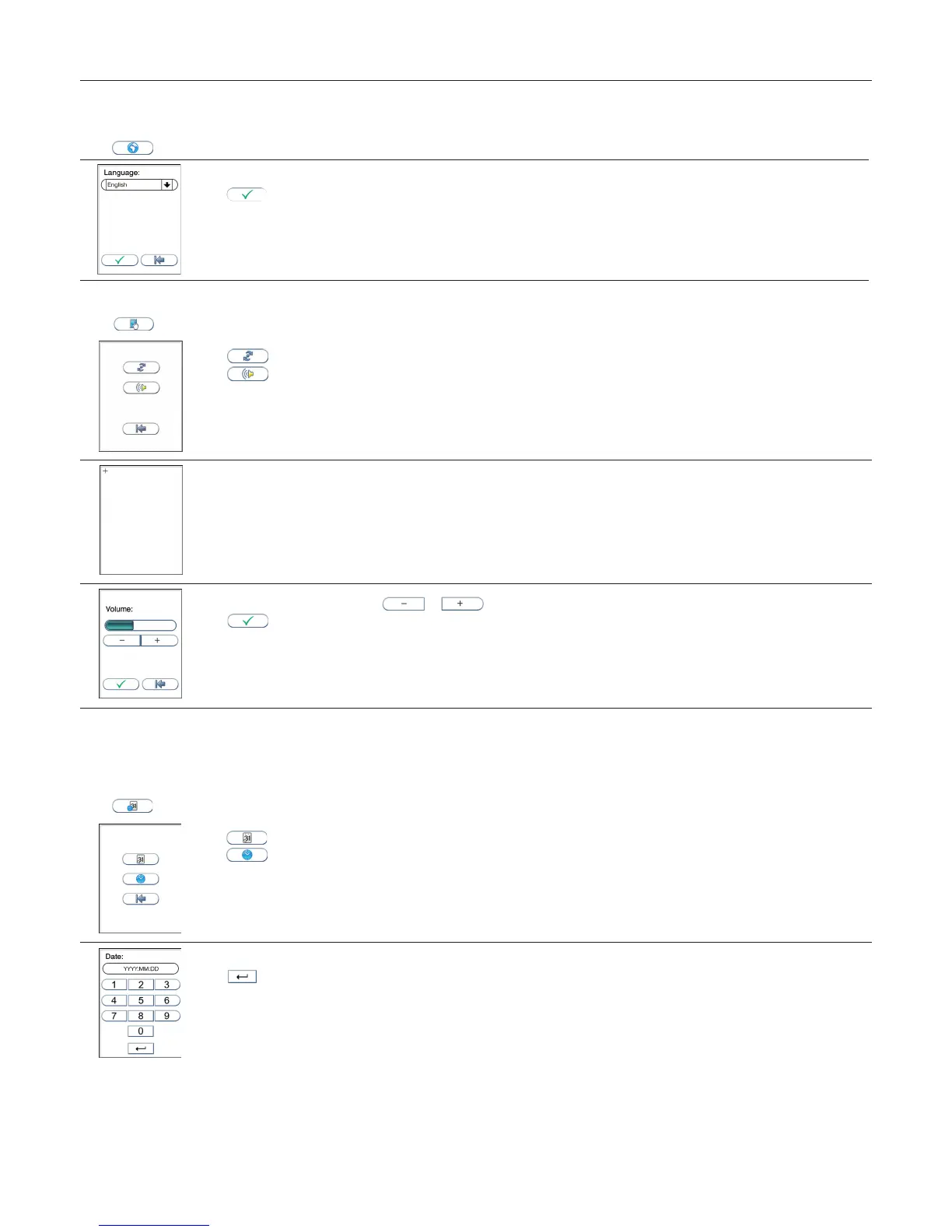
Touch in the Conguration menu to enter the language setting. The default setting by manufacturer is English. Other languages are available.
1
Touch the arrow in the window to view other options. Scroll down until you nd the preferred language.
Touch to accept and return to the Conguration menu.
Adjusting screen/beeper settings
Touch in the Conguration menu to enter the Screen/beeper menu.
Touch to enter the Screen alignment setting.
Touch to enter the Beeper volume setting.
A + sign is shown. Use a blunt pencil and tap the center of the +. Repeat tapping the center of the + each time it is shown. When the
process is nished, the previous screen will return.
Adjust the beeper volume by touching or
Touch to conrm and return to the previous view.
Setting date and time
The correct date and time should always be set because the date and time for the analyses are stored and displayed in the patient and control records. The
date format is YYYY:MM:DD, where YYYY is the year, MM is the month (01 to 12), and DD is the day (01 to 31). The time format is hh:mm, where hh is the hour
from 00 to 23 and mm is minutes from 00 to 59.
Touch in the Conguration menu to enter Date/time menu.
1
Touch to enter Date setting.
Touch to enter Time setting.
2
Enter today’s date or time.
Touch to conrm and return to the previous view.



 To Next Page