US | 23
Using the control ID function
In quality control testing, a suitable control ID must always be entered. The lot number of the control material is recommended as a suitable control ID. The control
ID function cannot be disabled.
Entering Control ID
It is recommended to enter the control ID during processing of the test cartridge in the analyzer. Entering the control ID will not interrupt the processing. It is also
possible to enter the control ID before processing. Both letters and numbers can be entered (maximum 16 characters). The control ID will be stored in the memory
and displayed along with the other specic data for this run.
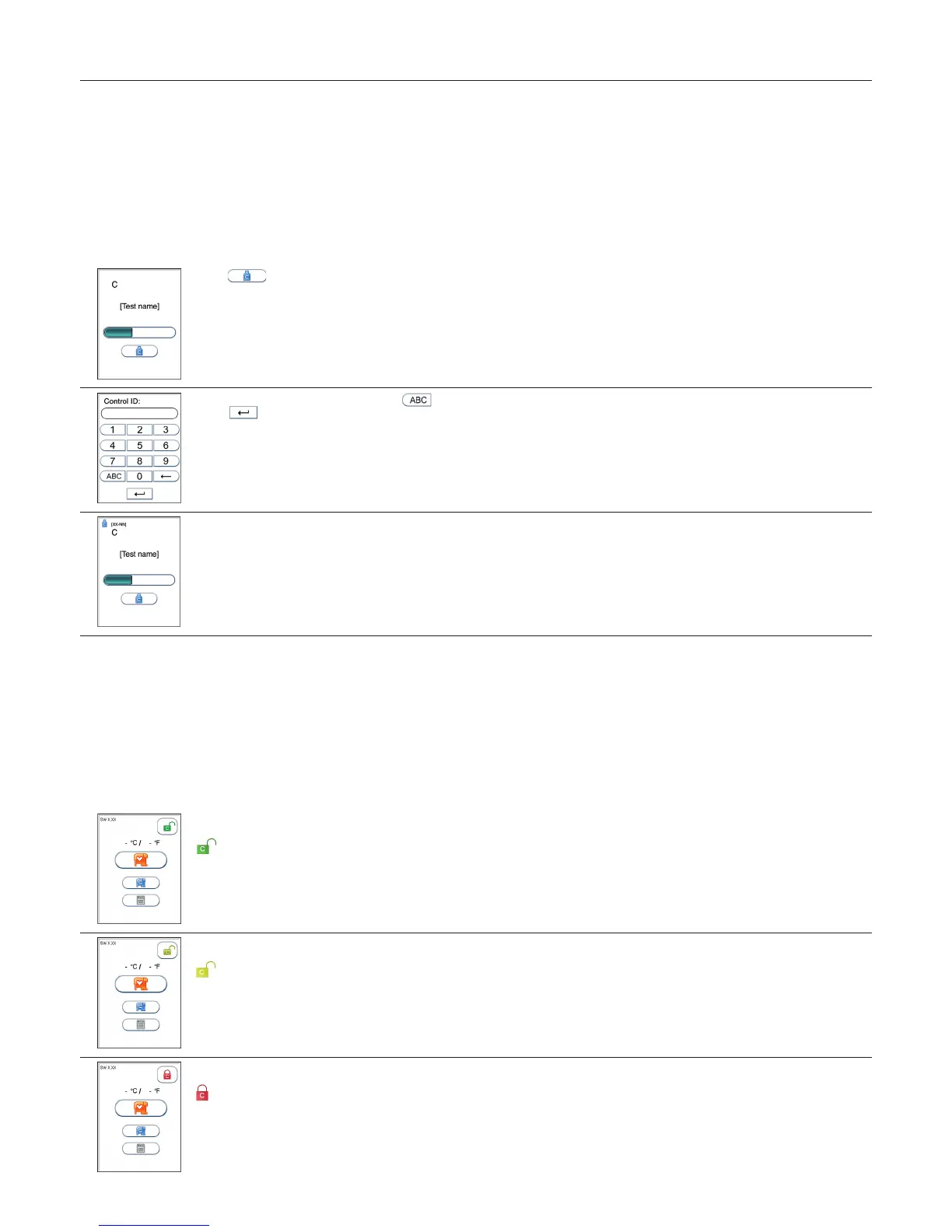
To enter the control ID during processing, do the following:
1
Touch to enter the control ID option.
2
Enter control ID by numbers and/or touch to enter letters.
Touch to conrm and return to the previous view.
3
The entered control ID will appear on the screen.
The control ID touch button will remain in the view and make corrections possible.
Using the QC lockout function
When the QC lockout function is enabled for one or more assays, approved control testing is required within the congured interval. If the interval expires, patient
testing for the assay will be locked. A passed control run must be performed according to conguration to reset the interval or to unlock the assay for patient testing.
A failed control run will disable patient testing (see “QC lockout conguration”, page 16).
QC lockout status
The status of the active QC lockouts is presented with a QC lockout status button (padlock symbol) visible in the Start-up menu. This gives the operator the status
of QC lockout before he attempts to run any tests.
The padlock symbol will only be visible if QC lockout function is enabled for one or more assay types.
The padlock symbols used are:
Enabled-unlocked
All controls are within the congured interval. It is possible to run patient tests for all assays.
Warning-unlocked
All controls are within the congured interval. When one or more of the assays has 10 % or less of the congured interval remaining the
warning icon will be displayed. It is possible to run patient tests for all assays.
Expired-locked
One or more controls have expired according to the congured interval. Patient testing on the expired assay has been locked.
Testing Procedures



 To Next Page