Step Action
5
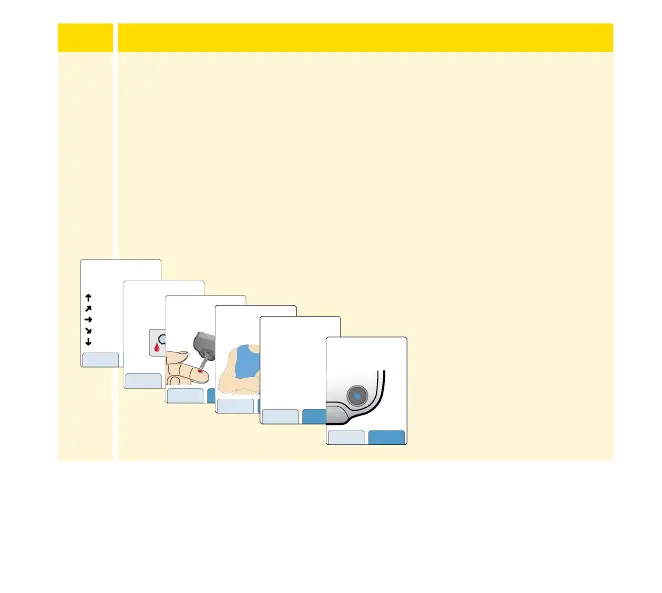
The Reader now displays important information about key
topics to help you use the System:
• How to understand the Glucose Trend Arrow included on
the Glucose Reading screen.
• When to do a blood glucose test.
• Where to apply the Sensor.
• Why not to take more than 500 mg of Vitamin C
supplements per day.
• How to return to the Home screen from any other screen.
Touch next to move
to the next topic. At
the end of the Reader
setup, touch done to
go to the Home screen.
Note: Charge the Reader if the battery level is low. Only use the USB
cable and power adapter included with the System. A fully charged
battery should last up to 4 days but this may vary depending on your
usage.
nextback
When you scan your
Sensor an arrow will
indicate your recent
glucose trend:
Rising quickly
Rising
Changing slowly
Falling
Falling quickly
If you see this symbol, do
a blood glucose test before
making treatment
decisions.
back next
If the Sensor glucose
reading does not match
how you feel, do a blood
glucose test.
back next
nextback
The Sensor can only be
applied to the back of
your upper arm.
nextback
Important
Do not take high doses
of vitamin C (more than
500 mg per day). This may
falsely raise your Sensor
readings. Supplements like
Airborne
®
or Emergen-C
®
have high doses of vitamin
C. Read labeling for all
supplements to determine
vitamin C content.
doneback
While using the Reader, press
the Home Button to return to
the Home Screen.
30














 To Next Page