137
English
6.12 HTTP event
Use this function to save image data (snapshots) on a HTTP server. A CGI script on the HTTP server must be
able to receive the data. In the event of questions, please contact your network administrator.
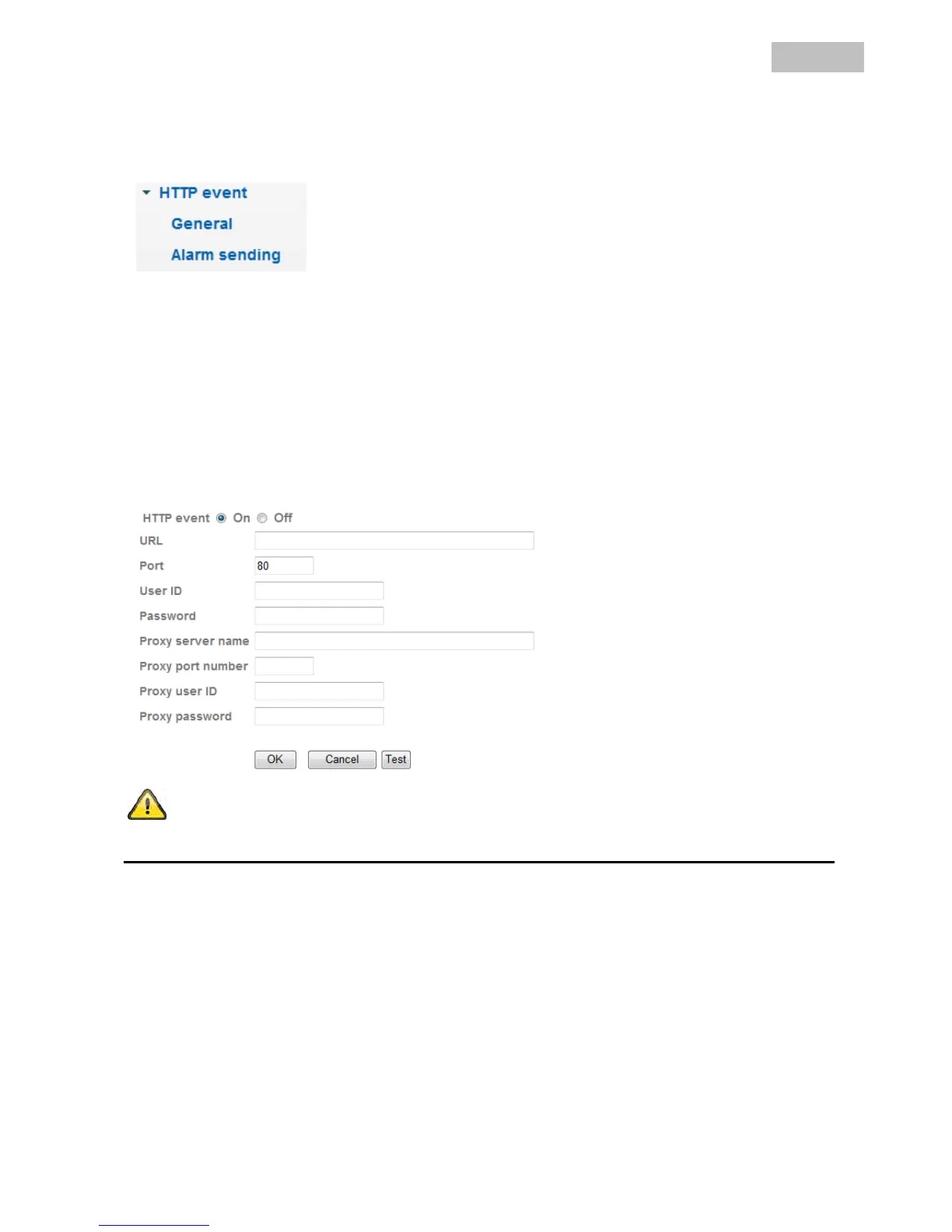
General
HTTP: Activates or deactivates the HTTP upload function.
URL: Enter the URL of the HTTP server with the folder parameters here (e.g.
“192.168.0.156/cgi-bin/webcam”).
Port: Indicates the port where the HTTP server is operated.
User ID: User ID on the HTTP server.
Password: Password on the HTTP server.
Proxy server name: Server name when using a proxy server.
Proxy port number: Port number of the proxy server.
Proxy user ID: User ID on the proxy server.
Proxy password: Password on the proxy server.
The settings can be tested using the “Test” button. Accept the settings by
pressing “OK” or cancel them by pressing “Cancel”.
Alarm sending
Alarm sending: Activates or deactivates the transmission of image data (snapshots) to a HTTP
server.
Alarm: In the event of an alarm, certain reactions can be configured for HTTP transmission
here. A button for configuring the corresponding alarm detector is available for each
entry (if configuration of the detector or trigger is possible).
Effective Period:
Always: The detectors for these alarms are permanently activated.
Schedule: The detectors for these alarms are activated at defined schedules. Press the
“Schedule” button to configure these settings (see also the “Schedule” section).



 To Next Page