User Manual The Accutech Software 6-
7.0 User Interface
User Interface
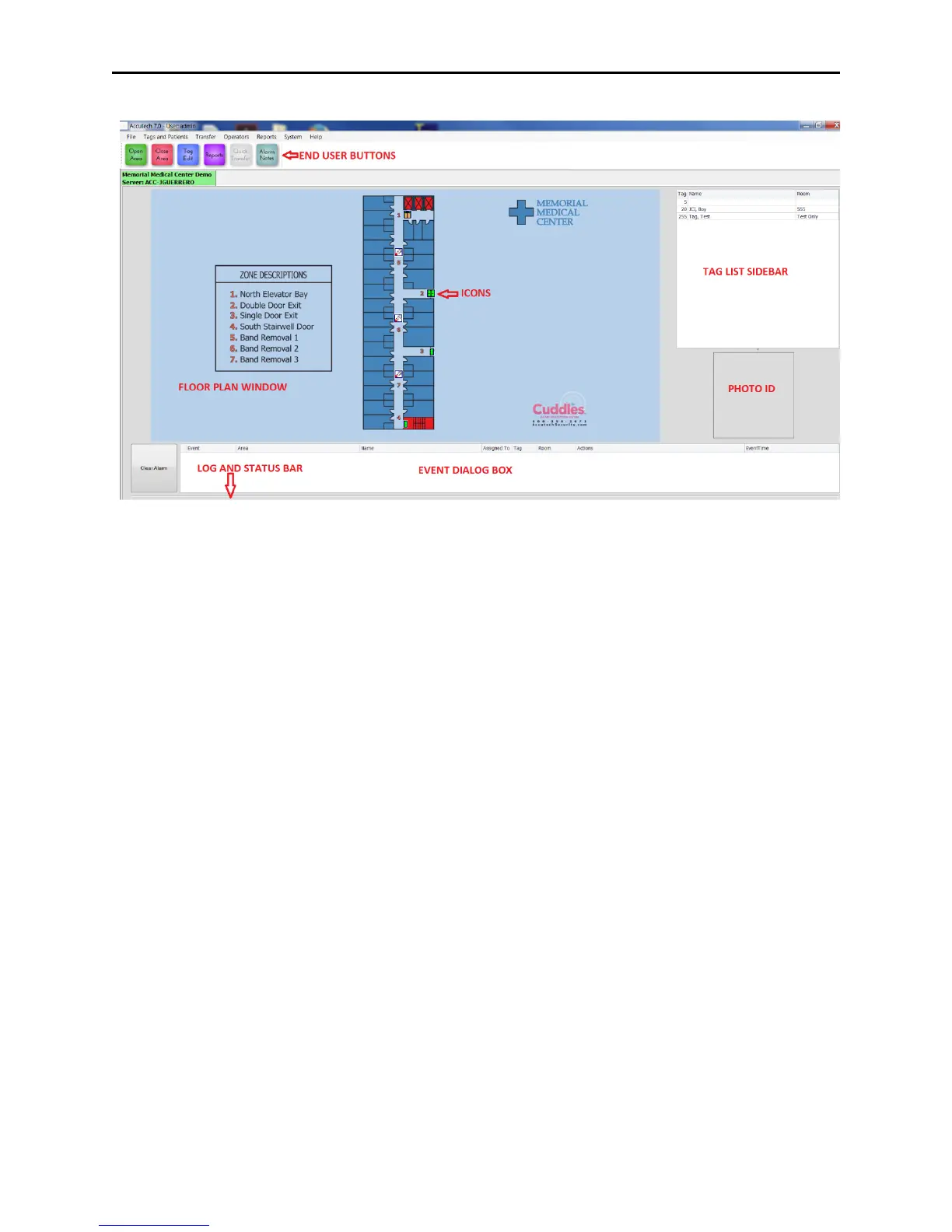
1. End User buttons – quick access to the most commonly used software operations
2. Floor plan window – displays monitored exit points and Band Alarm Receiver locations
3. Tag List sidebar – displays the area’s currently assigned Tags (Tag number, name, and room)
4. Photo ID – displays Photo ID of the Tag assignment upon alarm event
5. Event Dialog box – displays incoming alarm event information (user action required to clear)
6. Log and Status bar – display incoming alarm event information in YELLOW (no user action
required)
Icons
The Accutech Software uses architectural-specific icons to represent monitored zones in the Floor plan
window. Icons are dormant until an event triggers them into active state. When alarming, icons cycle
between dormant, transitional, and active state. If a dormant icon is clicked on, the zone number and
name will appear in a dialog box; this is the ID state. If an active icon is clicked on, the Alarm
Information dialog box appears.



 To Next Page