6-10 The Accutech Software Us
Assigning a Tag
Tag assignment associated a name, room number, and photo ID for
display in the Accutech 7.0 software when an alarm event occurs.
To assign a Tag, use the following instructions:
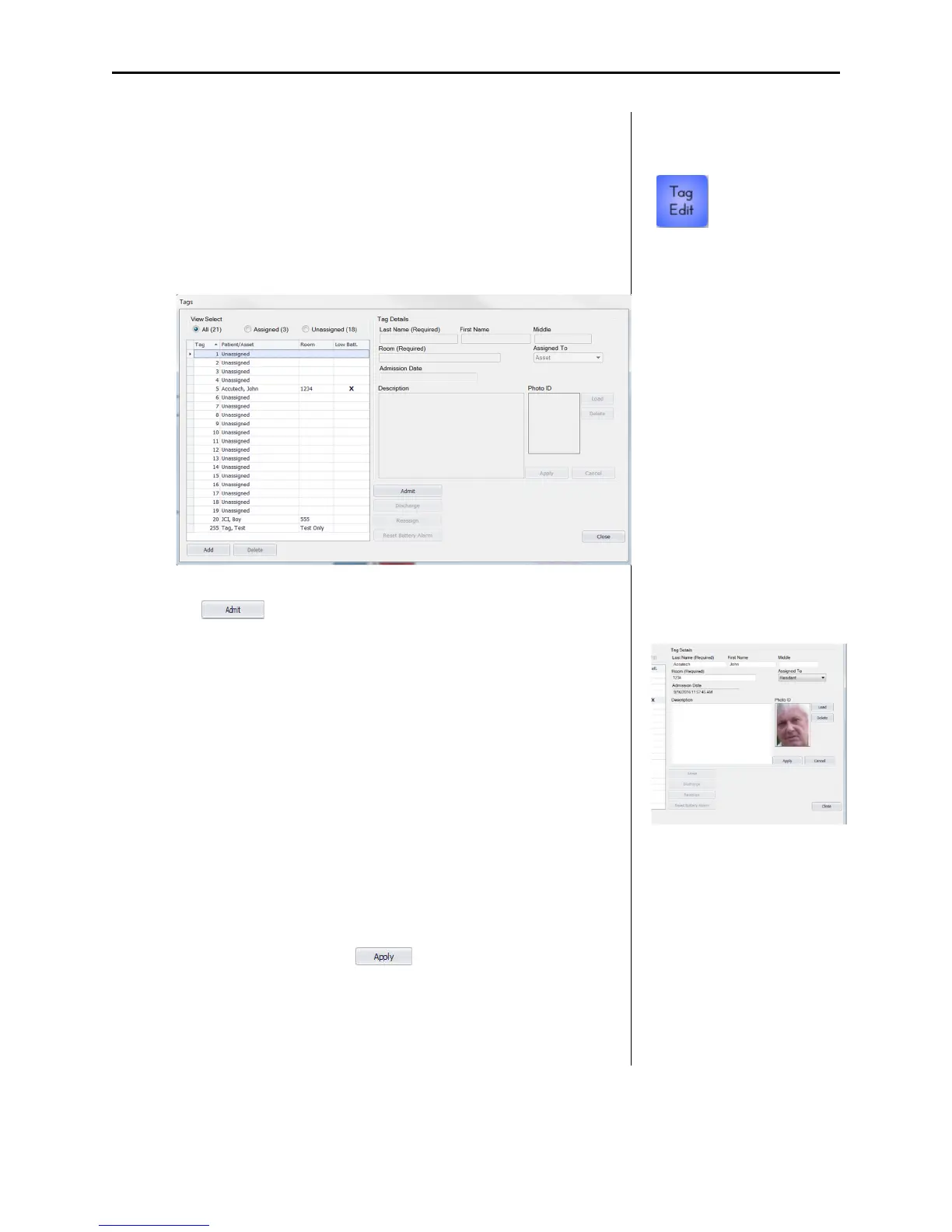
1. Select the Tag Edit (1) button.
The Tags dialog appears.
2. Highlight the desired Tag number from the Tag list and select
the button. The Tags Details section becomes
accessible (2). Complete the Tag Details section:
a. The Last Name - required
b. First Name and or middle
c. Room – required
d. Assigned To – select from: Asset, Baby, Personnel, Patient,
Resident
e. Photo ID
3. The user can also associate a Photo ID (2) with the Tag
assignment by selecting the Load button, then the Load Image
button, browsing to the photo location, selecting the photo,
selecting the Open button, cropping the photo as desired, and
finally selecting the OK button.
4. When finished, select the button.
The Tag list updates with the entered information and the
assignment is listed in the Tag list sidebar of the user interface.
An admission date will automatically be associated with the tag
assignment.
1
2



 To Next Page