01010101100110101010110011010101011001101010101100110101010110011010101011001101010101100110
1001101010101100110101010110011010101011001101010101100110101010110011010101011001101010101100110101010110110101010
11
10101010110011010101011011010101001101010100110101101101101010100101
1011010101100110011010101011010101111010111
11010101101101010100111110
1101110110110011
0111011110
111101
011
11
1
PC-3000 EXPRESS / UDMA / PORTABLE Seagate
ACE Lab F3 architecture
Technical support: ts@acelab.ru
Phone: +7 863 201 50 06
ts.acelaboratory.com 47
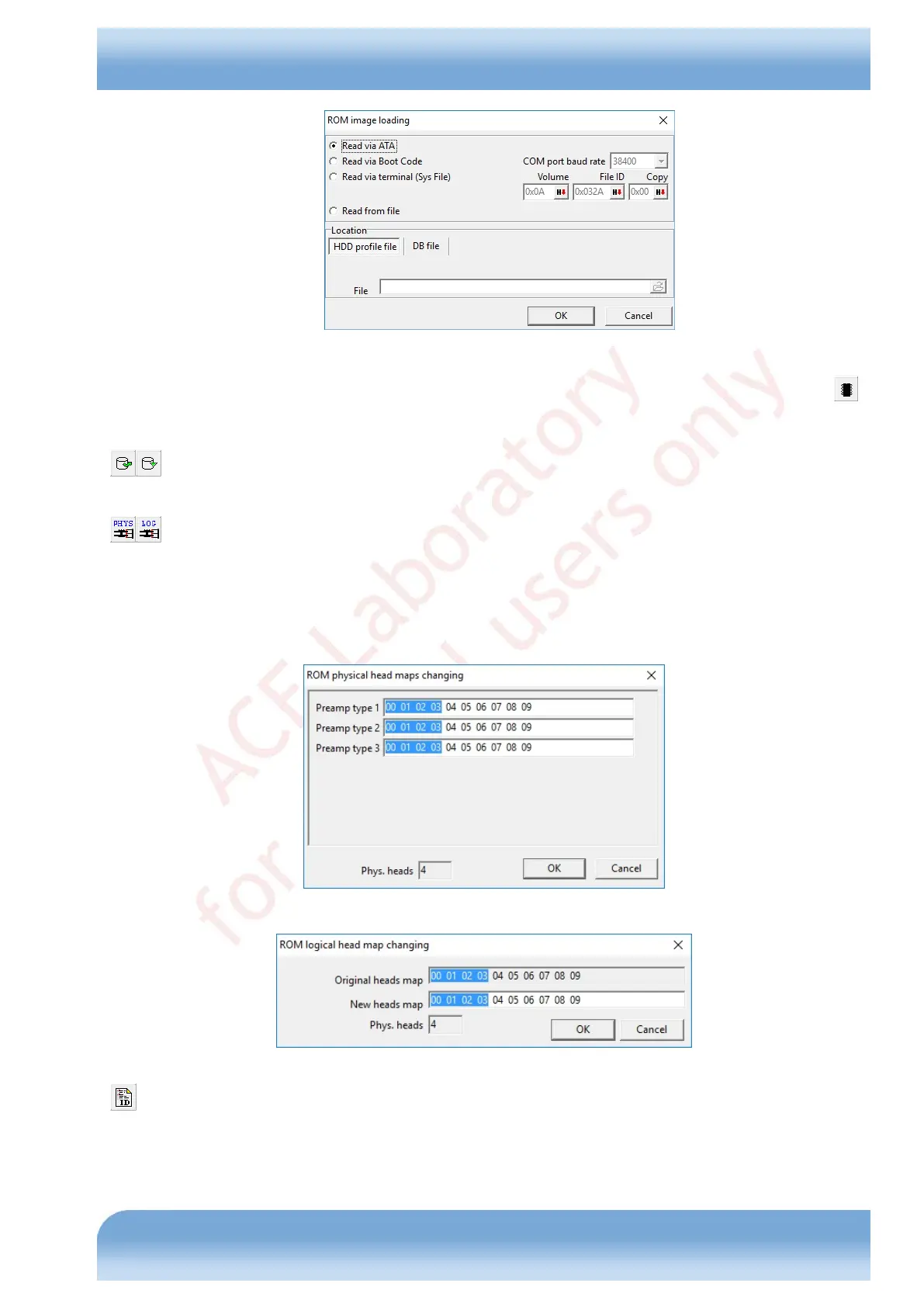
Fig. 7.12
When started, the wizard loads ROM image from a file or drive (you may also perform the procedure using the
button when necessary (see the loading dialog above), and allows you to correct the information in ROM manually or
with the integrated tools. Tools available in the wizard are:
- Load data of the object being edited from drive memory and write it back via the interface for operations
with DT. Available for CAP, RAP, and SAP.
- Correct the head maps in ROM. The tool consequently supports the maps for conversion of physical head
numbers to the preamplifier channel selection codes (editing of all available maps) and the map for conversion of
logical head numbers to physical ones. For details please refer to the section 6.6.3.1, Heads maps in Seagate F3 drives.
Editing of the maps for conversion of physical head numbers to the preamplifier channel selection codes is performed
in the dialog shown in Fig. 7.13.
Editing of the map for conversion of logical head numbers to physical ones occurs in the dialog shown in Fig. 7.14.
Fig. 7.13
Fig. 7.14
- Correction of HDD ID data in ROM. The button displays a dialog that allows you to modify the serial number of
the HDA, controller, WWN, manufacture date, model name, and capacity (if the field is stored in ROM).


 To Next Page