16
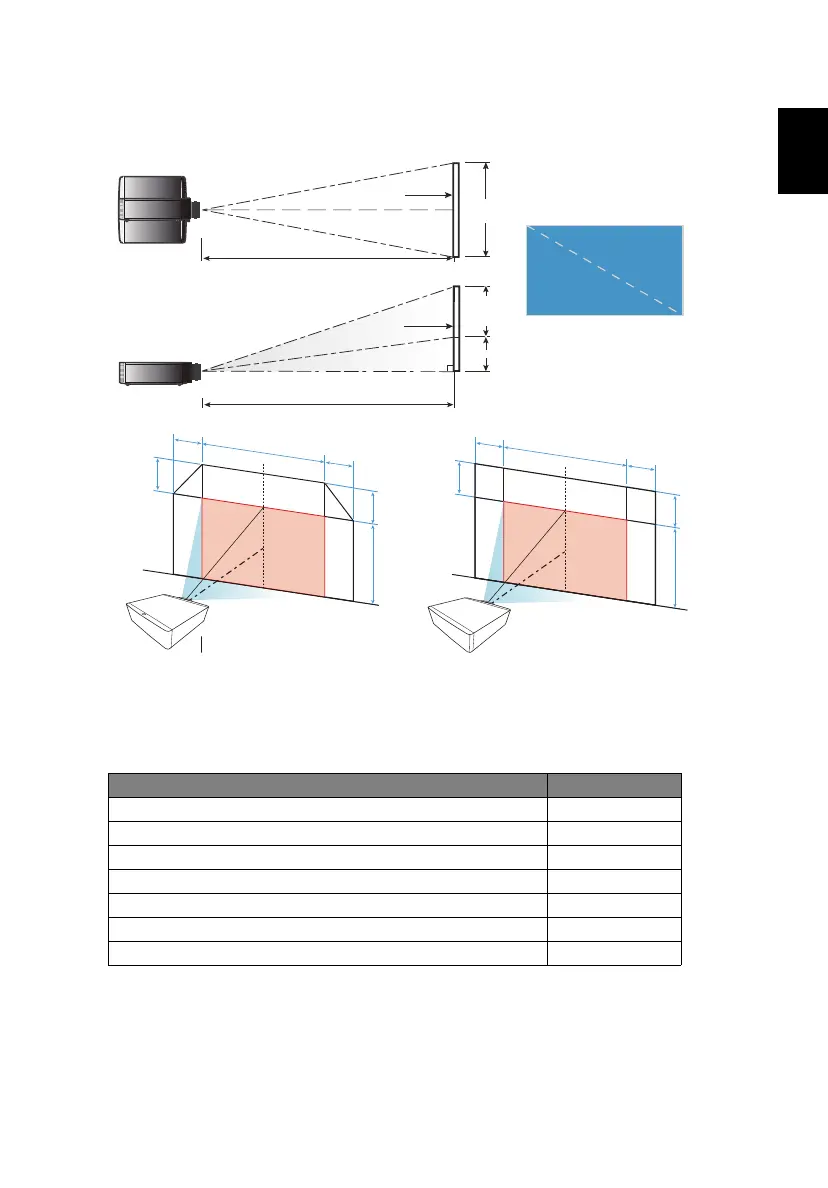
Optimizing Image Size and Distance
[A] differs when different lens is installed.
Lens installed [A]
Acer FL8 series Standard Zoom Lens 0.6H
Acer FL8 series Ultra Short Throw Zoom Lens 0.5H
Acer FL8 series Short Throw Zoom Lens 0.6H
Acer FL8 series Middle Throw Zoom Lens 0.6H
Acer FL8 series Long Throw Zoom Lens 0.6H
Acer FL8 series Ultra Long Throw Zoom Lens 0.6H
Acer FL8 series Ultra Short Throw Lens N/A
Screen
Screen
Projection distance (D)
Top view
Side view
Projection distance (D)
Screen (W)
Screen (H)
Offset (Hd)
Width
Height
D
i
a
g
o
n
a
l
[A]
0
.
1
W
W
0
.
1
W
[A]
H
[A]
0
.
1
W
W
0
.
1
W
[A]
H
Only with the following lenses:
Acer FL8 series Standard Zoom Lens/
Acer FL8 series Middle Throw Zoom Lens/
Acer FL8 series Long Throw Zoom Lens/
Acer FL8 series Ultra Long Throw Zoom Lens


 To Next Page