5
Control Panel
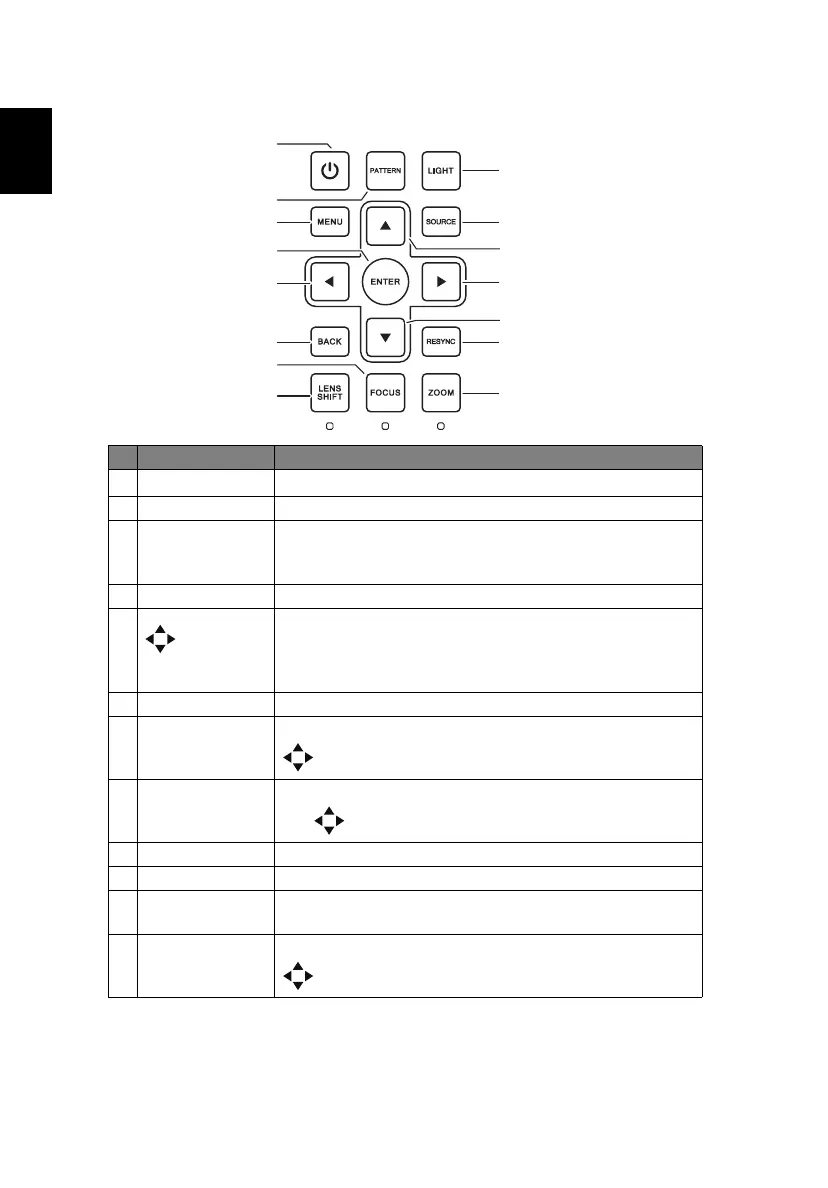
# Function Description
1
Power key
Refer to the "Turning the Projector On/Off" section.
2 PATTERN Displays the test pattern.
3 MENU Launches the Onscreen Display (OSD) menu, returns to
the previous step for the OSD menu operation or exits
the OSD menu.
4 ENTER Confirms your selection of items.
5Four
directional
selection
keys
Selects items or makes adjustments to your selection
6 BACK Cancels your selection, or goes back to previous page.
7 FOCUS Press "FOCUS" and the indicator below lights up. Use
to adjust the focus setting.
8 LENS SHIFT Press "LENS SHIFT" and the indicator below lights up.
Use to shift the projection lens.
9 LIGHT Turns on or off the back light of the control panel.
10 SOURCE Changes the active source.
11 RESYNC Automatically synchronizes the projector to the input
source.
12 ZOOM Press "ZOOM" and the indicator below lights up. Use
to adjust the zoom setting.


 To Next Page