25
Display settings
Aspect Ratio
Use this function to choose your desired aspect ratio.
• Auto: Keeps the image with original width-height
ratio and maximizes the image to fit native horizontal
or vertical pixels.
• 4:3/16:9/16:10/1.88:1/2.35:1: The image will be scaled
to fit the screen and displayed using a 4:3/16:9/16:10/
1.88:1/2.35:1 ratio.
Phase
Eliminates flicker from the image displayed. Use
key to adjust the value.
Frequency
Changes the projector’s refresh rate to match the
frequency of your computer’s graphics card. If you
experience a vertical flickering bar in the projected image,
use this function to correct it.
H. Position
• Press to move the image left.
• Press to move the image right.
V. Position
• Press to move the image down.
• Press to move the image up.
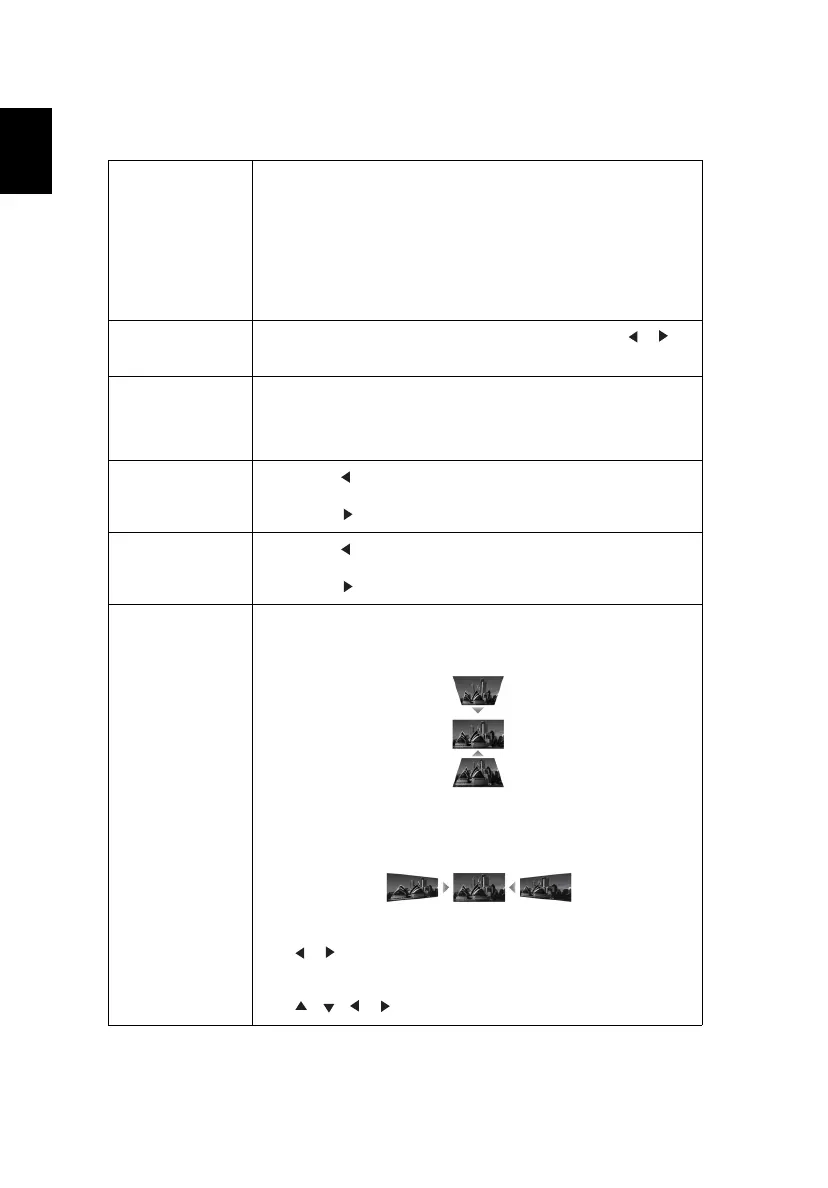
Keystone
V. Keystone
Manually adjusts image distortion caused by tilting
projection.
H. Keystone
Manually adjusts image distortion caused by tilting
projection.
Four Corners
Use key to select which corner to adjust and press
the “ENTER” key to enter its submenu.
Use key to adjust the setting.


 To Next Page