6
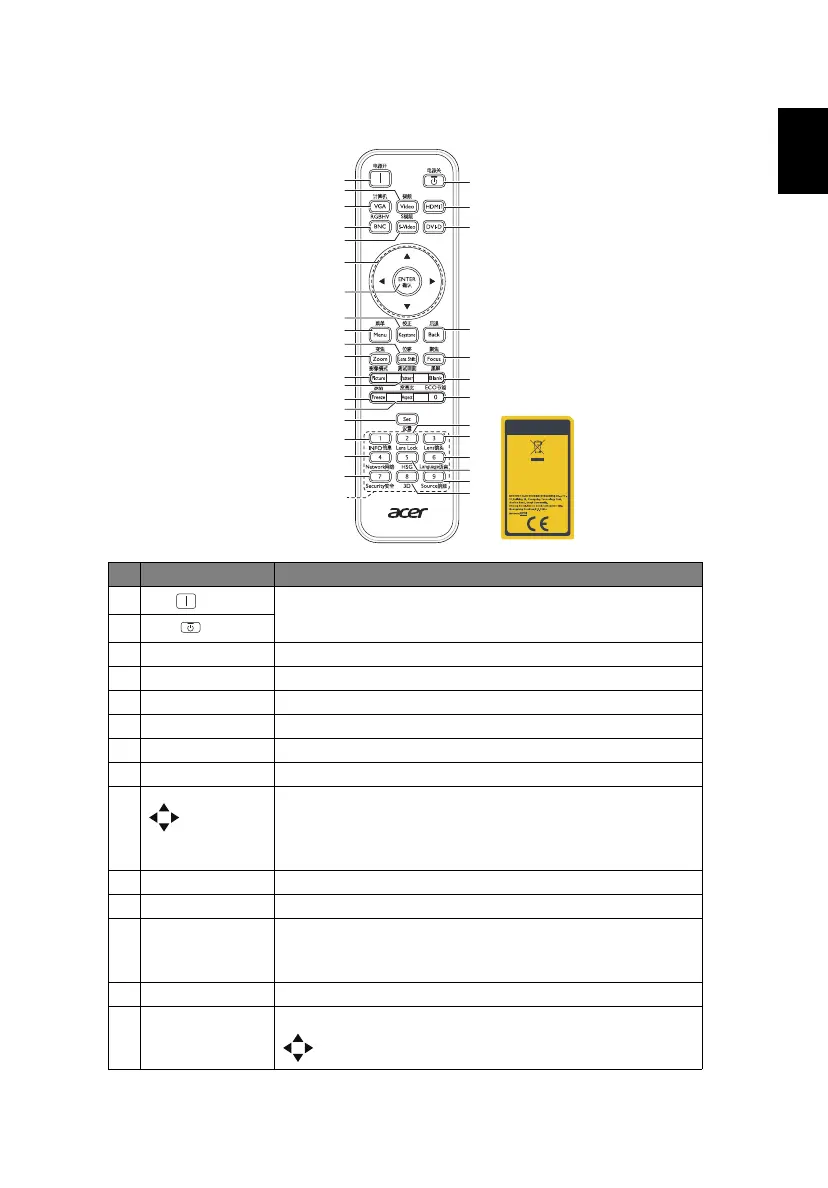
Remote Control Layout
# Function Description
1
ON
Refer to the "Turning the Projector On/Off" section.
2
OFF
3 Video To change source to composite video.
4 VGA To change source to VGA IN.
5 HDMI1 To change source to HDMI.
6 BNC To change source to BNC.
7 S-Video To change source to S-Video.
8 DVI-D To change source to DVI-D.
9Four
directional
selection
keys
Selects items or makes adjustments to your selection.
10 ENTER Confirms your selection of items.
11 Keystone Displays the Keystone correction menu.
12 Menu Launches the Onscreen Display (OSD) menu, returns to
the previous step for the OSD menu operation or exits
the OSD menu.
13 Back Cancels the selection, or goes back to previous page.
14 Lens Shift Press "Lens Shift" and the indicator below lights up. Use
to shift the projection lens.
13 13
1
4
12
15
17
20
2
13
16
19
22
5
8
18
21
23
6
9
7
10
11
14
3
28
25
31
33
24
27
30
26
29
32



 To Next Page