EasyManua.ls Logo

Acom 500S - Table 2-1 | Signals and Pin out of the CAT;AUX Connector; Table 2-2 | Signals and Pin out of the RS-232 Connector

Acom 500S
66 pages
Print Icon
To Next Page IconTo Next Page
To Previous Page IconTo Previous Page
Loading...
User's Manual | ACOM 500S | 160-4
m Linear Power Amplifier
March 2023
S e c t i o n INSTALLATION | Page 25 of 66
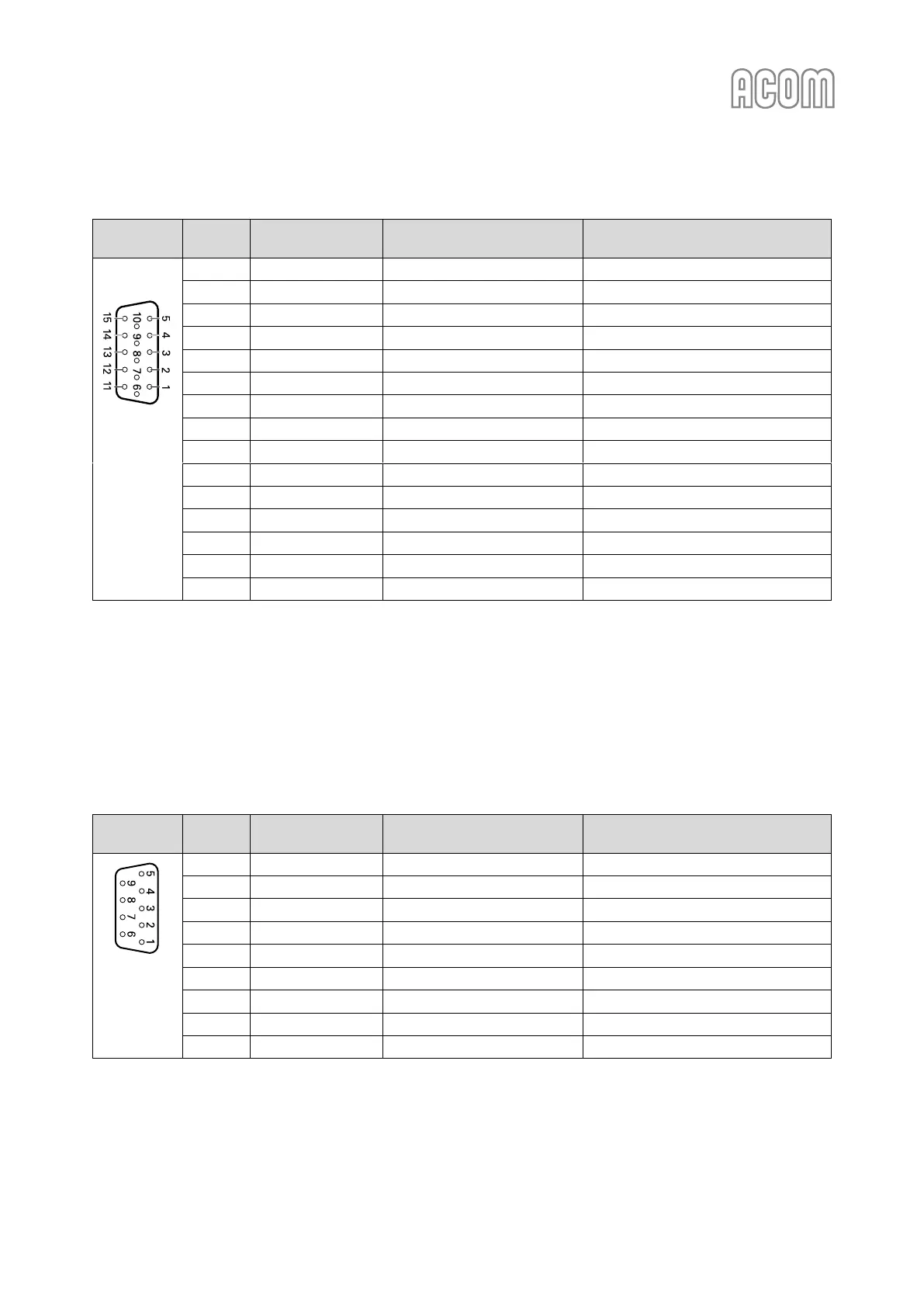
Table 2-1 | Signals and pin out of the CAT/AUX connector
CAT/AUX
interface
Pin Nr.
Pin name
Description
Specification
D-sub
connector,
15-pin,
3-row,
female
(Rear panel
view)
1
RxD
Receive Data
TTL input
2
RxD
Receive Data
RS-232 input
3
TxD
Transmit Data
RS-232 output
4
TxD
Transmit Data
TTL output
5
GND
Ground
0 Volt
6
BAND voltage
Analogue input
0 to +8 V
7
Band data 0
Bit 0
TTL input
8
Band data 1
Bit 1
TTL input
9
Band data 2
Bit 2
TTL input
10
Band data 3
Bit 3
TTL input
11
ON RMT
Remote Pwr On
+4.5 to +15 V / 3 mA max
12
Debug mode
CPU only Pwr input
+8 to +15 V / 0.4 A
13
KEY IN
Tx request
Less than +12 V / 6 mA
14
KEY OUT
Tx Ready
O.C. output, up to +50 V / 20 mA
15
GND
Ground
0 Volt
Table 2-1 | Signals and pin out of the CAT/AUX connector
b) RS-232 interface connector
Please, see Figure 2-3 | Rear panel - Connections, Pos. (4).
This connector may remain unused until you decide to control the amplifier remotely.
Please, see Section 6 REMOTE CONTROL.
Table 2-2 | Signals and pin out of the RS-232 connector

RS-232
interface
Pin Nr.
Pin name
Description
Specification
D-sub
connector,
9-pin, female
(Rear panel
view)
1
-
Not connected
-
2
TxD
Transmit Data
RS-232 level output
3
RxD
Receive Data
RS-232 level input
4
-
Not connected
-
5
GND
Ground
0 Volt
6
DSR
Remote Power On
RS-232 level input
7
-
Not connected
-
8
CTS
Remote Power On
RS-232 level input
9
-
Not connected
-
Table 2-2 | Signals and pin out of the RS-232 connector

Table of Contents

Related product manuals