5
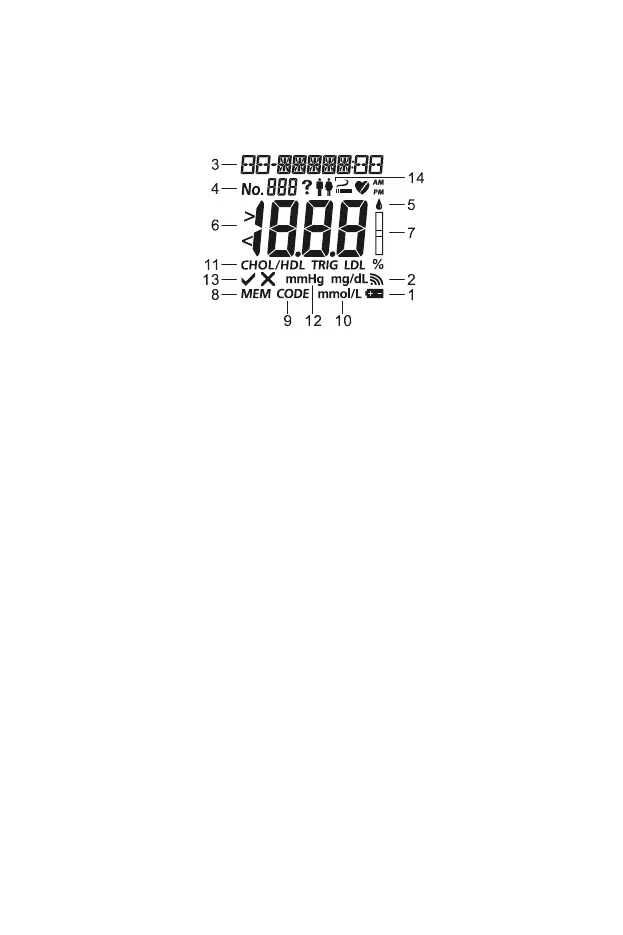
Meter Display
During testing, the Mission
®
Cholesterol Meter will display icons showing the
status, options available, and prompts for testing:
1 Battery Icon 8 Memory Indicator
2 Sound Icon 9 Code
3 Date 10 Measurement Units
4 Test Number 11 Te st I t e m
5 Blood Drop Symbol 12 Systolic Blood Pressure
6 Test Result Area 13 Yes/No Option
7 Test Device Symbol 14
Options for Gender, Smoker
or Non-smoker, and MI
Battery Icon: Appears when the battery should be replaced.
Sound Icon: Appears when the sound is turned on.
Date: Shows the current date or date tested.
Test Number: Indicates the specimen type and assigned test number.
Test Result Area: Displays the test result or menu options.
Memory Indicator (MEM): Appears when a test result is being recalled
from memory.
Code: Shows the code number of the test devices.
Measurement Units: Displays the measurement units of the test result.
Test Device and Blood Drop Symbols: Indicate when to insert test device
or apply specimen.
Test Item: Shows which item is being tested.
Systolic Blood Pressure: Needed for CHD risk analysis. Calculated CHD is
for professional use only.


 To Next Page