10
Connect to Antenna or Cable
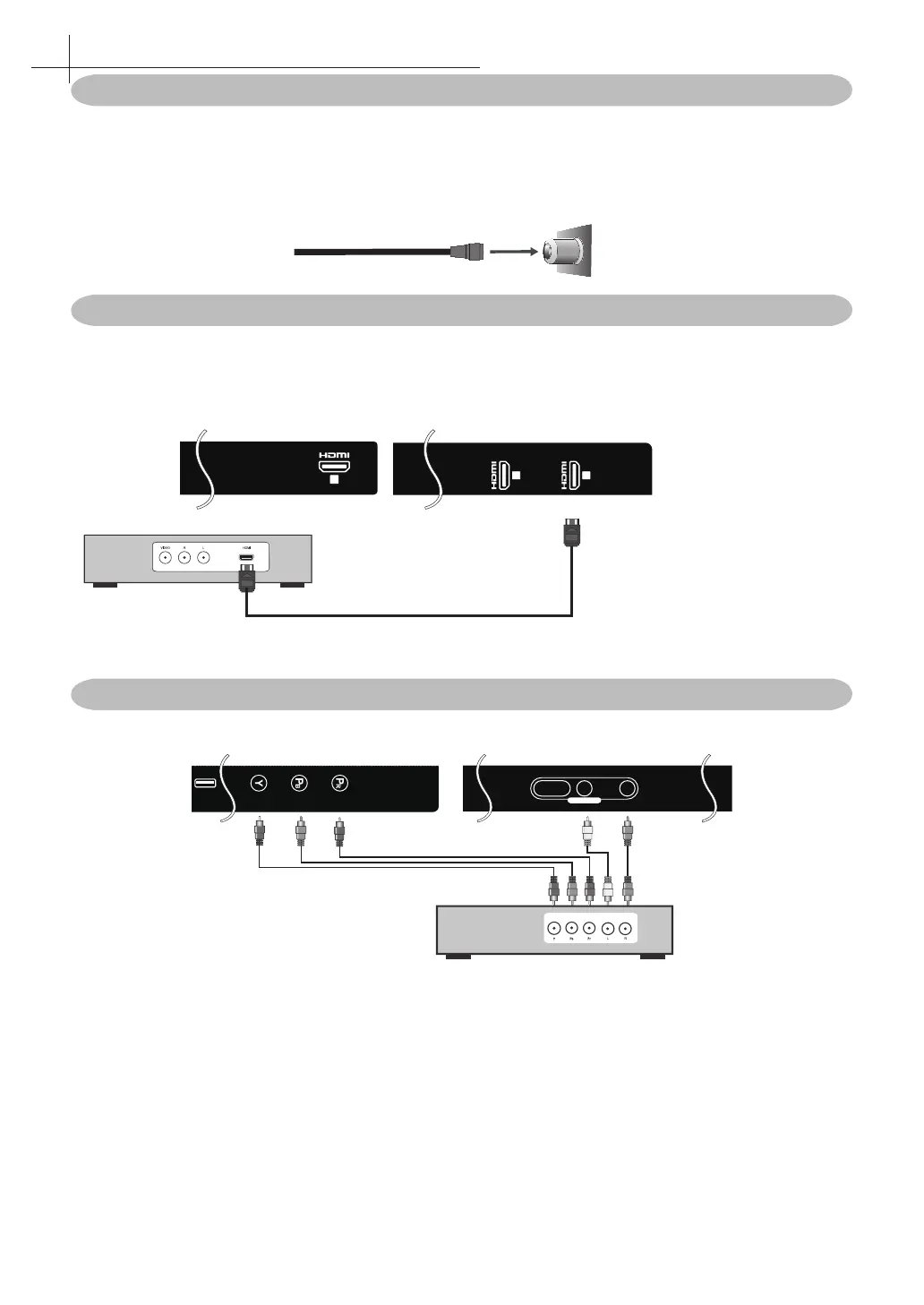
Typical wall antenna jack is used in apartment buildings, connect the antenna cable, as shown in below
diagram (Please use the correct type of antenna cable). We strongly remommend that you connect the
antenna/cable input using a 75-ohm coaxial cable (not supplied) to ensure the best picture quality.
Cable or VHF/UHF
75-ohm coaxial cable
Rear of TV
VHF/UHF/CABLE input
Connect Device Via HDMI interface
An HDMI cable carries both video and audio. You do not need to use any audio cables. You can connect ARC
devices, such as the Roku Streaming Stick and compatible mobile phones and tablets to the HDMI3(ARC)
port. USB to HDMI cable is required to connect a mobile phone or table is required to connect a mobile phone
or tablet to the TV. Please check the documentation of your device.
1
3
2
ARC
Digital set top box, gaming
console, or Blu-ray w /HDMI
interface
Optional HDMI cable (not included)
Connect Device Via Component(Y/Pb/Pr) + Audio L/R Interface
USB
VIDEO / Y
R
CVBS
L
CVBS IN
Optional Component cables (not
included)
Digital set top box, gaming
console or DVD
5
Connect External Devices



 To Next Page