©2018 ACP, Inc.
Cedar Rapids, IA 52404 Page 48 of 80
Part No. 16400033
Original Instructions
Panel Removal
Panel Removal
⚠
DANGER
Disconnect Power Supply before removing any Covers or Panels.
The high voltages and currents at the lament and secondary winding of the Transformer are extremely dangerous.
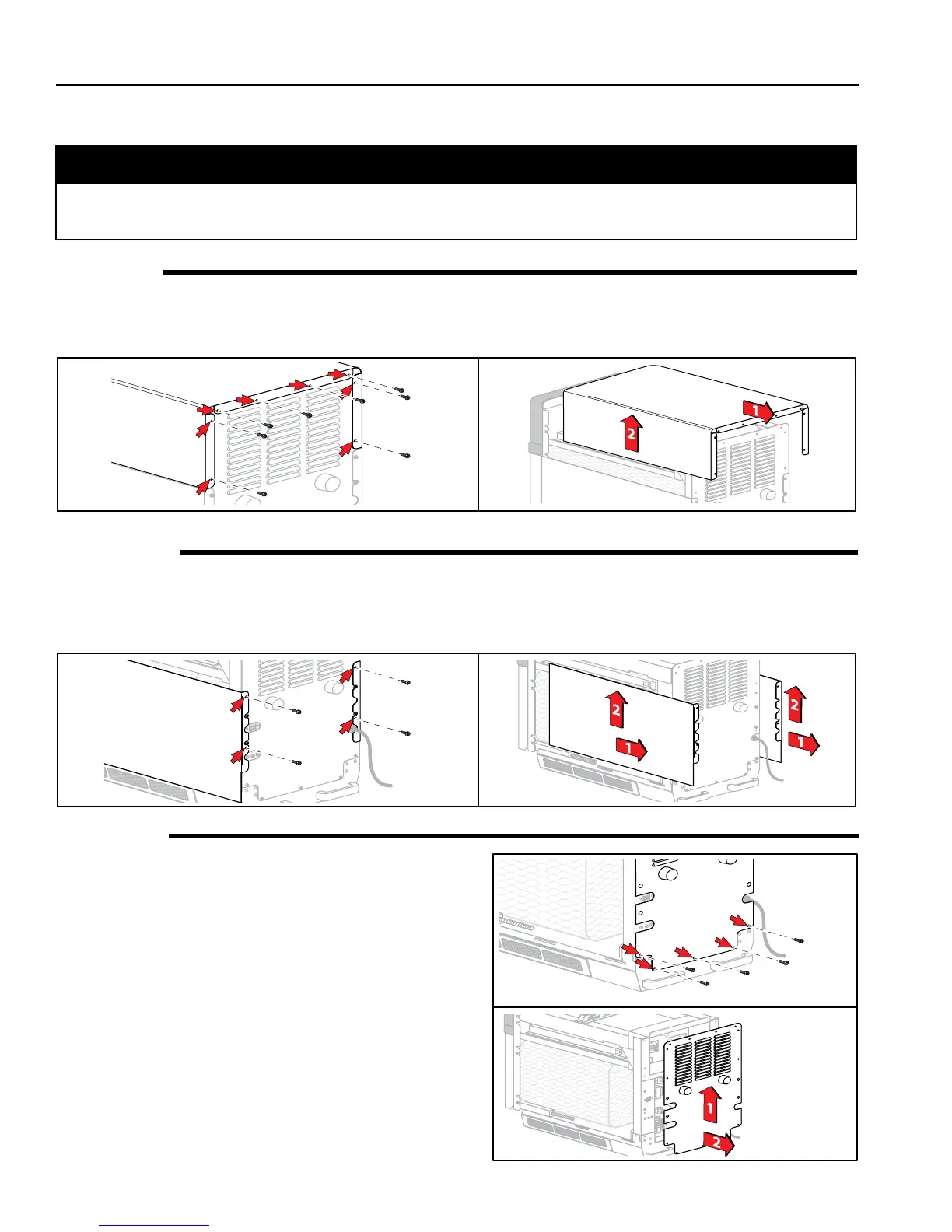
Top Panel
1. Remove the eight (8) Screws (4 along top, 2 on each
side) using a Phillips Head Screwdriver or 1/4” Hex
Socket.
2. Slide Panel towards rear until it disengages with front.
3. Lift o.
Side Panels
1. Remove Top Panel.
2. Remove two (2) Screws per side using a Phillips Head
Screwdriver or 1/4” Hex Socket.
3. Slide Panel towards rear until it disengages with
front.
4. Lift o.
Rear Panel
1. Remove Top and Side Panels.
2. Remove nine (9) Screws (3 along bottom, 1 on each
side) using a Phillips Head Screwdriver or 1/4” Hex
Socket.
3. Lift up and out.





 To Next Page