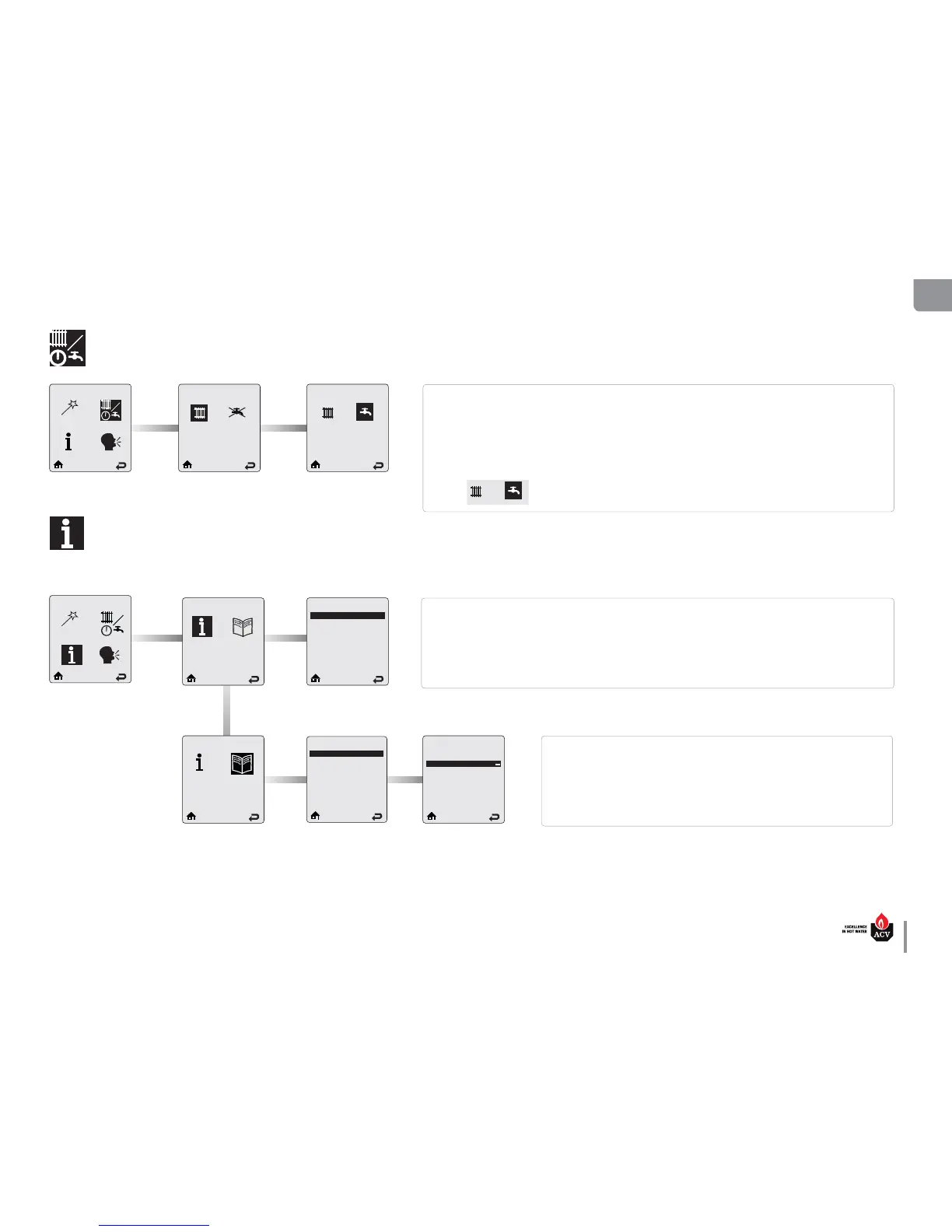
CH / DHW Operation
CH/DHW Operation
Heating enabled DHW enabled
CH/DHW Operation provides a simple way to enable/disable either the CH or the DHW function of the appli-
ance.
Press on LEFT or RIGHT button to select the object (CH or DHW icon), then press OK to toggle between the
enabled/disabled status. The status of the circuit is displayed at the top of the screen.
Using the arrow keys, select the HOME or RETURN icon at the bottom of the screen to go back either to the
home page or to the previous screen respectively.
Default:
Boiler Information screen provides real time operating information of the appliance. Each line contains an
information item followed by its current value. Six lines are displayed on the screen at one time.
Press on UP or DOWN button to scroll through the items. For more information, refer to the Installer’s Handbook
of the appliance.
Lockout History records the last eight lockouts. Six lines are displayed on the Lock-
out History screen at one time. Each line contains a lockout description followed
by how long ago the lockout occurred.
Press on UP or DOWN button to scroll through the items and on OK to select any of
them and get more details through the Lockout Details screen. For more informa-
tion, refer to the Installer’s Handbook of the appliance.
Boiler Information
Boiler Information
a
b
c
d
e
f
b
b
b
b
a
b
c
d
e
f
b
b
b
b
a
b
c
d
e
f
b
b
a
b
c
d
e
f
b
b
a
b
c
d
e
f
b
b
b
b
a
b
c
d
e
f
b
b
b
b
Boiler Information
Boiler Status Standby
Heating Call No
DHW Call No
Boiler Firing Rate --
Ionization current μA
Boiler Setpoint --
Lockout History
a
b
c
d
e
f
b
b
b
b
a
b
c
d
e
f
b
b
b
b
a
b
c
d
e
f
b
b
a
b
c
d
e
f
b
b
a
b
c
d
e
f
b
b
b
b
a
b
c
d
e
f
b
b
b
b
Lockout History
1. Blower speed 5h ago
2. DHW Sensor Open 2h ago
3. Sensor Drift 25 h ago
4. No error 27 h ago
5. No error 27 h ago
6. No error 27 h ago
Lockout Details
Blower speed
Boiler Status --
Heating Call --
DHW Call --
Boiler Firing Rate 44%
Ionization current 44μA
Boiler Information



 To Next Page