- 30 -
Global Setup (cont.) - Time Delay Adjustment
Surround Channel Delay
The concept of delaying the surround channel is designed to provide both a sense of space
as well as offering compensation for the time it takes for the sound from the front speakers to
reach the optimum seating position with respect to the sound from the surround channels. As
sound travels approximately 1 ft. per millisecond, actual mathematics will determine the best
delay setting, taking into consideration the surround speakers distance from the seating area
and the front speakers distance from the seating area.
There are however distinct differences between the recommended surround channel delays
for AC-3 source material and Pro Logic source material. Since AC-3 delivers discrete signals
for each channel, there is no leakage between channels, and thus no need for delaying the
surrounds to create a precedence effect. The surround and front channel sounds should
arrive at the same exact time (coincident arrivals). The AC-3 mode consequently uses 15 ms
less delay than the Pro Logic mode for the same speaker/seating arrangement.
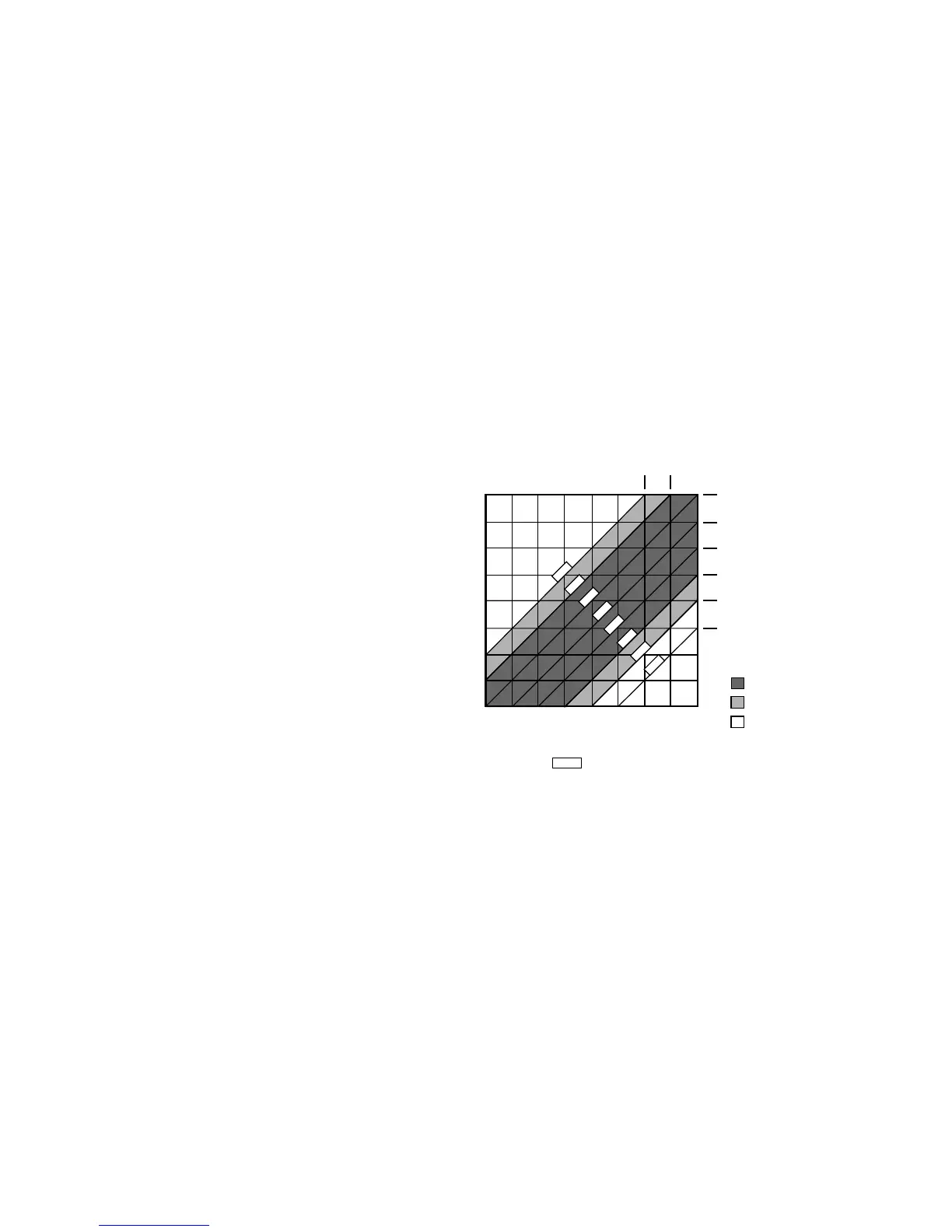
AC-3 Surround Channel Delay Setting
Determine the distance of the seating area to
the surround speakers and also the distance
of the front speakers to the seating area. Make
a note of these distances as you will also use
them to determine the Time Delay setting for
Pro Logic modes. Once you have determined
these distances, use the chart to find the cor-
responding time delay setting.
Example
If your surround speakers are 10 feet from the
seating area and the front speakers are 15 feet
from the seating area, the surround (or rear)
channel delay for AC-3 is determined by find-
ing the cross points on the chart. First find the line on the vertical axis that is labeled "10".
Then, find the point on the horizontal axis labeled "15". The cross point (or intersection of
these two lines) is on a diagonal line marked "5 ms" or 5 milliseconds.
To adjust the delay times for the surround channels, follow these following steps.
1 Press the INPUT SELECT button until the SSD-66 (5.1) display indicates "LASER AC3" or any
other AC-3 Input.
2 Press the MODE button and make certain that you are in either "DOLBY AC-3" or "AC-3 NIGHT"
mode. Typically, an AC-3 mode can only be engaged if you are playing an AC-3 source. Thus, it
may be necessary to start your laser disc player, using an AC-3 laser disc prior to continuing.
3 Press the DELAY button until it is lit.
4 Repeatedly press the REAR button until the display reads the appropriate rear channel delay set-
tings. As you press the REAR button, the display will advance in 1 ms increments between 0 ms
and 15 ms.
5 Press the DELAY button again to exit this setup mode.
0 ms
0 ms
0 ms
5 ms
10 ms
15 ms
15 ms
15 ms
0 5 10 15 20 25 30 35 40
0
5
10
15
20
25
30
35
40
DISTANCE FROM FRONT SPEAKERS (FEET)
DISTANCE FROM REAR SPEAKERS (FEET)
10 ms 5 ms
0 ms
0 ms
0 ms
0 ms
-5 ms
-10 ms
DIFFERENTIAL
ARRIVAL TIME
PREFERRED
ACCEPTABLE
NOT RECOMMENDED
USABLE SPEAKER PLACEMENT RANGE WITH
XX ms DELAY TIME
Dolby AC-3
Surround Delay Chart



 To Next Page