- 60 -
Appendix A
SSD-66 (5.1) Infrared Remote Control Operation
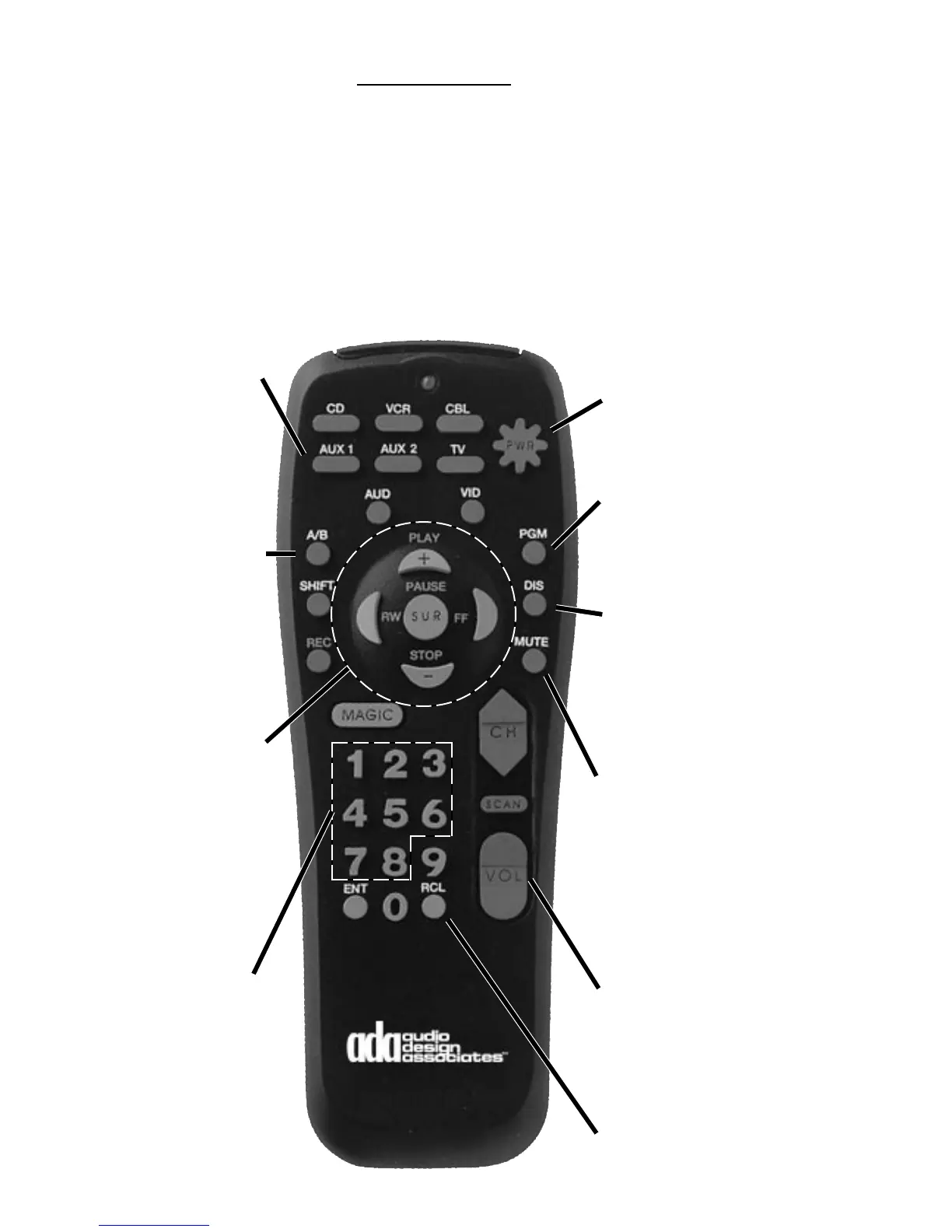
This remote control has been preprogrammed to operate the SSD-66 (5.1) Dolby Pro Logic
and AC-3 Preamplifier. To operate this devices press the AUX 1 button. To program the
remote control to operate other non-ADA components, consult the One-ForAll-6 instruction
manual.
If the SSD-66 (5.1) IR Remote Control is not functioning properly, make certain that your
SSD-66 (5.1) is set to ADA Bus™ Address "000". If you need to reset the IR Remote Control,
the correct IR Code is "847".
The PWR (star) button
turns on the SSD-66
and repeated pressing
will advance through
the SSD-66(5.1)'s inputs.
The PGM button recalls
the SSD-66(5.1)'s
Volume Preset.
The DIS button turns on
the SSD-66(5.1)'s Delay.
Repeated pressing of
the Rear and Center
buttons advances these
channel's delay settings.
When the MUTE button
is first pressed, the
SSD-66(5.1) will mute.
Pressing the MUTE
button a second time
will turn the SSD-
66(5.1) off. When in
mute, press the PWR
button to regain audio.
The VOL toggle switch
raises and lowers the
SSD-66(5.1)'s volume.
If a particular channel
has been selected, only
that channels volume
level will be controlled.
The RCL button toggles
the SSD-66(5.1) through
its Surround Modes.
In order to operate the
SSD-66(5.1) you must
first press the AUX 1
button.
The A/B button turns on
the SSD-66(5.1)'s Pink
Noise generator to
Sequence mode. To
select noise per channel,
press the A/B button
again. To turn off the
pink noise, press the
PWR (star) button once.
The directional buttons
in the center of the
control select the SSD-
66(5.1)'s various
speaker channels for
volume adjustment
during both normal play
and pink noise mode.
RW = Left Channel
PLAY = Center Channel
FF = Right Channel
STOP = RS, LS, R&LS
SUR = SUB & All Ch.
1-8 direct access the
SSD-66(5.1) Inputs.
1 = AC-3 Laser
2 = Normal Laser
3 = TV/Cable
4 = VCR
5 = CD Player
6 = FM Radio
7 = AM Radio
8 = Multi-Room Input



 To Next Page