FWA-1112VC_UserManual_Ed1 Copyright 2020 Advantech Co. Ltd. All rights reserved.
Page 48
3.1.3 SETTING SYSTEM TIME AND DATE
Use this option to change the system time and date. Highlight System Time or System
Date using the <Arrow> keys. Enter new values through the keyboard. Press the <Tab>
key or the <Arrow> keys to move between fields. The date must be entered in MM/DD/YY
format. The time is entered in HH:MM:SS format.
Please not that system time and date are set during manufacturing process according to
factory’s local time zone. You may need to update system time to reflect the desired time
zone when you receive the unit.
3.1.4 PLATFORM SETUP MENU
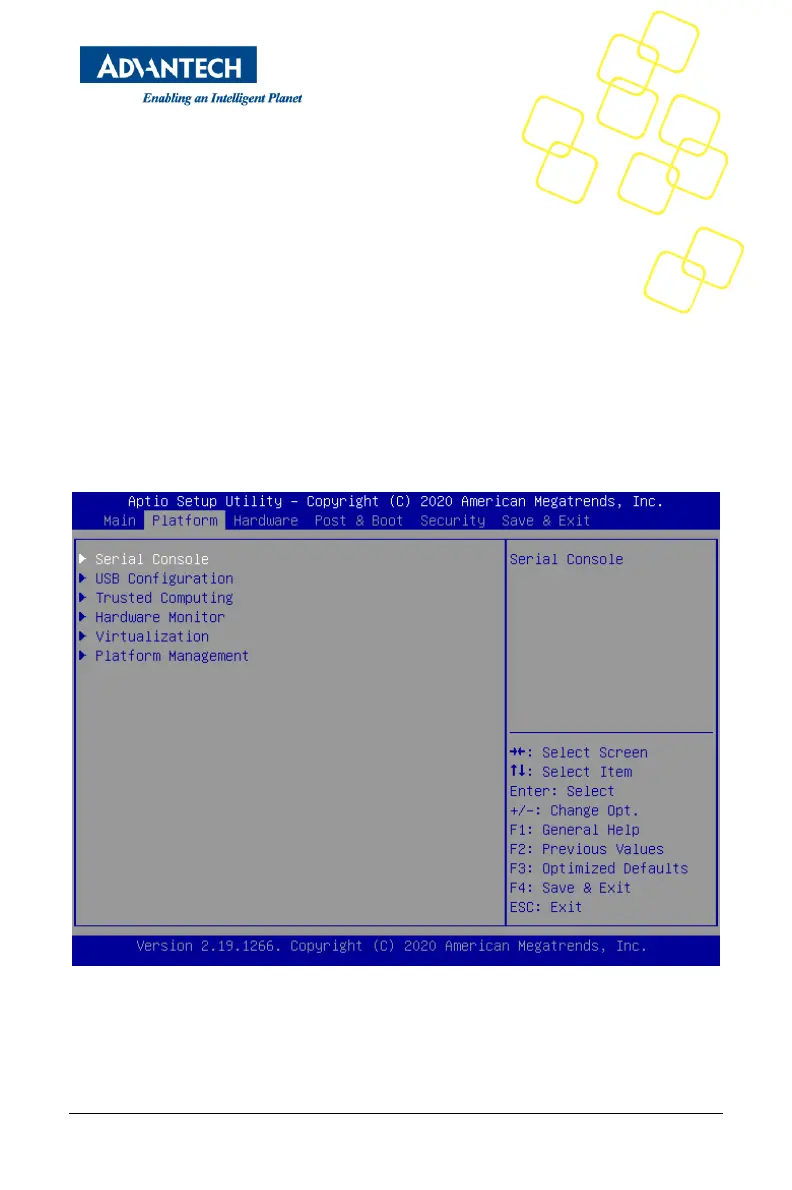
Select the Platform tab from the FWA-1112VC setup screen to enter the Platform Setup
screen. Users can select any of the items in the left frame of the screen, such as the
Trusted Computing Configuration, to go to the sub menu for that item. Users can display a
Platform BIOS Setup option by highlighting it using the <Arrow> keys. The Platform BIOS
Setup screen is shown below. The sub menus are described on the following pages. Note:
If BMC is Present in the system and Hardware Monitor page will be hidden.
Figure 42 Platform Setup Main screen



 To Next Page