FWA-1112VC_UserManual_Ed1 Copyright 2020 Advantech Co. Ltd. All rights reserved.
Page 60
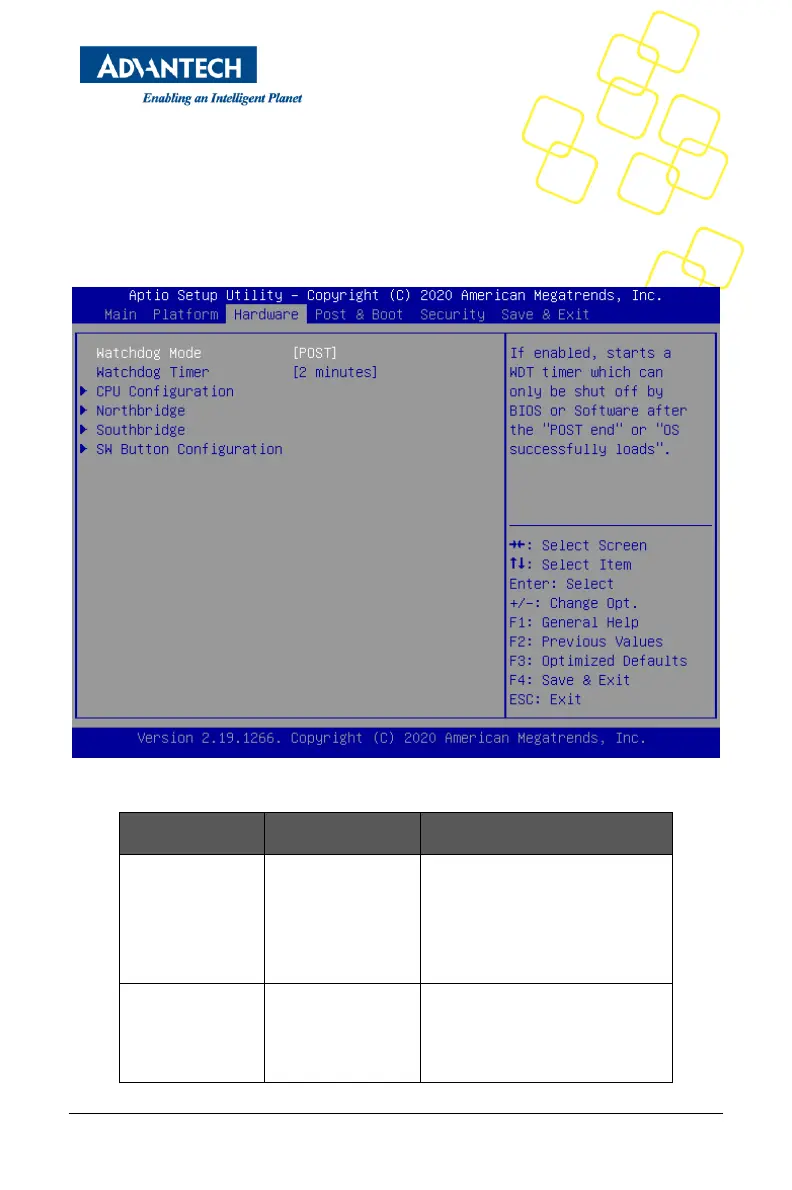
3.1.10 HARDWARE SETUP MENU
This sub menu allows you to change the settings of the Intel chipset. Please note that
“chipset” is a legacy term and the related functionality is split over the CPU and PCH
portions of the SoC. Similarly, the terms “South Bridge” and “North Bridge” are legacy
terms and do not represent the silicon implementation any more. However, those terms
are kept consistent with previous products to allow users to navigate more easily. The sub
menus are described on the following pages.
Figure 49 Hardware Configuration Menu
If enabled, starts a WDT timer which
can only be shut off by BIOS or
Software after the "POST end" or
"OS successfully loads".
Configure the length of the
Watchdog Timer. Not available if
Watchdog Timer is disabled.



 To Next Page