CONDOR A22 User Manual
20 | P a g e
2023 All Rights Reserved
V1.2
Calibration Procedure:
Confirm the mode switch in P-Mode and ensure you are in an open area.
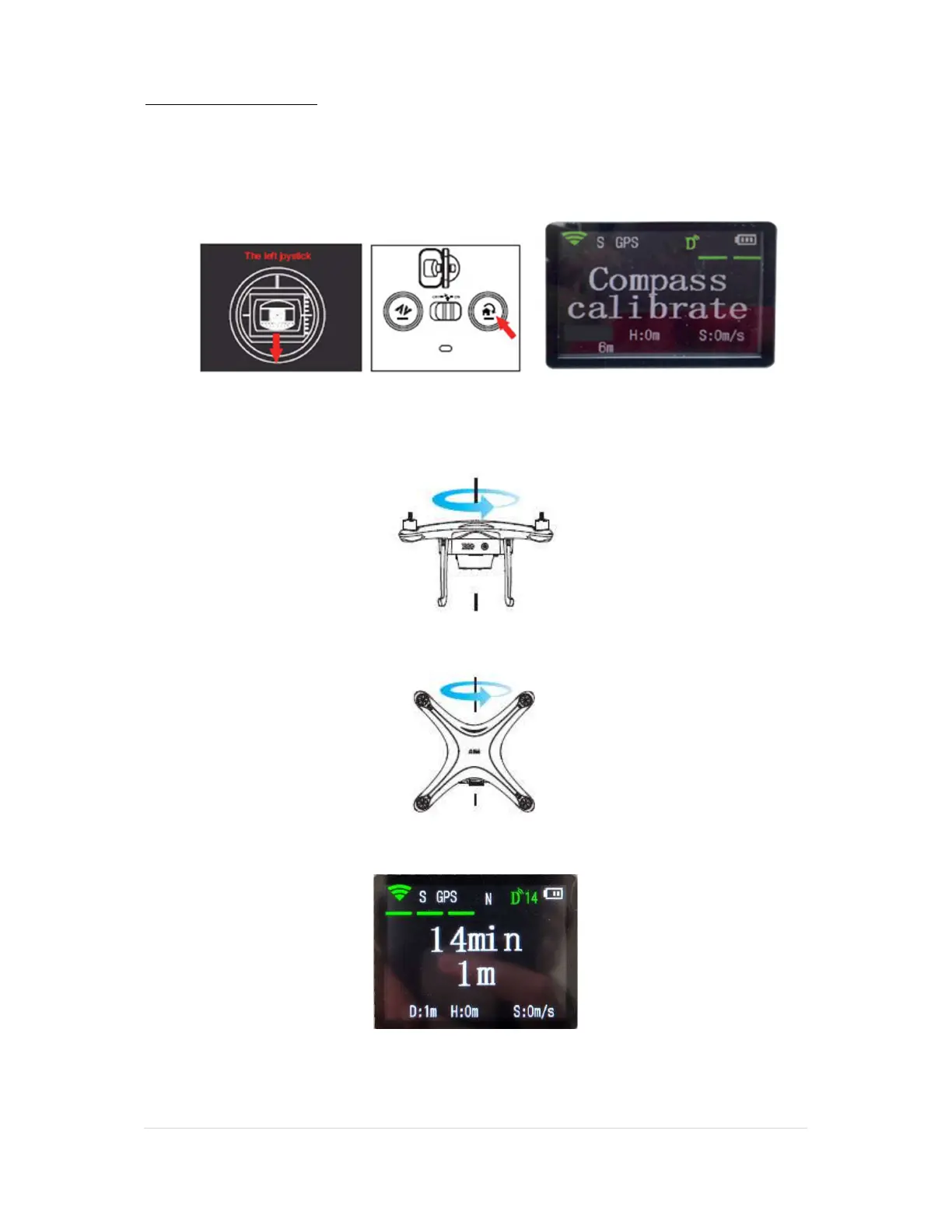
1. Pull down and hold the left joystick (A) and press the Auto-Return-Home button (B) 10
times or more until the remote screen displays “Compass Calibrate”, as shown below.
The two LED taillights on the UAV will flash a steady yellow in calibration mode.
2. Lift the drone horizontally with the battery facing you and rotate yourself
counterclockwise, rotate continuously for just over 360 degrees until the two flashing
taillights of the drone change from flashing yellow to a steady flashing green.
3. Change the drone to a vertical position with the battery pointing up. Rotate yourself just
over 360 degrees counterclockwise until the bottom taillights of the drone change from
flashing green to solid green.
4. After successful calibration the screen of the remote will display the battery time and
distance from the remote to the UAV. You are ready to fly. The height “H” and speed “S”
in meters per second are displayed at the bottom of the remote screen.
WARNING: IF THE STATUS INDICATORS DO NOT GO SOLID GREEN BUT FLASH
ALTERNATING RED AND YELLOW, MOVE TO A DIFFERENT LOCATION AS THE
CALIBRATION FAILED AND TRY AGAIN.
N



 To Next Page