CONDOR A22 User Manual
21 | P a g e
2023 All Rights Reserved
V1.2
Recalibration Conditions
1. Compass data error: the rear status LEDs alternate flashing red and yellow.
2. You have moved to a new location.
3. The UAV has sustained mechanical or structural damage.
4. The UAV drifts severely in the flight, i.e., does not fly in a straight line.
Starting and Stopping the Motors
Starting
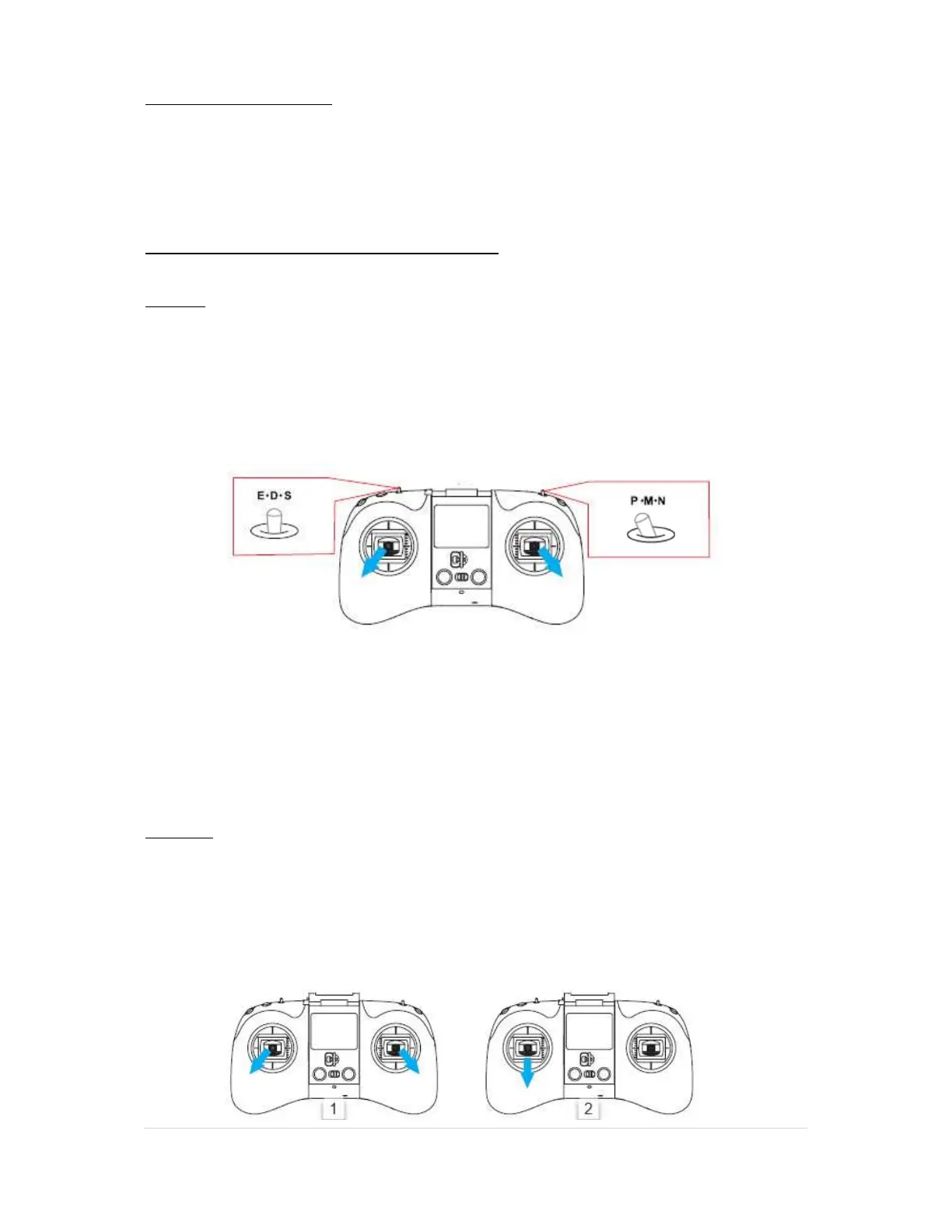
To start the drone after calibration, pull both levers down into the outer bottom corners of the
remote.
As soon as the motors start, gently release the levers and the drone motors will idle with the
drone on the ground.
WARNING: THIS LEVER POSITION IS ALSO THE EMERGENCY SHUTDOWN, NEVER PULL
BOTH LEVERS DOWN AND OUTWARDS WHILE FLYING AS YOU WILL CRASH YOUR
DRONE DUE TO THE MOTORS SHUTTING DOWN.
Practice in an open field before going fishing for the 1st time to learn the basic operation of your
drone.
Stopping
Use either of the following methods to stop the motors:
Method 1 (Fig. 1): After the UAV lands, pull both joysticks into the bottom outer corners (same as
the position for starting) and hold until the motors stop rotating.
Method 2 (Fig. 2): After the UAV lands, pull the left joystick straight down and hold until the
motors stop rotating (this method is the recommended method).



 To Next Page