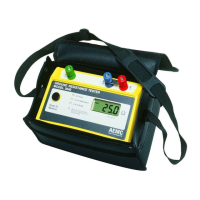
Ground Resistance Tester Model 6471
73
At the middle and bottom of the display you will see one of the following messages:
bAtt CHrG Fast charging is active (normal state)
bAtt LOW Battery voltage is too low for a fast charge - charging at a lower current
bAtt Battery voltage is too high for a fast charge - charging at a lower current
bAtt HOt Battery is too warm for a fast charge (>40°C) - charging at a lower current
bAtt COLd Battery is too cold for a fast charge (< 0°C) - charging at a lower current
bAtt FULL Battery is full - switch to trickle charging
The 6471 tester can also be recharged from a 12VDC car outlet with a special
charging unit.
NOTE: In this case the low-potential of the vehicle’s 12V outlet is at the po-
tential of terminals E (X) and ES (Xv) of the ground tester. For safety reasons,
do not connect or use the unit if there is a possibility that voltages at E (X) or
ES (Xv) could exceed 32V.
9.5 Replacing the Battery
The battery in this unit is a special product with customized safety features and
protective devices. It should be replaced only by the same model. If a different
model is used, there is a danger of re or explosion, leading to possible damage
or injury.
NOTE: For safety reasons, replace the battery with an identical model:
NiMH Custom Pack 9.6 V / 3.5 Ah (Cat. #2960.21)
Procedureforreplacingthebattery:
1. Disconnect the unit completely, turn the rotary switch to OFF, and close
the lid.
2. Loosen the four permanent screws at the bottom of the unit, but do not
remove them.
3. Open the lid and carefully turn the housing upside-down, making sure the
front panel does not fall out. Then carefully pull the front panel and the unit
all the way out of the housing.
4. Loosen the two screws on the lid of the battery case and remove the lid.
5. Pull the battery a short way out of the case without overstretching the con-
nection leads, and loosen the two screws at the bottom of the case. Then
put the battery back into the case.
6. Making sure the battery leads are not overstretched and that the battery
www.ShopAEMC.com
Shop for AEMC products online at:
1.888.610.7664



 To Next Page