17
A300/A300 XT OPERATING MANUAL
© 2002 Design, 2012 Doc. No. 12-7255-r01 (5/14/12)
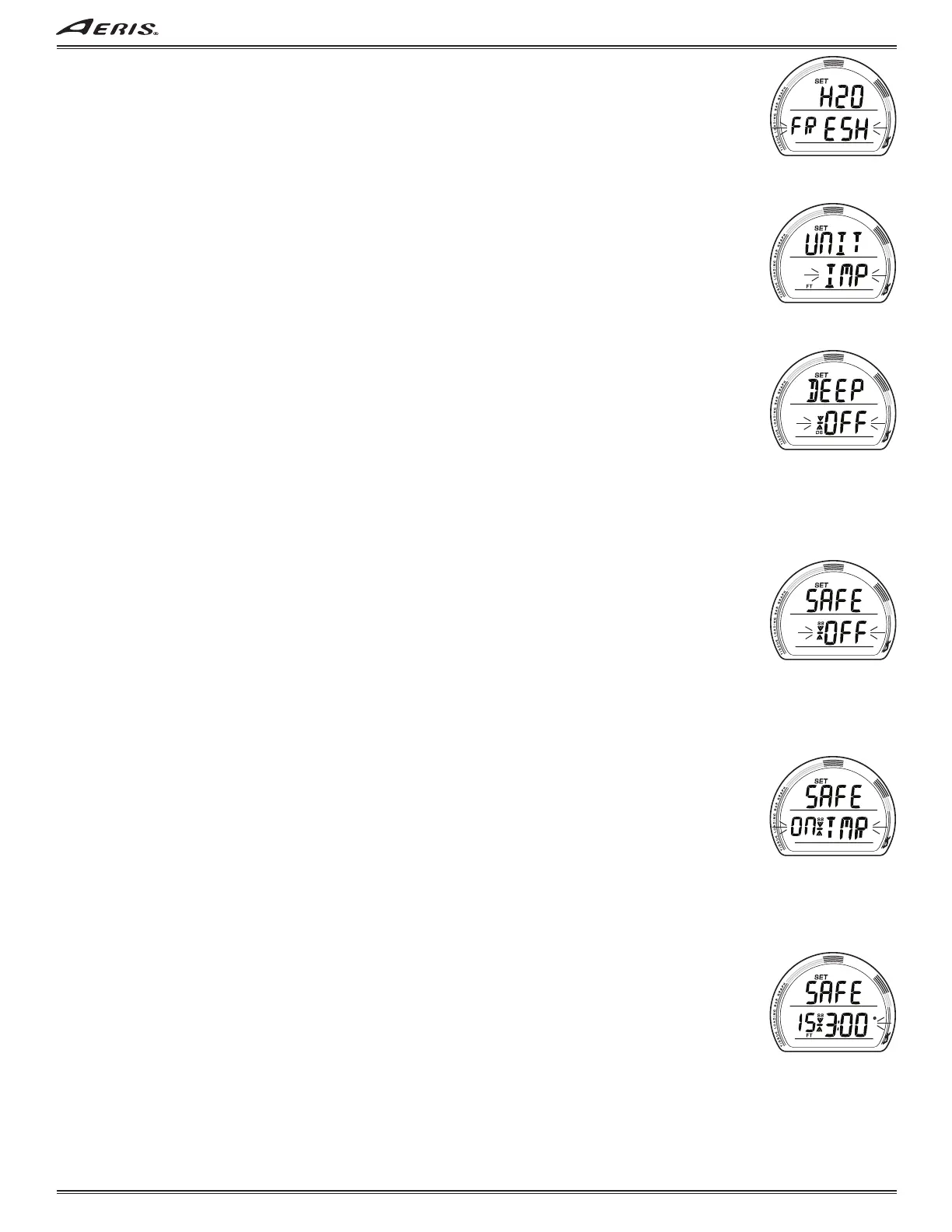
SET WATER TYPE (TECH only), information includes (Fig. 37):
> Graphic H2O with SET icon.
> Graphic FRESH (or SEA) flashing.
• A or M (< 2 sec) to toggle between FRESH and SEA.
• S (< 2 sec) to save the setting and access Set Units.
• S (2 sec), if the Set Point is not changed, to step back to Set UTL Lead-in.
• 2 minutes, or M (2 sec), revert to Main.
SET UNITS, information includes (Fig. 38):
> Graphic UNIT with SET icon.
> Graphic IMP with FT icon (or MET with M icon) flashing.
• A or M (< 2 sec) to toggle between IMP (imperial) and MET (metric).
• S (< 2 sec) to save the setting and access Set Deep Stop (if TECH), or Set Safety Stop (if NORM).
• S (2 sec), if the Set Point is not changed, to step back to Set Wet Activation.
• 2 minutes, or M (2 sec), revert to Main.
SET DEEP STOP (TECH only), information includes (Fig. 39):
> Graphic DEEP with SET, Stop Bar/Arrows, and DS icons.
> Graphic OFF (or ON) flashing.
• A or M (< 2 sec) to toggle between OFF and ON.
• S (< 2 sec) to save the setting and access Set Safety Stop.
• S (2 sec), if the Set Point is not changed, to step back to Set Units.
• 2 minutes, or M (2 sec), revert to Main.
When Deep Stop is set On, a Stop screen will appear upon ascent to within 10 FT (3 M) below the calculated Stop Depth
which is 1/2 the Max Depth achieved after first having descended to => 80 FT (24 M).
SET SAFETY STOP (NORM), information includes (Fig. 40, 41):
The Safety Stop (SS) can be turned OFF or ON, or set for TMR (Timer) which is a Run Timer that can be Started, Stopped, and
Reset to time an independent SSp at a preferred depth (often required by charter operators).
If while in TECH mode, the SS is set for a Depth and Time other than 15 FT (4.5 M) for 3 minutes, the SS setting will revert to 15
FT (4.5 M) for 3 min if the OP Mode is changed to NORM and a dive is made in NORM.
> Graphic SAFE with SET, Stop Bar/Arrows, and SS icons.
> Graphic OFF, or ON, or ON TMR, flashing.
• A (< 2 sec) to step forward through the settings.
• M (< 2 sec) to step back through the settings.
• S (< 2 sec) to save the setting and access Set Algorithm.
• S (2 sec), if the Set Point is not changed, to step back to Set Units.
• 2 minutes, or M (2 sec), revert to Main.
SET SAFETY STOP (TECH), information includes (Fig. 40, 41, 42):
In TECH mode, the Safety Stop can be turned OFF or ON, set for TMR, or a Stop Depth and Time can be selected.
If the SS is set for a ON while in NORM mode, the SS will remain set ON and revert to the Depth/Time previously set while in
TECH if the OP Mode is changed and a dive is made in TECH.
> Graphic SAFE with SET, Stop Bar/Arrows, and SS icons.
> Graphic OFF, or ON, or ON TMR, flashing.
• A (< 2 sec) to step forward through the settings of OFF, ON, ON TMR, and SET.
• M (< 2 sec) to step back through the settings.
• S (< 2 sec) to save the setting.
• 2 minutes, or M (2 sec), revert to Main.
. . If OFF, ON, or TMR, is selected, operation will advance to Set Algorithm.
. . If SET is selected, Stop Depth with FT (or M) icon and Stop Time with clock icon will be displayed, with the Time digits
flashing (Fig. 42).
• A or M (< 2 sec) to toggle Stop Time between 3:00 and 5:00 (min:sec).
• S (< 2 sec) to save the Stop Time setting and flash the Depth digits.
• A (< 2 sec) to step through Depth Set Points of 10, 15, and 20 FT (or 3, 4, 5, and 6 M).
• M (< 2 sec) to step back through Depth Set Points.
• S (< 2 sec) to save Depth setting and revert to the Set SS screen with the graphic SET flashing.
• A or M (< 2 sec) to select ON or OFF (or TMR) and advance to Set Algorithm.
• S (2 sec), if the Set Point is not changed, to step back to Set Deep Stop.
• 2 minutes, or M (2 sec), revert to Main.
Fig. 37 - SET WATER TYPE
Fig. 38 - SET UNITS
Fig. 39 - SET DEEP STOP
Fig. 40 - SET SAFETY STOP
(NORM/TECH)
Fig. 41 - SET SAFETY STOP
(NORM/TECH, Timer)
Fig. 42 - SET SAFETY STOP
(TECH, Time/Depth)



 To Next Page