40
A300/A300 XT OPERATING MANUAL
© 2002 Design, 2012 Doc. No. 12-7255-r01 (5/14/12)
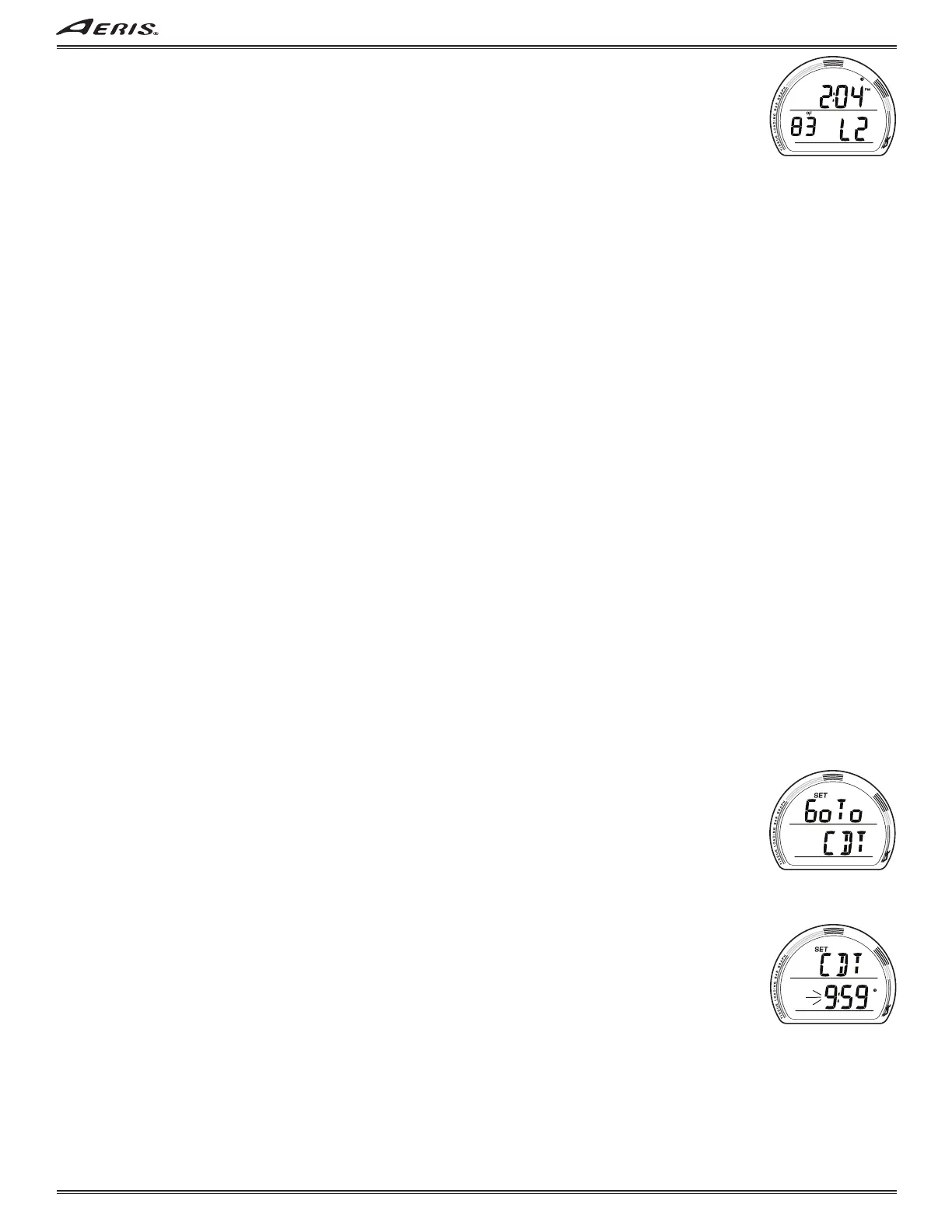
FREE SURF ALT 2, information includes (Fig. 106):
> Time of Day (hr:min) with AM (or PM) icon, no icon if 24 hour format.
> Temperature with °F (or °C) icon.
> Altitude graphic, if L2 (to L7), blank if Sea level.
• A (< 2 sec) to step forward to FLY.
• M (< 2 sec) to step back to ALT 1.
• 10 sec, or M (2 sec), revert to Main.
• S (press) to activate Backlight.
- - - - - - - - - -
Some of the descriptions that follow are shared with NORM/TECH modes,
and are referenced back in those sections.
- - - - - - - - - -
FLY/DESAT - shared with NORM/TECH (see page 11).
FREE SET GROUPS.
Sequence >> Set Lead-in >> Set OP MOD >> Set CDT >> Set ALM >> Set UTL >> Set TME.
> FREE does not access Set Gas (FO2).
SET GROUP LEAD-IN, information includes (similar to Fig. 23):
> Graphics Go To SET.
• S (< 2 sec) to access Set OP MOD Lead-in.
• A (< 2 sec) to step forward to ID-SN.
• M (< 2 sec) to step back to Fly/Desat.
• 2 minutes, or M (2 sec), revert to Main.
SET OP MOD (Mode) - shared with NORM/TECH (see page 13).
SET CDT (Countdown Timer) - separate from NORM/TECH (refer to the following).
SET ALM (Alarms) - separate from NORM/TECH (refer to the following).
SET UTL (Utilities) - shared with NORM/TECH (see page 16); no DS, SS, Algorithm, or CF.
SET TME (Time/Date) - shared with NORM/TECH (see page 18).
SET CDT (COUNTDOWN TIMER) LEAD-IN, information is to include (Fig. 107):
> Graphics Go To and CDT with SET icon.
• S (< 2 sec) to access Set CDT.
• A (< 2 sec) to step forward to Set ALM Lead-in.
• M (< 2 sec) to step back to Set OP MOD Lead-in.
• 2 minutes, or M (2 sec), revert to Main.
SET CDT, information is to include (Fig. 108):
> Graphic CDT with SET icon, solid.
> Graphic OFF; or time value previously set (min:sec) with clock icon, Minute digits flashing.
• A (hold) to scroll upward through Minute Set Points from OFF to 0: to 9: in 1 Minute (1:) increments at 8/sec.
• A (< 2 sec) to step upward through Minute Set Points.
• M (< 2 sec) to step back through Minute Set Points.
• S (< 2 sec) to save the Minute setting and flash the Seconds digits.
• S (2 sec), if the setting is not changed, to revert to Set CDT Lead-in.
• A (hold), while the Seconds digits are flashing, to scroll upward through Set Points from :00 to :59 in 1 Second (:01)
increments at 8/sec.
• A (< 2 sece) to step upward through Second Set Points.
• M (< 2 sec) to step back through Second Set Points.
• S (< 2 sec) to save the CDT setting and revert to Set CDT Lead-in.
• 2 minutes, or M (2 sec), revert to Main.
Fig. 106 - FREE SURF ALT 2
Fig. 107 - SET CDT LEAD-IN
Fig. 108 - SET CDT



 To Next Page