37
A300/A300 XT OPERATING MANUAL
© 2002 Design, 2012 Doc. No. 12-7255-r01 (5/14/12)
GAUG Dive Run Timer
While operating in GAUG Dive mode a Run Timer, that by default is displayed on the Dive ALT 1 screen, can be interchanged
with EDT (Elapsed Dive Time) and displayed on the Main with EDT moving to the ALT 1 screen.
When the Run Timer is active, it will continue to run in the background during the first 10 minutes on the surface after a dive, then
shut off with time reverting to 0:00.
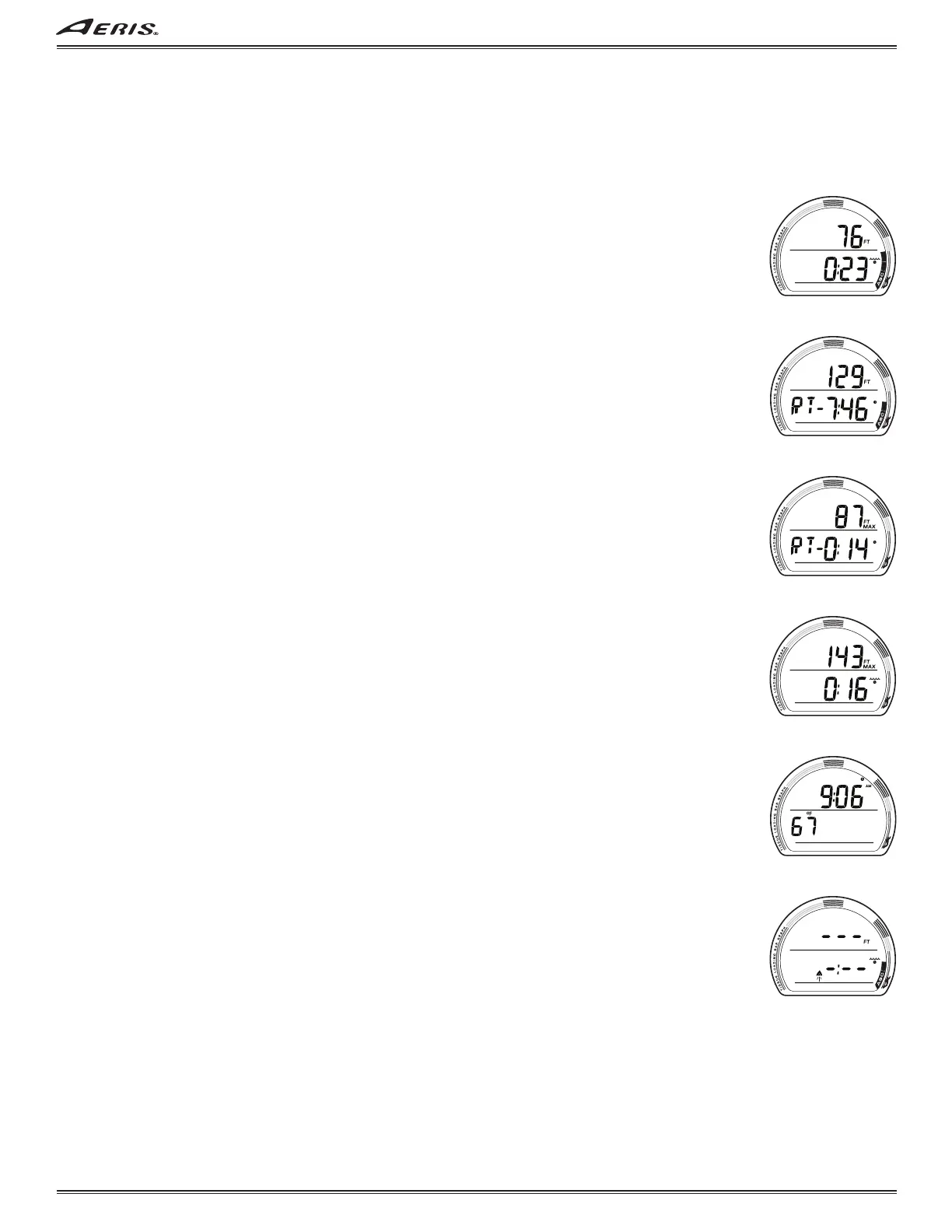
GAUG DIVE MAIN, information includes (Fig. 99A/B) -
> Current Depth with FT (or M) icon.
> EDT (hr:min) with wave/clock icon, or -
graphic RT- and Run Time with clock icon, counting up from 0:00 to 9:59 (min:sec), then from 0:10 to 5:59 (hr:min).
> VARI, while ascending.
• A (< 2 sec) to access ALT 1.
• M (2 sec) to interchange EDT with the Run Timer and move EDT to ALT 1.
• S (< 2 sec) to Start/Stop the Run Timer, if in use.
• S (2 sec) to Reset the Run Timer (to 0:00), if in use.
• S (< 2 sec) to acknowledge alarms.
• S (press) to activate Smartglo
®
Backlight.
GAUG DIVE ALT 1, information includes (Fig. 100A/B) -
> Max Depth with FT (or M) and MAX icons.
> Graphic RT- and Run Time with clock icon, counting up from 0:00 to 9:59 (min:sec), then from 0:10 to 5:59 (hr:min); or -
EDT (hr:min) with wave/clock icon.
• A (< 2 sec) to access ALT 2.
• M (< 2 sec) to revert to Main.
• S (press) to activate Smartglo
®
Backlight.
GAUG DIVE ALT 2, information includes (Fig. 101) -
> Time of Day (hr:min) with AM (or PM) icon if 12 Hour.
> Temperature with °F (or °C) icon.
• A (< 2 sec) to revert to Main.
• M (< 2 sec) to step back to ALT 1.
• 10 sec, revert to Main if A or M is not pressed.
• S (press) to activate Smartglo
®
Backlight.
GAUG DELAYED VIOLATION 3 (DV3)
Upon descent deeper the MOD (Max Operating Depth) of 400 FT (120 M), the Audible will sound and the Up Arrow icon will
flash (Fig. 102).
Current Depth and Max Depth will only indicate 3 dashes ( - - - ) signifying that you are Out of Range. The Up Arrow will flash
until ascent is made above the MOD.
Upon ascending above the MOD, Current Depth will be restored, however, Max Depth will display 3 dashes for the remainder of
that dive. Also, the Log for that dive will display 3 dashes as the Max Depth.
Fig. 99B - GAUG DIVE MAIN
(with Run Timer)
Fig. 99A - GAUG DIVE MAIN
(with EDT, default)
Fig. 101 - GAUG DIVE ALT 2
Fig. 102 - GAUG DV3 MAIN
Fig. 100B - GAUG DIVE ALT 1
(with EDT)
Fig. 100A - GAUG DIVE ALT 1
(Run Timer, default)



 To Next Page