26
A300/A300 XT OPERATING MANUAL
© 2002 Design, 2012 Doc. No. 12-7255-r01 (5/14/12)
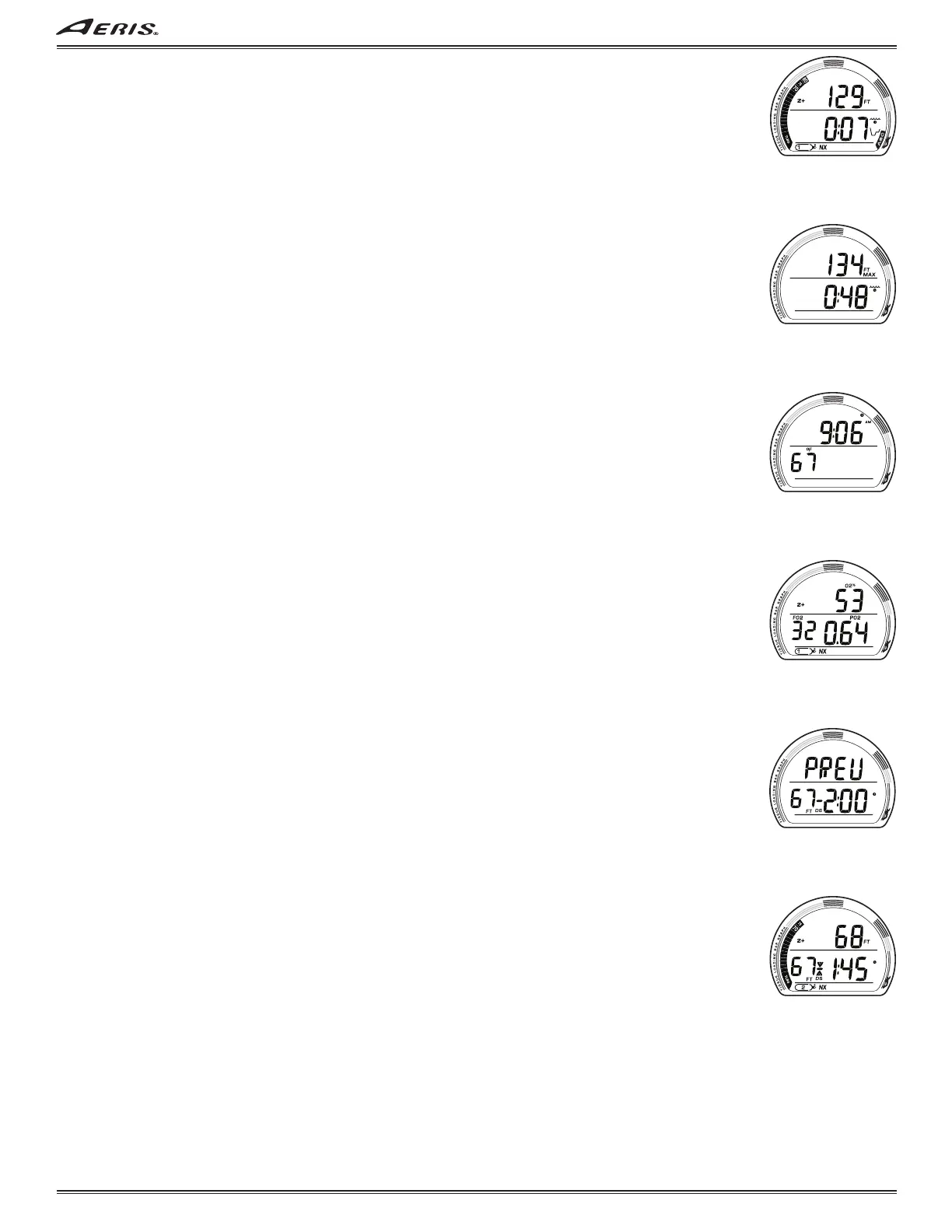
NO DECO MAIN, information includes (Fig. 62) -
> Z+ (or DSAT) icon, algorithm selected.
> CF icon, if set On (TECH only).
> Current Depth with FT (or M) icon.
> DTR (hr:min) with wave/clock/profile (NDC) icon.
> DS icon, if set On and triggered (TECH only).
> Gas (tank) 1 icon; one in use (1, 2, or 3 if TECH).
> NX icon, if FO2 is set for nitrox, blank if Air.
> TLBG, VARI, if they apply.
• A (< 2 sec) to access ALT 1.
• M (2 sec) to access Gas Switching (TECH only).
• S (< 2 sec) to silence/acknowledge alarms.
• S (press) to activate Smartglo
®
Backlight.
NO DECO ALT 1, information includes (Fig. 63) -
> Max Depth with FT (or M) and MAX icons.
> EDT (hr:min) with wave/clock icon.
• A (< 2 sec) to access ALT 2.
• M (< 2 sec) to step back to Main.
• 10 sec, revert to Main if A or M is not pressed.
• S (press) to activate Smartglo
®
Backlight.
NO DECO ALT 2, information includes (Fig. 64) -
> Time of Day (hr:min) with AM (or PM) icon if 12 Hour.
> Temperature with °F (or °C) icon.
• A (< 2 sec) to access ALT 3 if Nitrox, or revert to Main if Air.
• M (< 2 sec) to step back to ALT 1.
• 10 sec, revert to Main if A or M is not pressed.
• S (press) to activate Smartglo
®
Backlight.
NO DECO ALT 3, information includes (Fig. 65) -
> Z+ (or DSAT) icon, algorithm selected.
> O2% accumulated with icon.
> FO2 with icon, value set for Gas in use.
> PO2 value (x.xx ATA) with icon.
> Gas (tank) 1 icon; one in use (1, 2, or 3 if TECH).
> NX icon.
• A (< 2 sec) to revert to Main (if NORM), or access DS Preview if set On and triggered (if TECH).
• M (< 2 sec) to step back to ALT 2.
• 10 sec, revert to Main if A or M is not pressed.
• S (press) to activate Smartglo
®
Backlight.
TECH DEEP STOP PREVIEW, information includes (Fig. 66) -
> Graphic PREV.
> Stop Depth with FT (or M) icon, calculated to be 1/2 Max Depth.
> DS icon with dash ( - ).
> Stop Time as 2:00 (min:sec) with clock icon.
• A (< 2 sec) to revert to Main.
• M (< 2 sec) to step back to ALT 3 if Nitrox or to ALT 2 if Air.
• 10 sec, revert to Main if A or M is not pressed.
• S (press) to activate Smartglo
®
Backlight.
TECH DEEP STOP MAIN, information includes (Fig. 67) -
> Z+ (or DSAT) icon, algorithm selected.
> CF icon, if set On.
> Current Depth with FT (or M) icon.
> Stop Depth with FT (or M) icon, calculated to be 1/2 Max Depth.
> Stop icon (arrows, bar) with DS icon.
> Stop Time (min:sec) with clock icon.
> Gas (tank) icon; one in use (1, 2, or 3).
> NX icon, if FO2 is set for Nitrox, blank if Air.
> TLBG, VARI, if they apply.
• A (< 2 sec) to access ALT 1.
• M (2 sec) to access Gas Switching.
• S (< 2 sec) to silence/acknowledge alarms.
• S (press) to activate Smartglo
®
Backlight.
Fig. 62 - NO DECO MAIN
Fig. 63 - NO DECO ALT 1
Fig. 64 - NO DECO ALT 2
Fig. 65 - NO DECO ALT 3
Fig. 66 - DS PREVIEW
Fig. 67 - DS MAIN



 To Next Page