35
A300/A300 XT OPERATING MANUAL
© 2002 Design, 2012 Doc. No. 12-7255-r01 (5/14/12)
GAUG SURFACE MODE
The SURF MAIN screen will remain on display for 10 minutes during which time the unit will enter GAUG Dive Mode upon
descent to 5 FT (1.5 M) for 5 seconds.
The unit will enter Post Dive Surface Mode upon ascent to 2 FT (0.6 M) for 1 second and display the Surface Main with the
Surface Mode (clock/wave) icon flashing.
Access to SURF ALT screens is allowed during the first 10 minutes with access to other surface modes/screens blocked until
10 minutes elapse.
Exception is for Violations.
When the 10 minute post dive surface Interval time has elapsed, access to other Surface modes/screens is allowed. If
another 10 minutes of no action elapses, operation will enter PSM.
GAUG SURFACE SEQUENCE
Sequence >> SURF MAIN >> ALT 1 > ALT 2 > FLY > LOG > SET > HIST > ID.
• A (< 2 sec) to step forward through the Surface sequence.
• A (hold) to scroll forward through the Surface sequence (4/sec).
• M (< 2 sec) to step back through the Surface sequence.
• S (< 2 sec) to access selections.
• S (2 sec) to step back from a selection to the previous selection or sequence item.
• M (2 sec), or if no button is pressed during a period of 2 minutes, to revert to SURF MAIN*.
• S (press) to activate the Smartglo Backlight.
*ALTs revert to the Main after 10 seconds of no button action.
- - - - - - - - - -
Some of the descriptions that follow are shared with NORM/TECH modes,
and are referenced back in those sections.
- - - - - - - - - -
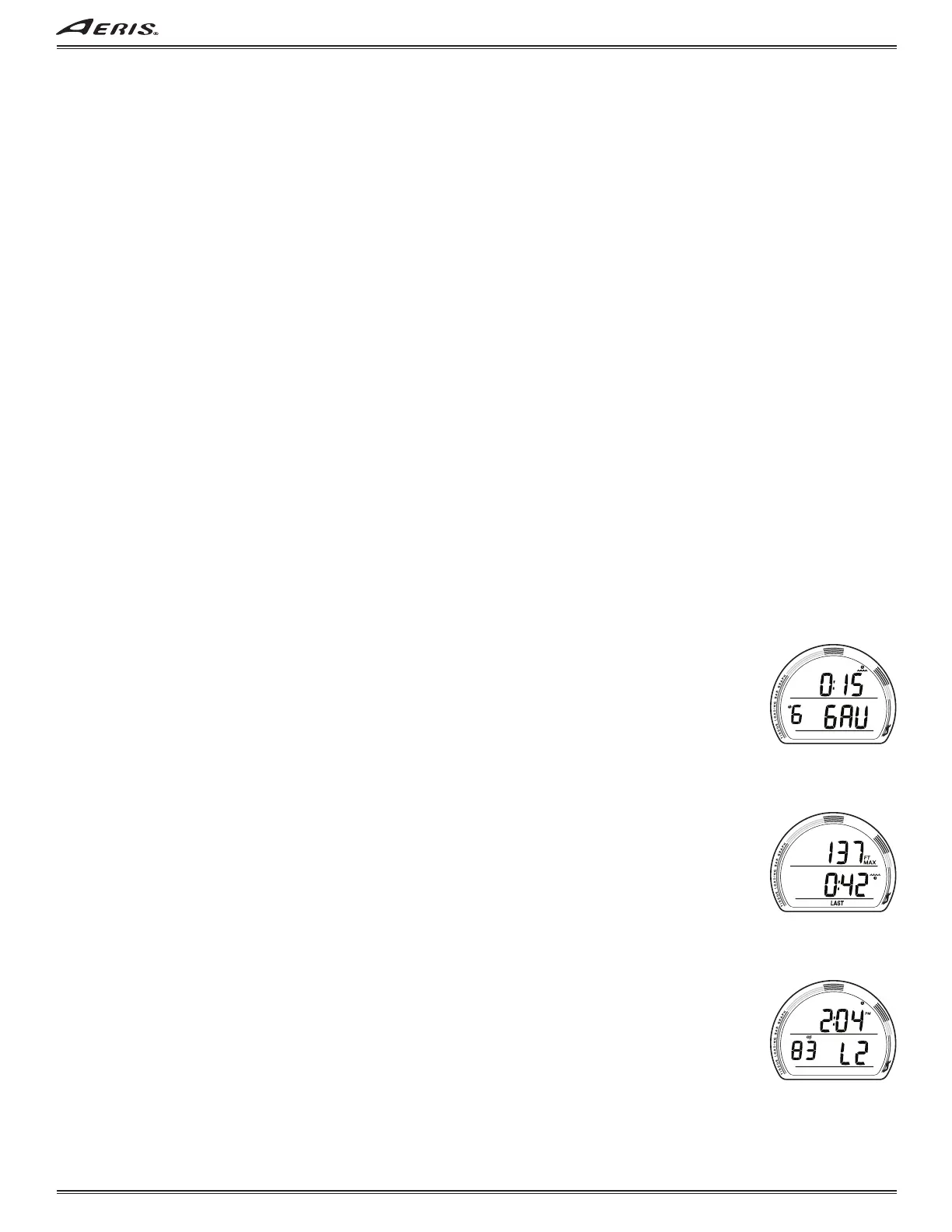
GAUG SURF MAIN, information includes (Fig. 95):
> SI (hr:min) with clock/wave icon.
> Dive number with # icon; that operating period, up to 24 (0 if no dive made yet).
> Graphic GAU (operating mode).
> Battery icon, if voltage is low.
• A (< 2 sec) to step forward to ALT 1, then step through the Surface Sequence.
• A (hold) to scroll forward through the Sequence (4/sec).
• M (< 2 sec) to access ID-SN, then step back through the Sequence.
• S (press) to activate Smartglo Backlight.
GAUG SURF ALT 1, information includes (Fig. 96):
> Max Depth* with FT (or M) and MAX icons.
> Elapsed Dive Time* (hr:min) with wave/clock icon.
> LAST icon, indicating that data is from the dive previously conducted.
*Dashes if no previous dive.
• A (< 2 sec) to step forward to ALT 2.
• M (< 2 sec) to step back to Main.
• 10 sec, or M (2 sec), revert to Main.
• S (press) to activate Backlight.
GAUG SURF ALT 2, information includes (Fig. 97):
> Time of Day (hr:min) with AM (or PM) icon, no icon if 24 hour format.
> Temperature with °F (or °C) icon.
> Altitude graphic, if L2 (to L7), blank if Sea level.
• A (< 2 sec) to step forward to FLY.
• M (< 2 sec) to step back to ALT 1.
• 10 sec, or M (2 sec), revert to Main.
• S (press) to activate Backlight.
Fig. 95 - GAUG SURF MAIN
(after dive # 2)
Fig. 96 - GAUG SURF ALT 1
(Last dive's data)
Fig. 97 - GAUG SURF ALT 2
(Last dive's data)



 To Next Page