2-18 Subject to Export Control, see Cover Page for details.
2-2-3. USER INTERFACE (UI) COMPONENTS (cont)
D. Defining Parameters
Numeric Keypad
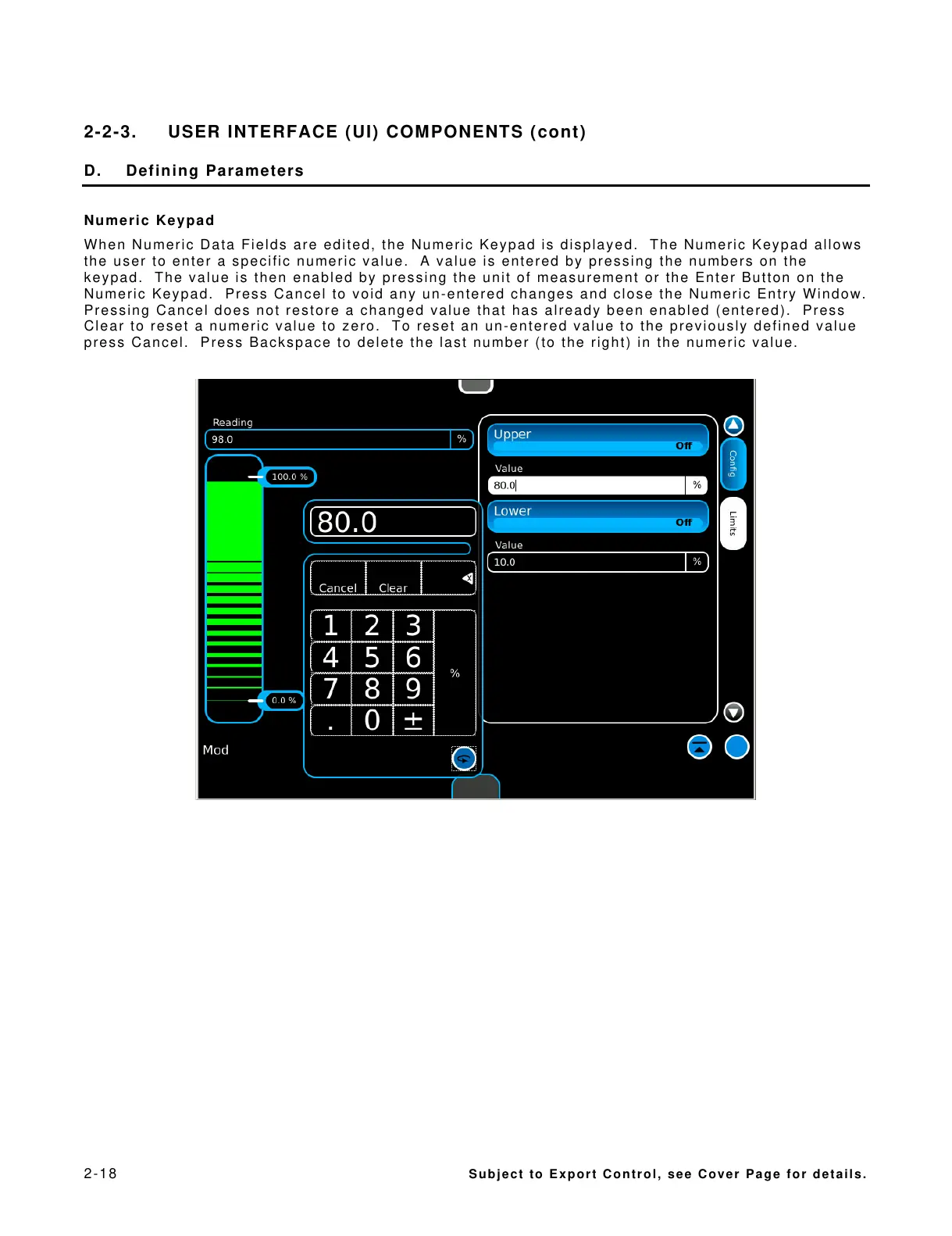
When Numeric Data Fields are edited, the Numeric Keypad is displayed. The Numeric Keypad allows
the user to enter a specific numeric value. A value is entered by pressing the numbers on the
keypad. The value is then enabled by pressing the unit of measurement or the Enter Button on the
Numeric Keypad. Press Cancel to void any un-entered changes and close the Numeric Entry Window.
Pressing Cancel does not restore a changed value that has already been enabled (entered). Press
Clear to reset a numeric value to zero. To reset an un-entered value to the previously defined value
press Cancel. Press Backspace to delete the last number (to the right) in the numeric value.



 To Next Page