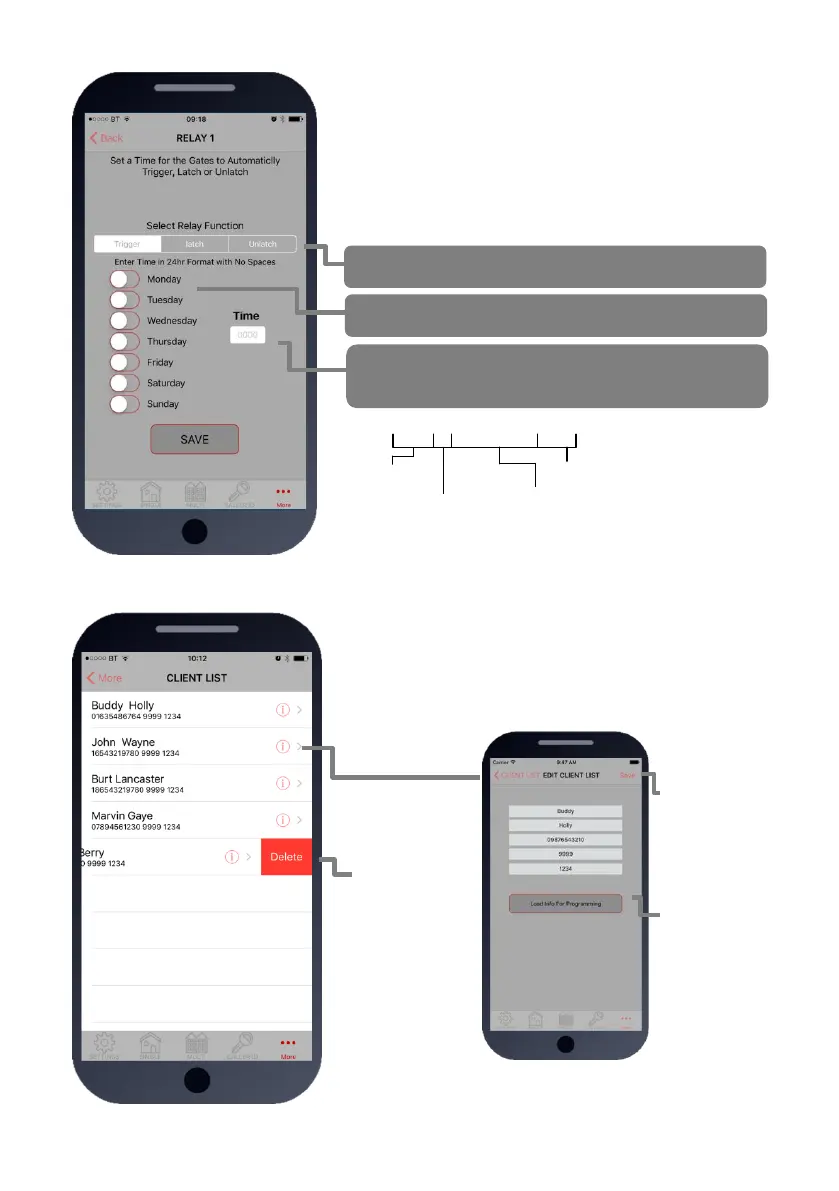
9. Auto Relay Trigger Times
Create up to 40 automatic time clock events to trigger or
latch/unlatch gates (depending on gate system setup).
For auto closing gates, send latch command at the desired
opening time, followed by a separate unlatch event to close at
the desired closing time.
For step-by-step operated gates (non auto-closing), then send
a momentary trigger command at the time required to change
the state of the gates from open to closed or closed to open.
1234#1#day,day,day#time#
USER
passcode
Command:
1=trigger relay 1
2=latch relay 1
3=unlatch relay 1
4=trigger relay 2
5=latch relay 2
6=unlatch relay 2
Enter time in 24hr format (no colon)
Select days (up to 7)
3 digit format, separate with commas.
E.g. mon,tue,wed,thu,fri
10. Client list on iphone
The client list allows you to save sim phone number, customer
name and pass codes for all your installs.
On any previous install, you can load the customer and then re-
program their intercom.


 To Next Page