12. Do not disturb
This feature allows the push button on the intercom to be
active during pre-set times, and ignore button presses all
other times.
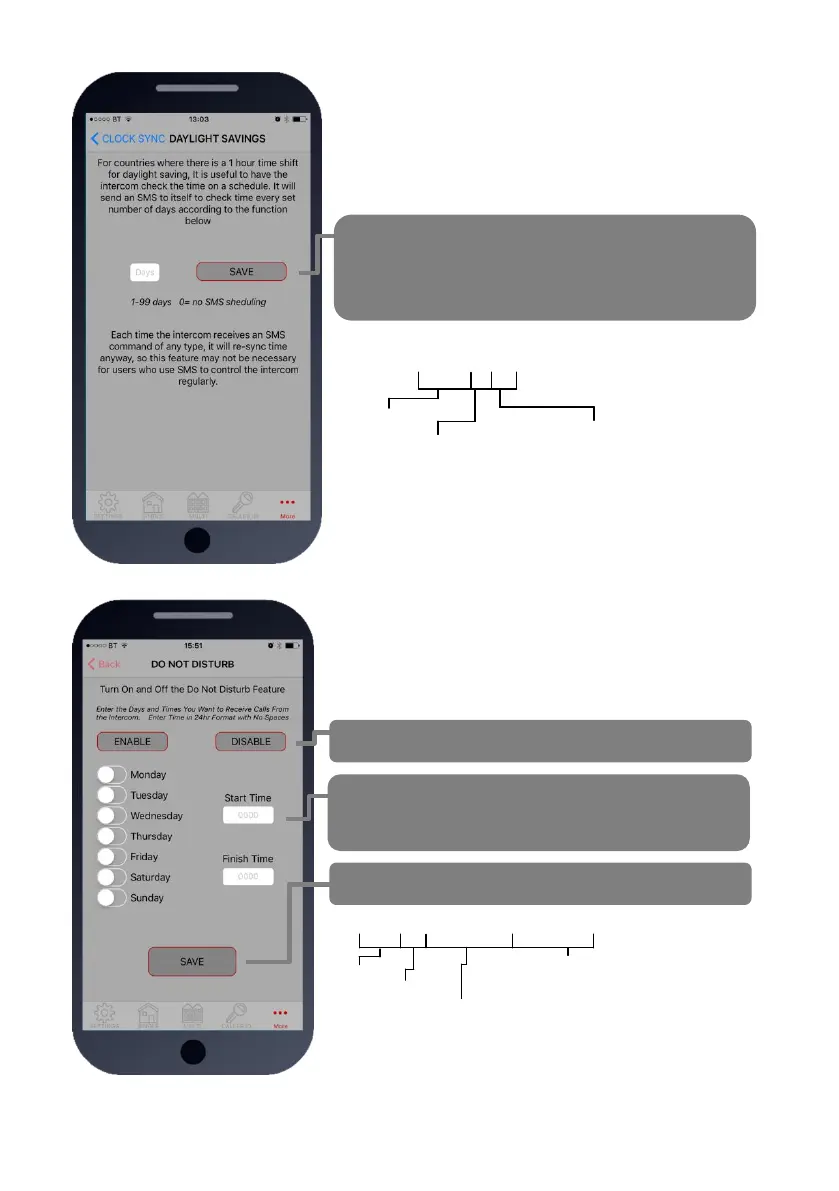
Use this screen to set the ACTIVE times and days for the
button.
Quick enable/disable button
Select start and finish times for the button to work
(24hr format, no spaces or colon. E.g. 8:30am = 0830
Press save to send SMS command.
9999#21#day,day,day#time1,time2#
Pass code
Function code
Enter start and end time in 24hr 4 digit
format (no colon), and separate with
comma. e.g. 0800,2300
Select days (up to 7)
3 digit format, separate with commas.
E.g. mon,tue,wed,thu,fri
To activate, enter the following code:
1234#21#ON# (change ON to OFF to disable again).
11b. Daylight Saving
For regions where there is a 1 hour time shift for daylight
saving, it can be useful to have the intercom send itself a
SMS every set number of days to re-synchronise the internal
clock. The intercom will do this anyway each time a SMS is
received.
Set the number of days between SMS message
sending (depending on carrier provider, this may be
chargeable to the customer).
9999#87??#
Pass code
Function code
1-99 days
0= no SMS sheduling


 To Next Page