:Anapurna M4F - Operator Manual Stay ahead. With Agfa Global Services.
30 Operations - Changing the parameters
The sensors must always be activitated
when the engine is powered on!
!
use both lamps during one printing pass. If the “normal” mode is selected,
onlythetalelampwillopentheshutter.Theprinterwillrstprintandthen
immediately cure with the lamp that follows the print heads.
OFF TIME (MIN)=20 (default) (value between 0 and 60)
This indicates the number of minutes the UV lamps will stay on after a print-
edjobisnished.Thisvaluerangesfrom0to60minutes.
If this value is set to 0, the lamps will immediately turn of when the print is
nished.Theadvisedtimeforthissettingis20minutes.Everylamploses30
minutes of its lifetime whenever it is switched on, so it would be better to
leave the lamps burning between two jobs (if the time between these jobs is
not more then 30minutes).
DELAY (ON/OFF)= 30/30 (default) (value between 0 and 99)
This value enables you to delay the point where the shutter of the lamps
opens and closes. The value is expressed in centimeters and ranges from 0
to 99.
F3 > HOME COVER
By pressing F3, the home cover protection plate slide backwards. This gives you
easy access underneath the print heads.
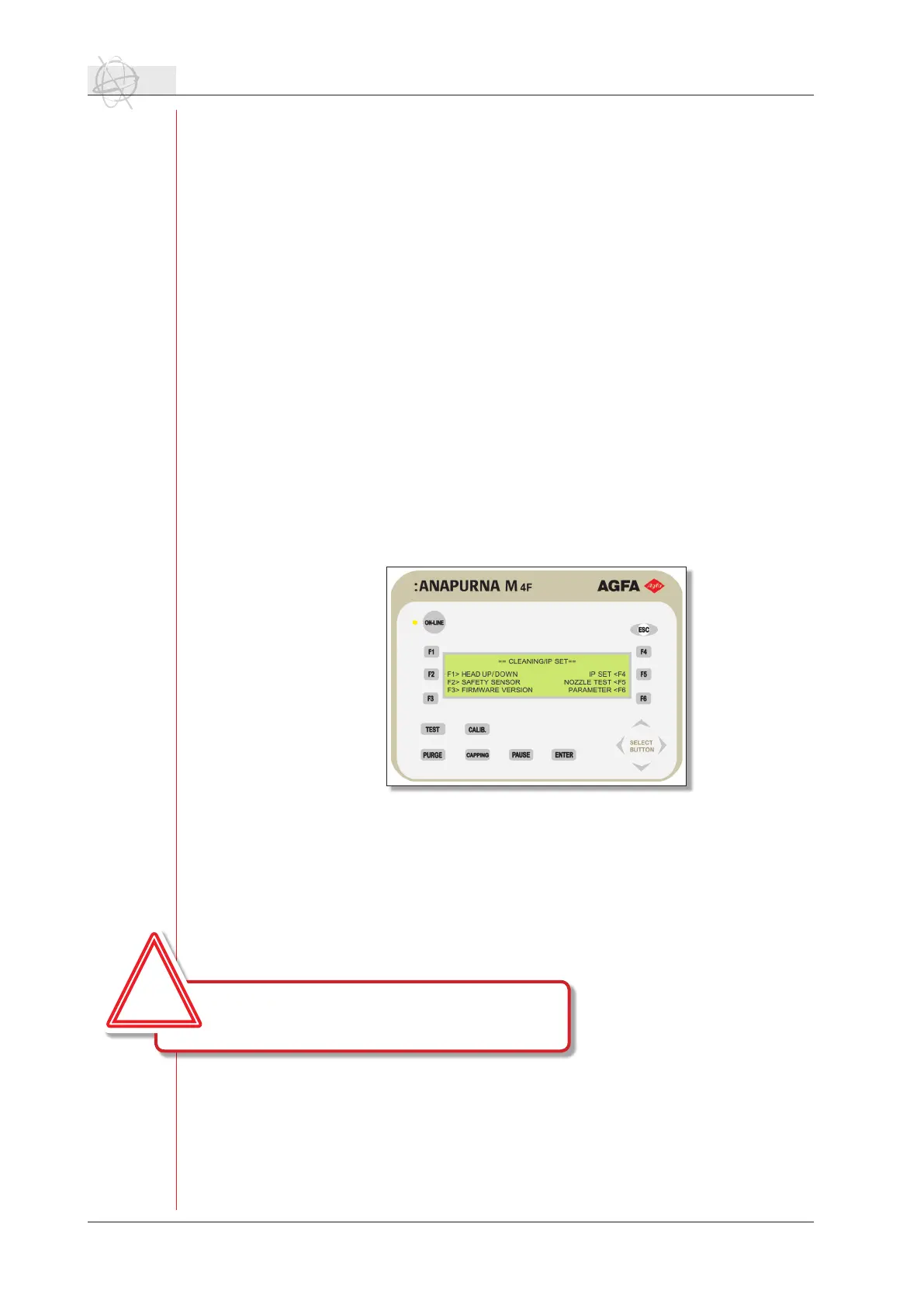
F4 > CLEANING / IP SET
The cleaning/ip set window contains information and parameters about safety,
network connection and the capping function.
F1 > HEAD UP/DOWN
By pressing F1, the shuttle will raise to the most upward position and the
home cover will open. You can easily access the heads for inspection or
cleaning.Toclosethecoverandlowertheshuttletothelastdenedheight,
press the head up/down function again.
F2 > SAFETY SENSOR (default = ON)
This function allows you to enable or to disable the optical sensors surround-
ing the engine. Use the arrows to toggle between ON or OFF.
F3 > FIRMWARE VERSION
Ifyouwanttochecktheversionofthermwarethatisrunningontheen-
gine, press F3. The necessary information will be displayed.
F4 > IP SET
The ip set control enables you to set and change the Anapurna’s IP address.
The default IP address is set to 192.168.1.5. Make sure that the :Anapurna


 To Next Page