Using the Windows wifi settings to switch between the
wireless DR detector and the wireless hospital network
The NX Workstation can be configured to connect to a wireless DR Detector as
well as to a wireless hospital network.
In a configuration without System Control Unit or without a wireless access
point that is connected to the workstation, the DR Detector communicates via
the internal wireless adapter of the workstation and only one connection can
be active at a time. The user must manually switch between the wireless
connection to the hospital network and the wireless connection to the DR
Detector.
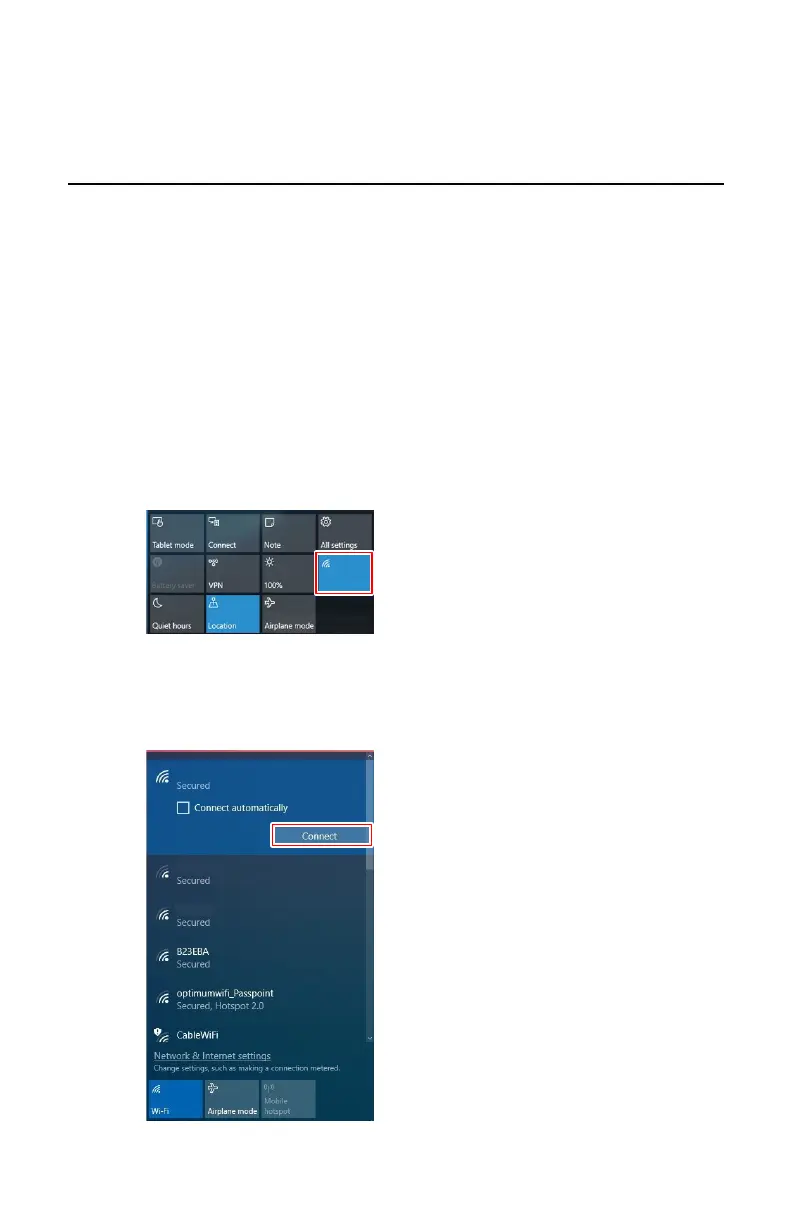
To switch between wireless networks:
1. Swipe in from the right side of the screen.
The Windows action center is displayed.
Wi-Fi
Hospital Network
DR Detector 1
DR Detector 2
Figure 16: Windows action center with Wifi button highlighted
2. Touch the Wifi button
The available wireless networks are displayed.
3. Select the wireless network.
Wi-Fi
Hospital Network
DR Detector 1
DR Detector 2
Figure 17: Available wireless networks
96
| DX-D 45C, DX-D 45G | Advanced Operating
0292B EN 20190401 1627



 To Next Page