AgfaPhoto Compact 104
25
Using the Record Menu
If you are in Photo Mode, you can access the Record menu simply by pressing the MENU button
on your camera.
When the menu is displayed, use the 4-way navigation control and the SET button to move through
menu selections and apply your desired settings. To close the menu anytime, press the menu button
again.
Record Menu
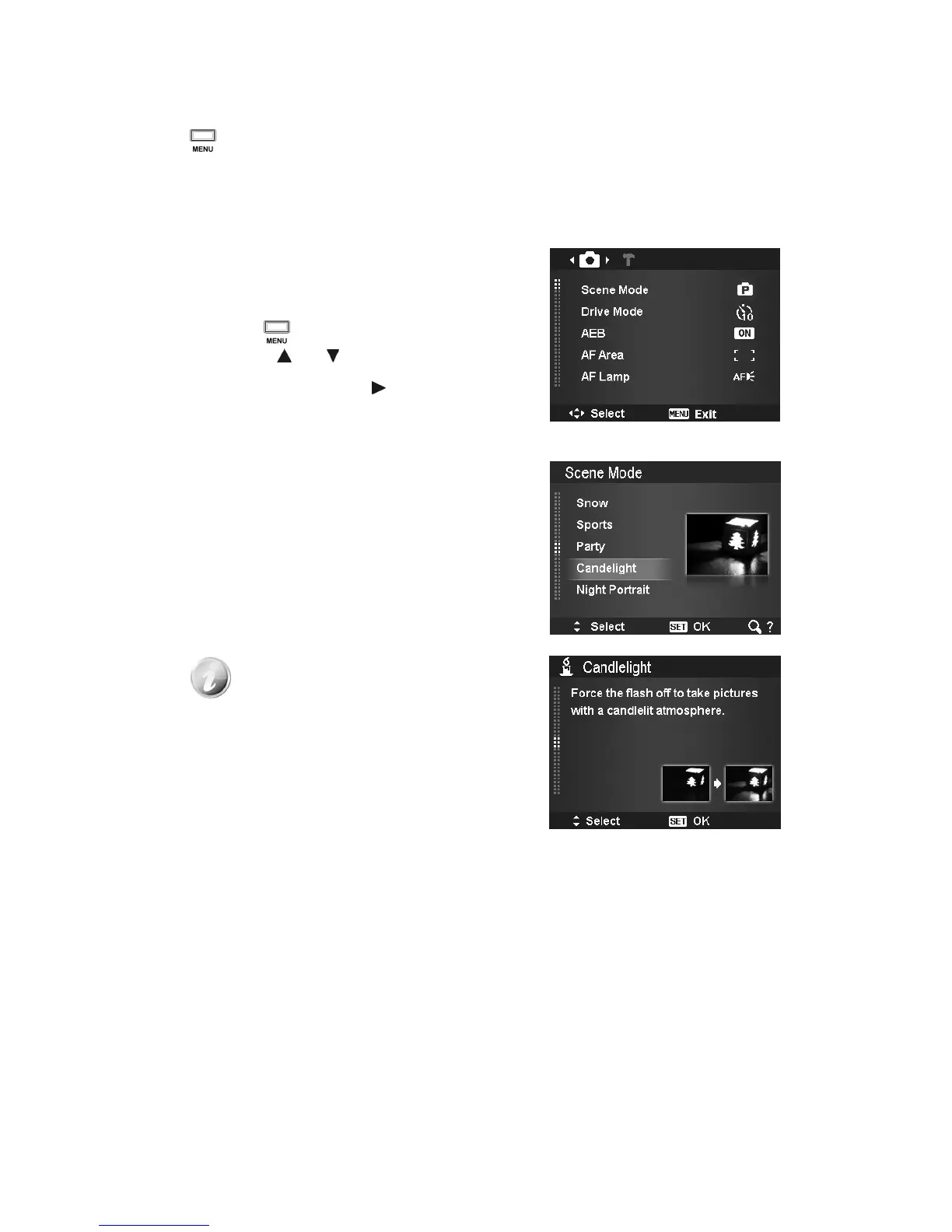
The Record menu allows you to change modes, and setup
other capture settings.
To go to Record Menu:
Turn on the camera by pressing Power button.
1. Press to launch the Record Menu.
2. Use the or keys to move through the
menu.
3. To select an item, press or SET button.
4. Change the submenu settings using the 4-way
navigation control.
5. Press the SET button to save and apply settings.
Setting the Scene Mode
By simply selecting one of the following 33 modes, you can
capture the image with the most appropriate settings.
1. From the Record Menu, press to select Scene Mode.
2. Use the navigation controls to move through the
selection.
3. Press the SET button to save and activate the
selected scene mode.
While using scene mode menu:
•
Press the "T" button to enter the Help
screen for scene mode selection.
•
Press the "W" button to go back scene
mode menu.













 To Next Page