AgfaPhoto Compact 104
34
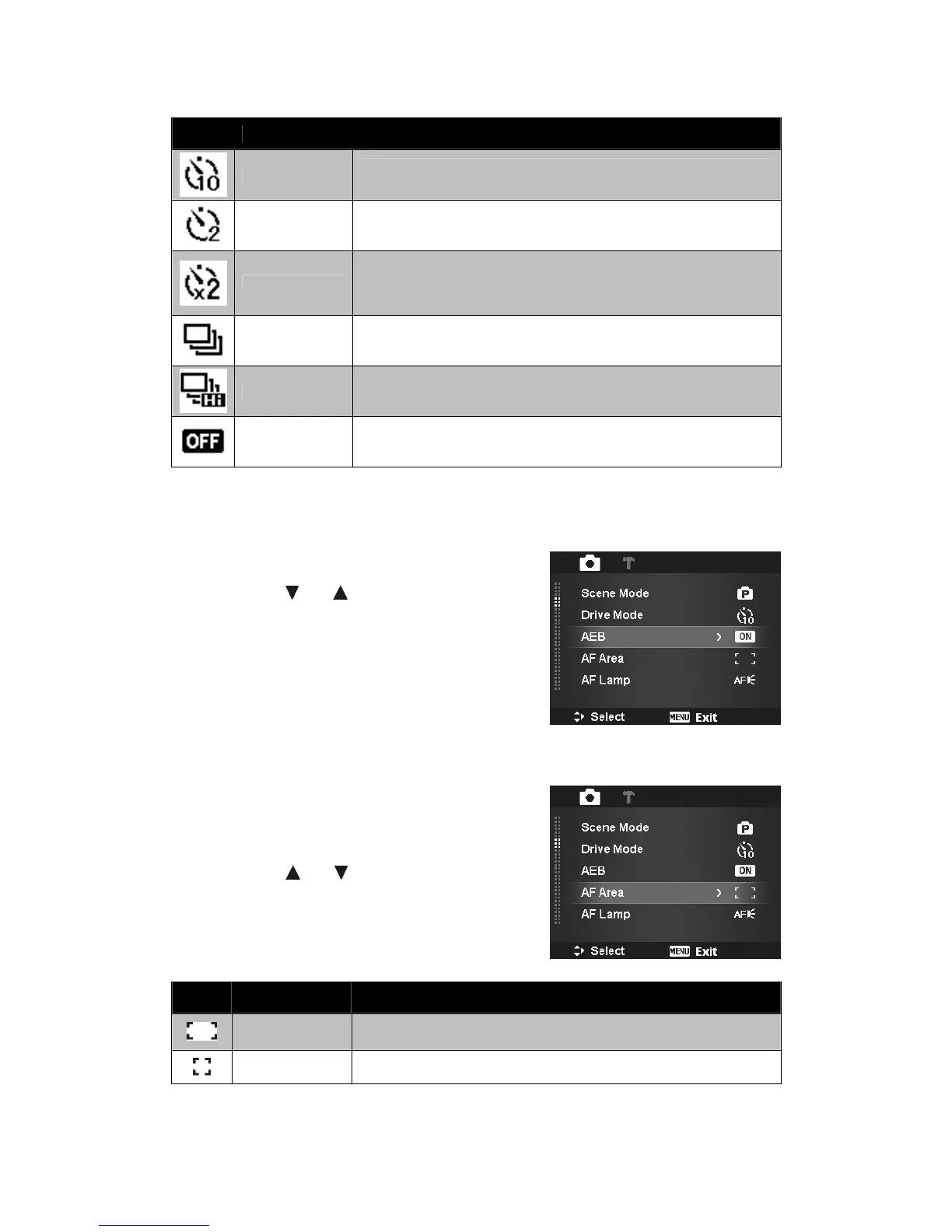
The table below shows the available Drive mode settings.
Icon Item Description
10 Sec.
Sets a 10-second delay to capture image after pressing the Shutter
button.
2 Sec.
Sets a 2-second delay to capture image after pressing the Shutter
button.
Double
Performs delay and capture twice:
• Performs a 10-second delay, then captures the image.
•
Performs another 2-second delay then captures the image
again.
Burst
Performs continuous shooting when the Shutter button is pressed.
Stops shooting when the shutter button is released.
Speedy Burst
Captures 30 images in a shot when the Shutter button is pressed.
Auto set Image size to VGA only.
Off Captures an image without time delay.
Setting the AEB
AEB stands for Automatic Exposure Bracketing. It permits 3 consecutive images in the order of
standard exposure, under exposure and overexposure compensation.
To set AEB
1. From the Record menu, select AEB.
2. Use the or keys to go through the
selection.
3. Press the SET button to save and apply changes.
Setting the AF Area
AF stands for Automatic Focus. This feature determines
the area on which the camera focuses.
To set AF Area
1. From the Record menu, select AF Area.
2. Use the or keys to go through the
selection.
3. Press the SET button to save and apply changes.
The table below shows the available AF area settings.
Icon Item Description
Wide
The camera automatically selects focus area within the wide frame.
Center The focus area is fixed on the center.













 To Next Page