AgfaPhoto Compact 104
35
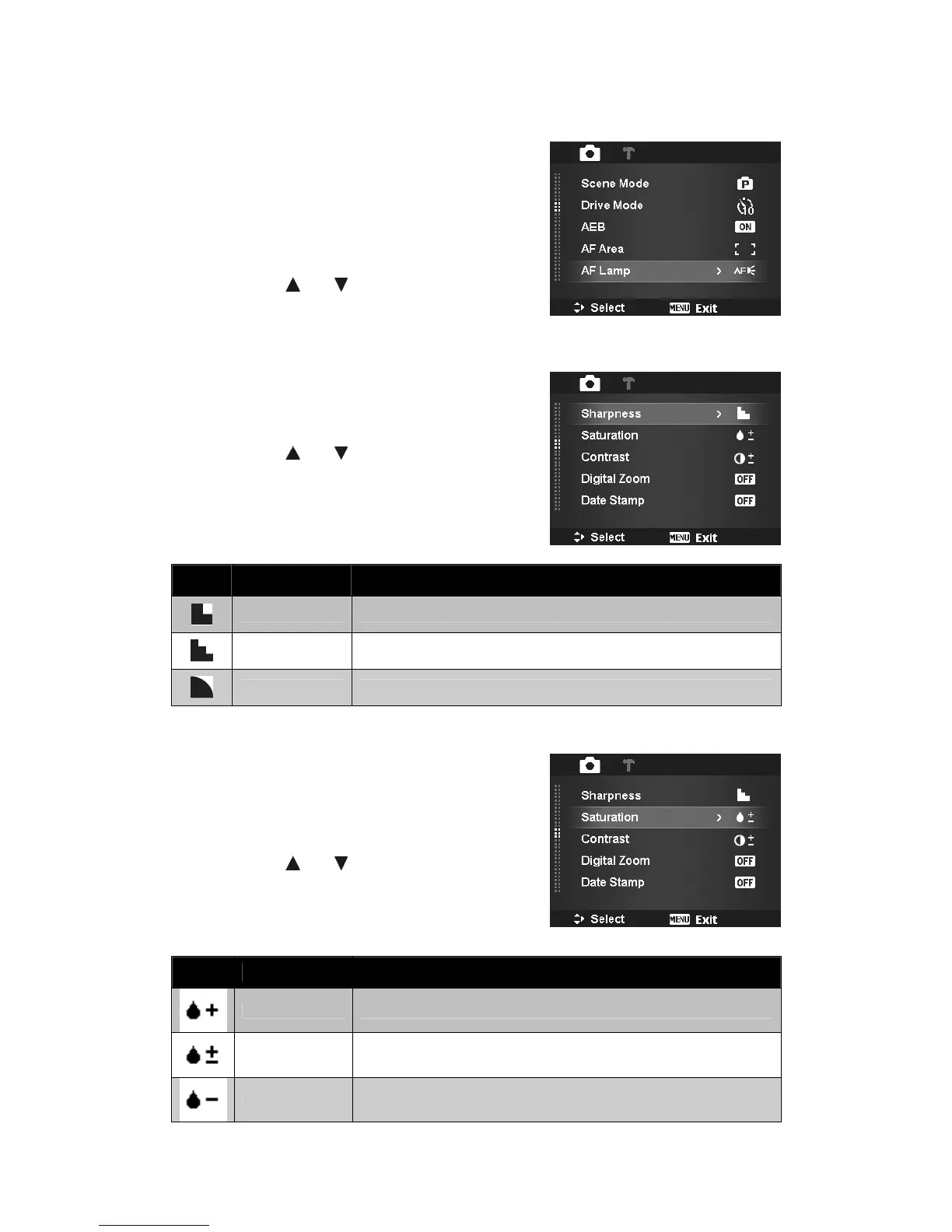
Setting the AF Lamp
The AF Lamp function allows you to record images even
low light conditions.
If AF Lamp is set to Auto, the AF lamp located in the
front of the camera, see "Front View" on page 7, emits
an red light by half pressing the Shutter button allowing
the camera to focus easily.
To set AF Lamp
1. From the Record menu, select AF Lamp.
2. Use the or keys to go through the
selection.
3. Press the SET button to save and apply changes.
Setting Sharpness
This function allows you to enhance or soften finer details
of your images.
To set Sharpness
1. From the Record menu, select Sharpness.
2. Use the or keys to go through the
selection.
3. Press the SET button to save and apply changes.
The table below shows the available Sharpness settings.
Icon Item Description
High
Sharpens the image.
Normal Normal sharpness.
Low Softens the image.
Setting Saturation
The Saturation function lets you adjust the color
saturation in your images. Use a higher saturation setting
for rich colors and a lower saturation setting for more
natural tones.
To set Saturation
1. From the Record menu, select Saturation.
2. Use the or keys to go through the
selection.
3. Press the SET button to save and apply changes.
The table below shows the available Saturation settings.
High
Enhance the saturation.
Normal Normal saturation.
Low Reduce the saturation.













 To Next Page