AgfaPhoto Compact 104
21
Using the Function Menu
The Function Menu is used to adjust capture settings in Photo Mode. It contains My Mode, Photo
Size, Quality, EV Compensation, White Balance, ISO, Metering, and Color Mode.
Press the FUNC button of your camera to launch the Function Menu.
Press the FUNC button again to close the menu.
Menu Options
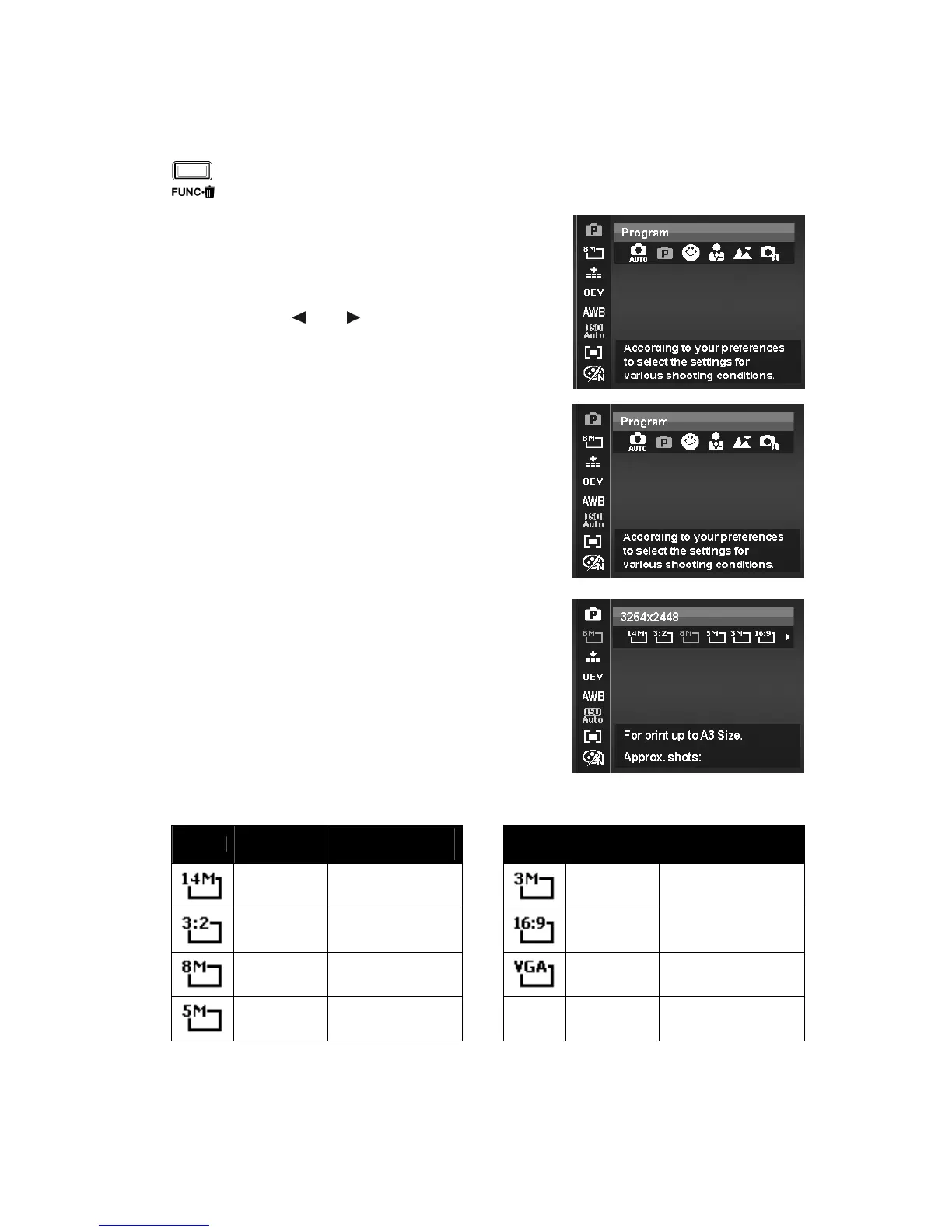
• The Menu bar displays the current status
of your camera settings. Only the
available functions for the settings are
shown as icon on the menu bar.
• The available options for each item on the
menu bar are shown in the Menu options.
• Use the or key to move
through the menu selections then press
the SET button to save and apply
changes.
Menu bar
My Mode
The My Mode function displays the 5 most recent modes
used in order. When you move through the different modes
in the menu options, the items on the menu bar changes
synchronously to the corresponding available settings.
Photo Size
The Photo Size function is used to set the resolution before
you capture the image. Changing the Photo Size affects the
number of images that can be stored in your memory card.
The higher the resolution, the more memory space is
required.













 To Next Page