32
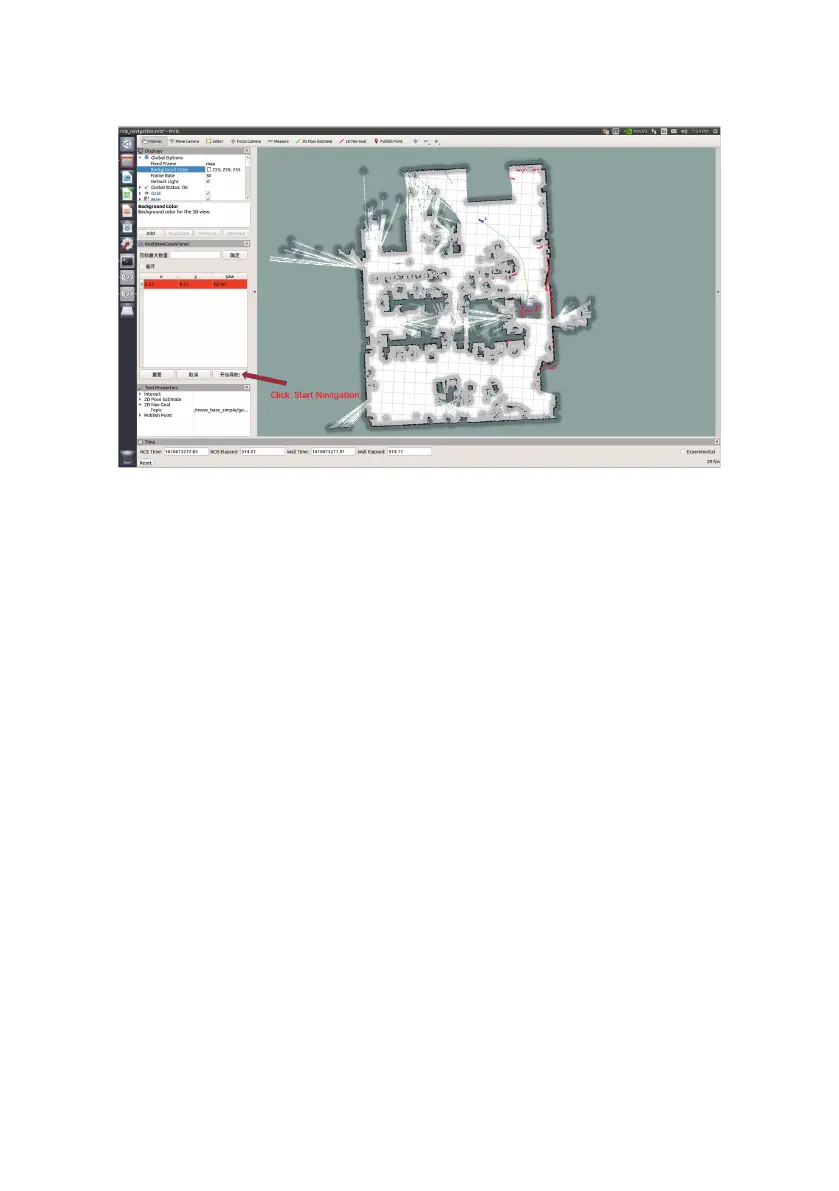
Click to start navigation, the map has generated a path (in green), and it will automatically
navigate to the target point
3.7.2.1 3D Lidar map building
3.7.2 3D Lidar
Take the VLP-16 radar as an example. The VLP-16 radar is a 16-line lidar. In 2° increments, 16° up
and down respectively. Since the VLP directly outputs point cloud data, 16 lines of laser data are
included. Gmapping mapping requires only one line of data, so point cloud data must be
compressed. For this time, you can use the ros package provided by VLP to compress the point
cloud data and output /scan. You can also use the pointcloud_to_laserscan package we provide
to compress point cloud data. Since the 3D lidar has a sweep angle, the sweep blind area of the 3D
radar will be less than that of the 2D radar. After obtaining the scan data, you can transfer the data
to gmapping, and then provide a relatively reliable odometer information and correct coordinate
system transformation and gmapping can be created.


 To Next Page