EasyManua.ls Logo

Aidcall Touchsafe Pro - WC Call Functionality; WC Call Display; Accept WC Call; Cancel WC Call

Aidcall Touchsafe Pro
33 pages
Print Icon
To Next Page IconTo Next Page
To Previous Page IconTo Previous Page
Loading...
Doc No. FM5600 issue E Page 20
17. PROGRAMMING
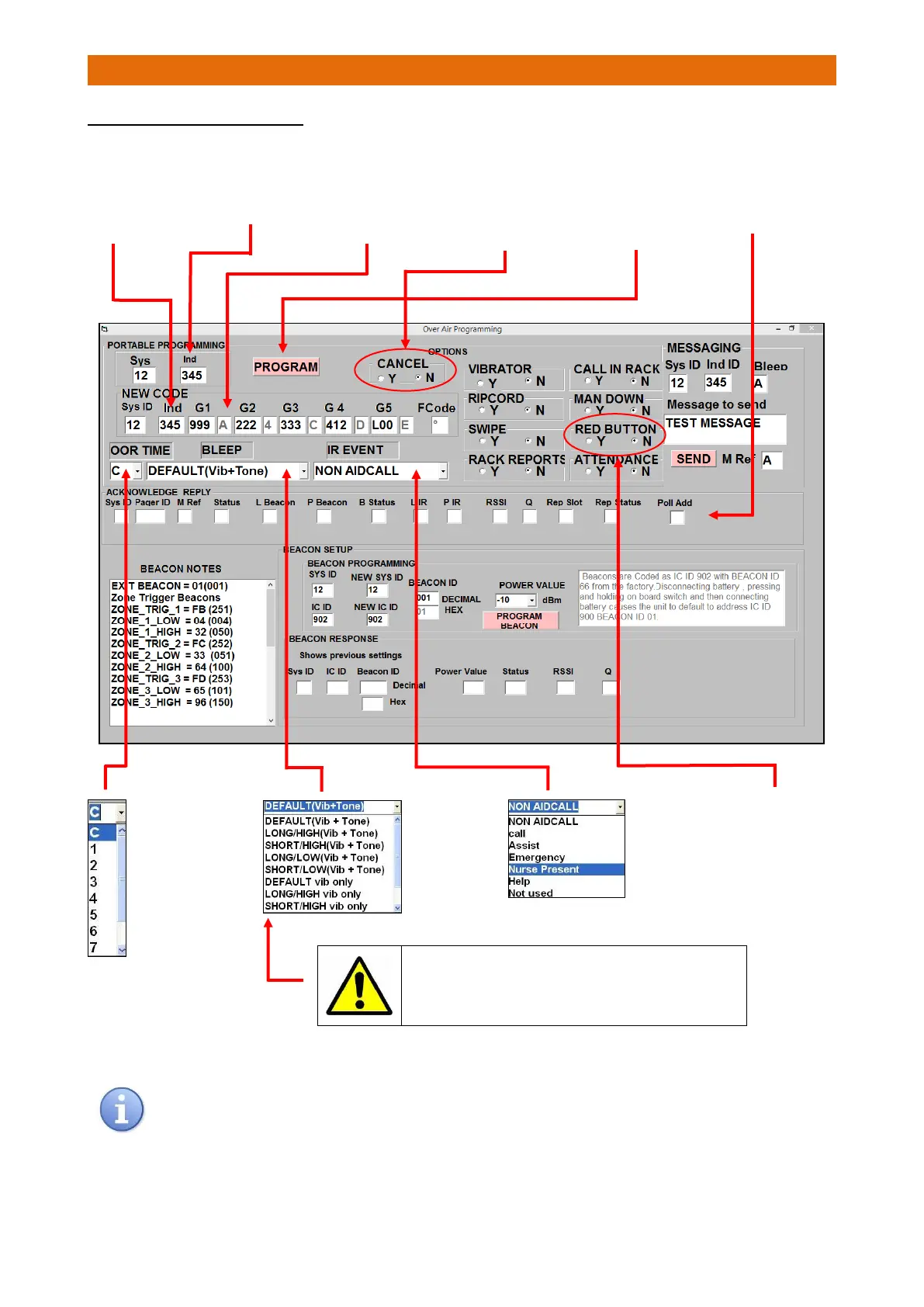
OVER AIR PROGRAMMING TAB
If the Pager volume is set as high from the Bleep drop-down list it can be set to low from the Pager menu,
however it will return to high if the Pager is turned off and on again.
1. Select ID of
Pager to be
programmed
(shown on LCD)
2. If you don’t
require a new
ID ensure this
box is the same
number
3. Set Pager group
ID codes (G1-G5)
the same as setup
in the Touchsafe
Pro Panel
9. When all
parameters are
set press
PROGRAM to
configure a
Pager
6. IR EVENT
Use drop-
down list to
select Nurse
Present IR
function
4. OOR TIME
Use drop-down
list to select 2
minutes delay
before bleeper
and “PLACE IN
RACK” display
when Pager is Out
Of Range (OOR)
5. BLEEP
Use drop-
down list to
select
sounder and
vibrate
options
10. Check the
“Acknowledge
Reply” area fills
with data when
programmed
7. RED BUTTON
Set as “Y” only if
Pager Red
Button is being
used for
Emergency calls
To use the day/night bleeper/vibrate feature it is necessary
to program the Pager with a Vib Only option and switch
Vibrator to N in the menu options. The Log-on is then e.g.
123# day (bleep) and 123* night (vibrate).
8. CANCEL
Set as “Y” only if
Pager Red
Button is being
used for
Emergency calls

Other manuals for Aidcall Touchsafe Pro