CHAPTER 6
46 47
MXm
Create and set MXm alarm
As for any AiM logger you can import/export alarms using the related buttons but
you can also create new ones.
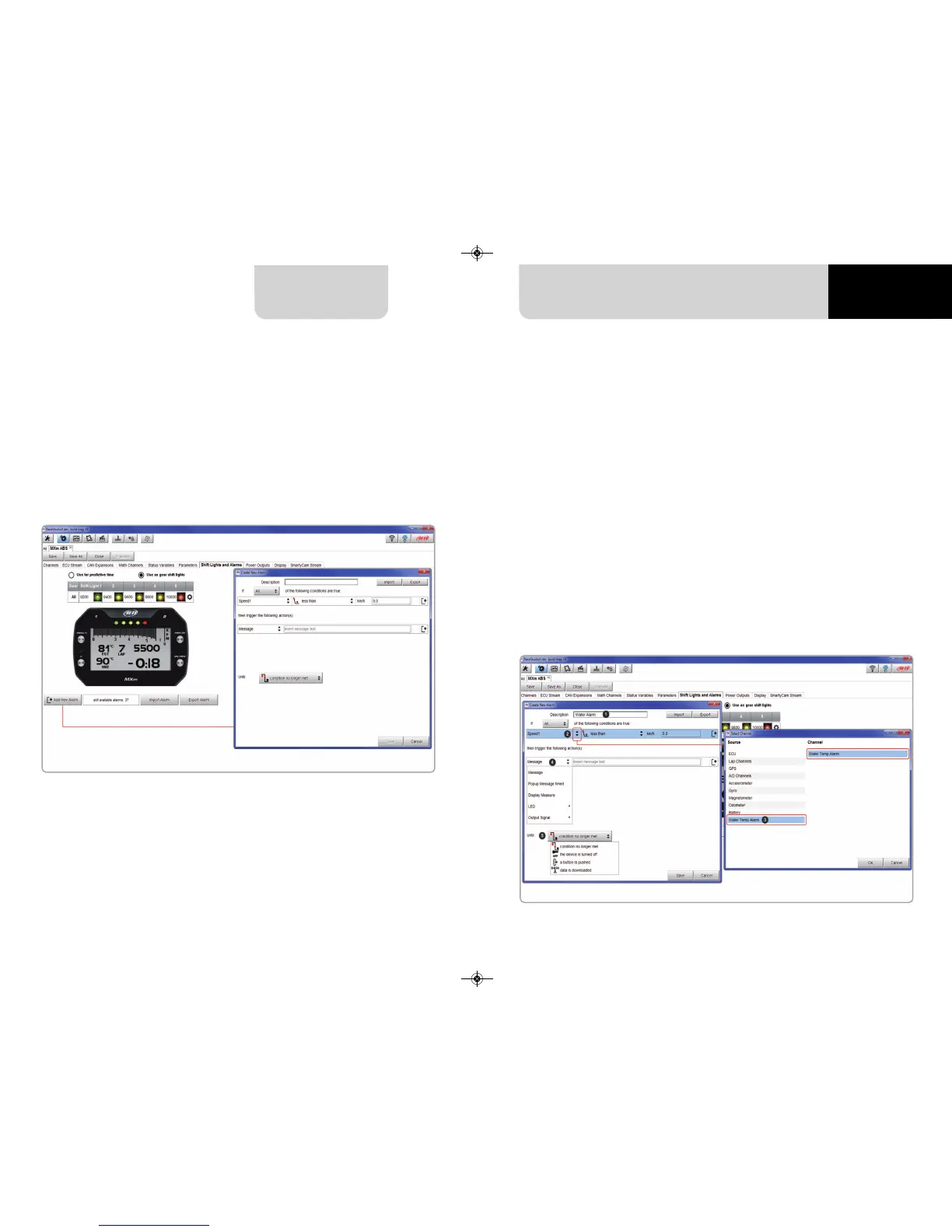
To create a new alarm press “+ Add new Alarm”
To set the new alarm:
n
fill in description box on top of “Create New Alarm Panel” (1)
n
press the arrows you find on the left of “Create new alarm “ panel (2)
n
“Select Channel” panel shows up on the right
n
as you can see in the image below if you set a status variable (Water Temp Alarm
in the example) you find it in the available channels list: select the channel
you prefer (3) and press “OK”
n
decide which action is to be trigged (4) among displaying a message or a timed
popup message, display a measure, switch a LED on or activate an output signal
(Power output page, see the related paragraph)
n
decide the alarm ending condition (“Until” – 5) among condition no longer met,
the device is turned off, a button is pushed or data are downloaded
n
“+” buttons you find right of the panel are to add new alarms (the top one) or
to add new actions to an alarm (bottom one)
n
when all operations have been performed press “Save” in “Create New Alarm Panel”
and you will come back to “Shift Lights and Alarm” page



 To Next Page