CHAPTER 6
54 55
MXm
6.3 Managing a track on MXm with Race Studio 3
With Track Manager function of Race Studio 3 you can create, delete and modify
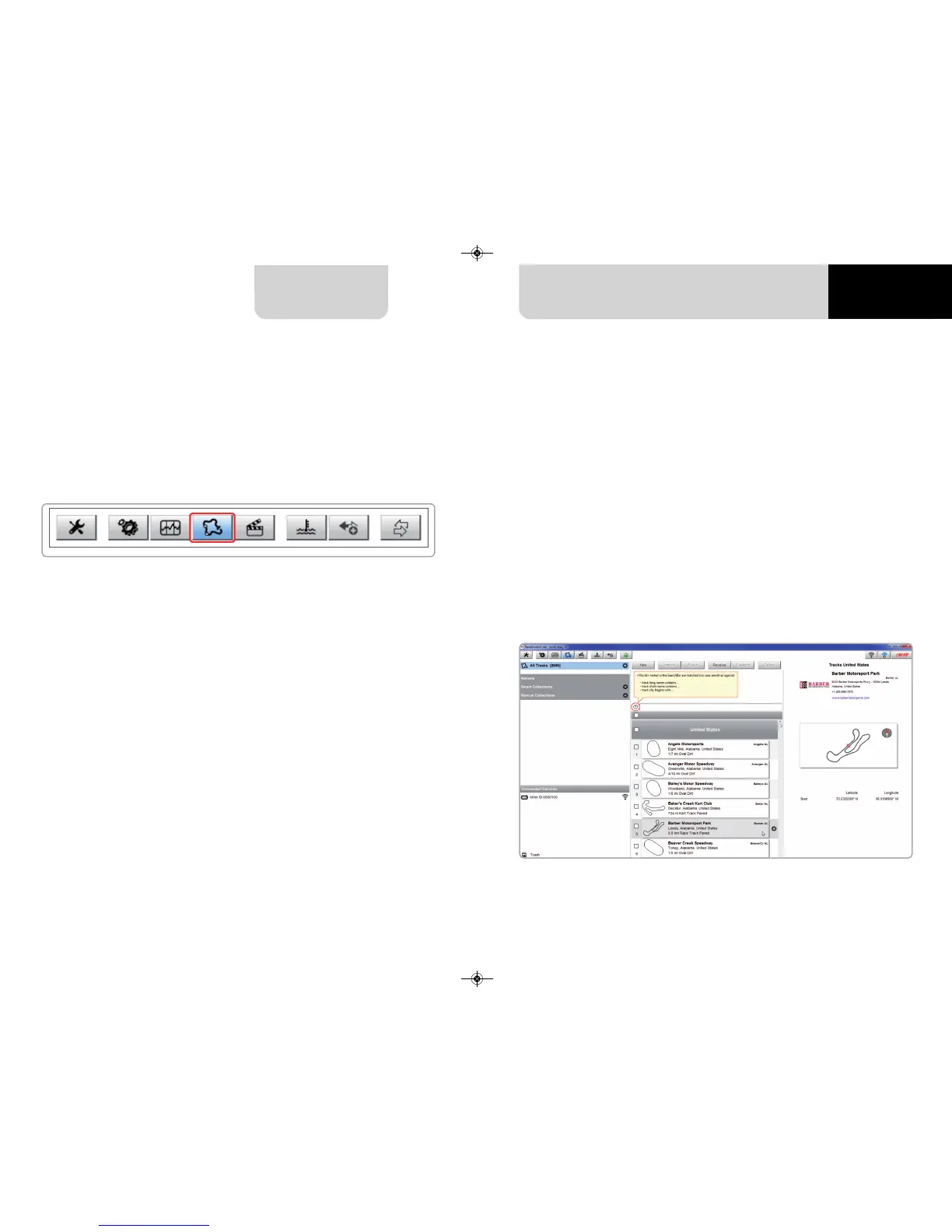
tracks, transmit and receive them to/from your MXm. Press “Tracks” icon.
The main page is divided in three columns; on the left:
n
on top, the filters that allow to collect many tracks following customized criteria;
by default, all tracks are shown (light blue “All Tracks” filter in the image below).
n
bottom left, the connected devices (in the image, “MXm ID 6500100”)
The column in the middle shows:
n
on top a fast search bar, that allows to select the tracks which satisfy your personal
research criteria; by pressing “?”a pop-up window explains research criteria
(highlighted in red below), where:
n
long name is the name you see in bold in each track box
n
short name is the track name shown on the display of your MXm and is
the name you find top right of each track box
n
track city is the name of the city the track is located in
n
all the tracks listed in Race Studio 3 database. It automatically updates at start up
if a connection to the Internet is available.
The column on the Right shows:
n
the data sheet of the track you are mousing over.



 To Next Page