Page 12
LcD anD PROgRaMMing kEYS
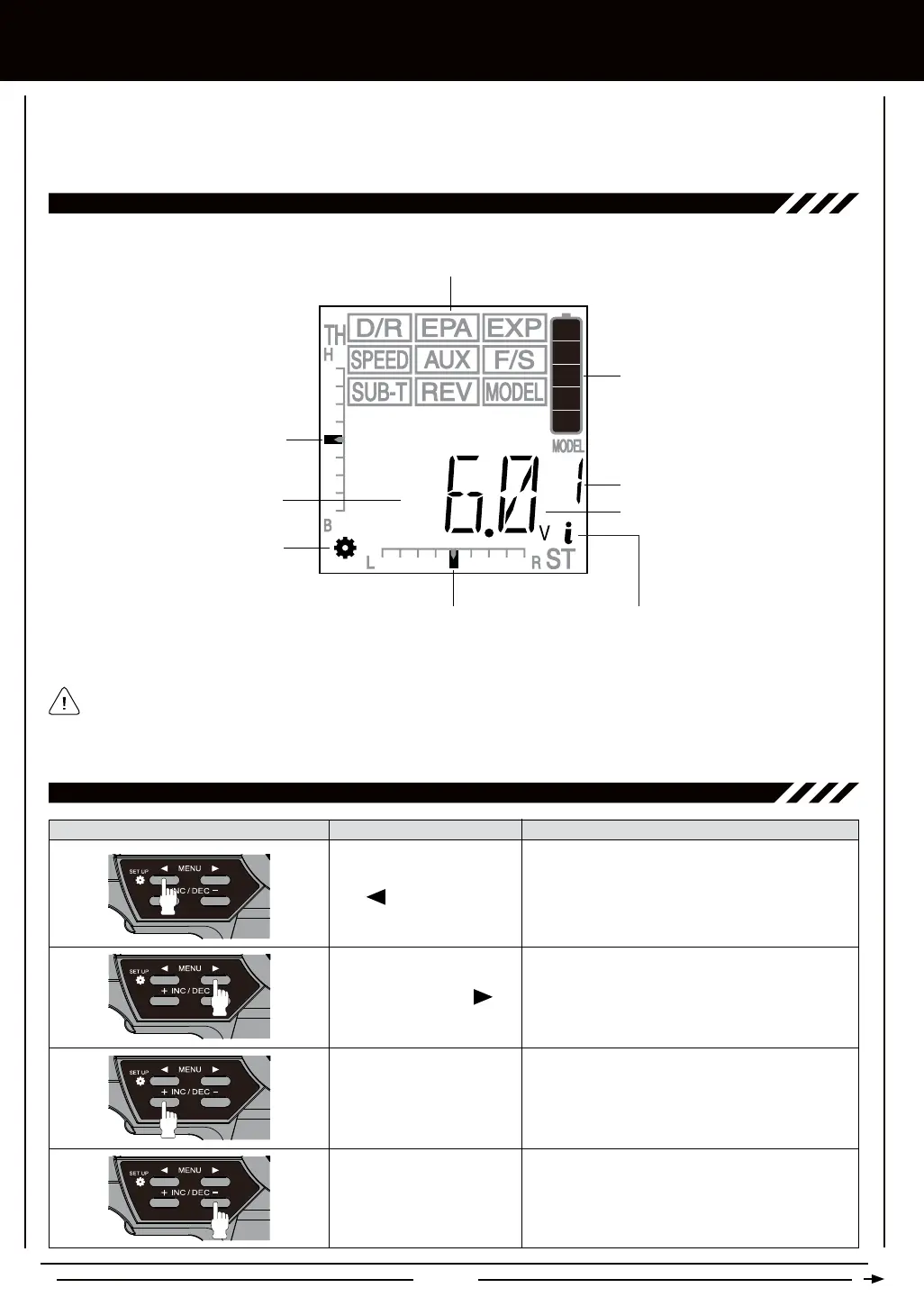
The MX-3X 2.4GHz FHSS-3 transmitter features four Programming Keys that are used to facilitate transmitter programming.
The four Programming Keys consist of two MENU Keys (Right and Left), one +/INC (Increase) Key, and one DEC/- (Decrease)
Key. This section summarizes the functions of each of the 4 Programming Keys in addition to describing the main areas of the
Multi-Function LCD.
Because certain areas of the LCD are printed onto the display, the PROGRAMMING menu selections displayed will NOT
change when cycling through the various SETUP menu options. This is normal because those areas of the LCD are printed
onto the display. For example, when you enter the SETUP menu and highlight D/R, MOD will be displayed in the Programming
Window, when you highlight EXP, TRM will be displayed in the Programming Window, etc.
Scrolls left (backward) through the individual
functions assigned to the currently highlighted
menu. In addition, when held down while turning
the transmitter ON, enters the SETUP menu.
Scrolls right (forward) through the individual
functions assigned to the currently highlighted
menu.
+/INC Key (Increase)
Increases number values in the Programming
Window and is used to make programming
selections.
DEC/- Key (Decrease)
Decreases number values in the Programming
Window and is used to make programming
selections.
Left MENU Key
Right MENU Key
PROgRaMMing kEY FUncTiOnS
MULTi-FUncTiOn LcD OvERviEw
Programming
Window
Model Number
Battery
Indicator
PROGRAMMING Menu / SETUP Menu Functions
Digital Voltage
Indicator
Steering Trim Display
Throttle Trim
Display
Setup Menu
Icon
Top Menu Icon
(SETUP Menu Only)



 To Next Page