Page 13
+
PROgRaMMing kEY SHORTcUTS
LcD anD PROgRaMMing kEYS
The Programming Keys can be used to change important information displayed in the Programming Window. The information
that can be displayed will vary depending on what menu you're currently in and/or what is currently displayed in the Programming
Window.
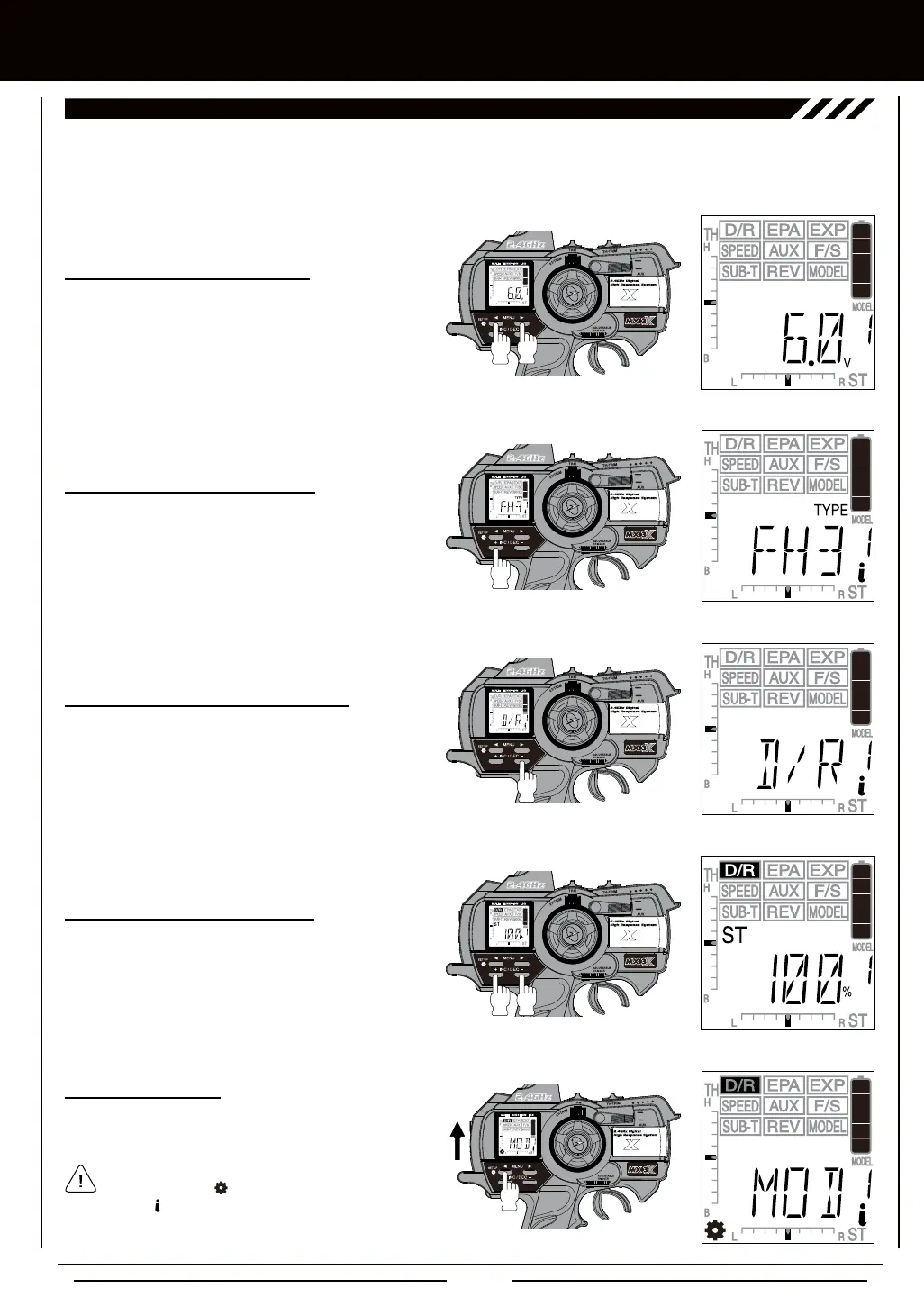
While within a PROGRAMMING menu, pressing the Right
MENU key and the Left MENU key at the same time will
display the Digital Voltage Indicator.
While the Digital Voltage Indicator is displayed, pressing
and HOLDING the +/INC key will display the current
Modulation Type in use.
While the Digital Voltage Indicator is displayed, pressing
and HOLDING the DEC/- key will display the current
function assigned to the TRM switch.
While within a PROGRAMMING menu, pressing the +/INC
key and the DEC/- key at the same time will reset the
Programming Value to the default value.
+
ON
All SETUP menu options displayed are indicated by
the Setup Menu icon in the lower left corner of
the LCD. The icon indicates that you are at the top level
of that specic menu.
To enter the SETUP menu, press and hold the Left MENU
key and turn the transmitter ON.



 To Next Page