Page 39
SETUP MEnU
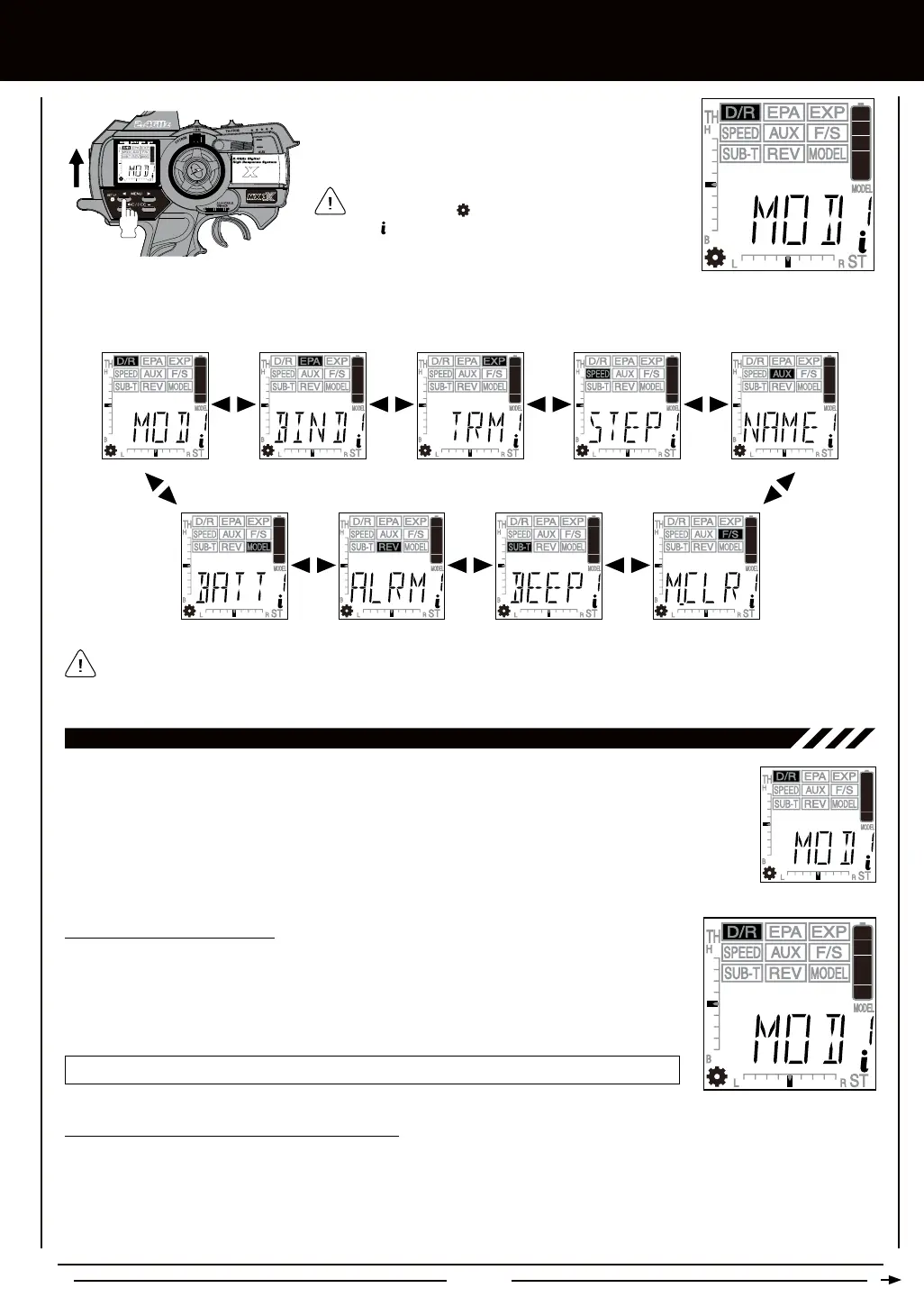
Because certain areas of the LCD are printed onto the display, the PROGRAMMING menu selections displayed will NOT
change when cycling through the various SETUP menu options. This is normal because those areas of the LCD are printed
onto the display. For example, when D/R is highlighted, MOD will be displayed in the Programming Window.
To enter the SETUP menu, press and hold the Left MENU
key and turn the transmitter ON.
All SETUP menu options displayed are indicated by
the Setup Menu icon in the lower left corner of the
LCD. The icon indicates that you are at the top level of
that specic menu.
The following SETUP menu options are available by repeatedly pressing the Right MENU key or the Left MENU key:
The Modulation Type function allows you to choose the transmitter Modulation Type. The Modulation Type
can be changed to match the receiver you're using. For example, if you wish to use an Airtronics 2.4GHz
FHSS-2 receiver with your transmitter, you would need to change the Modulation Type to FH2 prior to Binding
your transmitter and receiver. Modulation Type is model-specic, meaning that you can have one model use
FH3 Modulation and another model use FH2 Modulation, etc.
MOD - MODULaTiOn TYPE
1) Press the Right or Left MENU key to highlight the D/R menu. MOD will be displayed in the
Programming Window.
2) Press the +/INC or DEC/- keys to display the desired Modulation Type that matches the receiver
that you're using. The Modulation Type displayed that's not currently in use will begin to ash.
MOD setting range is FHS3, FH3F, FH2, and DS2. The default setting is FH3.
The following Modulation Type options are available:
- Select this Modulation Type when using Airtronics 2.4GHz FHSS-2 receivers.
- Select this Modulation Type when using Airtronics 2.4GHz FHSS-3 receivers.
- This Modulation Type is NOT used in North America. This Modulation Type is typically used in France.
- This Modulation Type is NOT used in North America. This Modulation Type is typically used in Japan.
Modulation Type Binding Trim Switch Assign Trim Step Resolution Model Naming
Model ClearAudible Key ToneInactivity AlarmBattery Cell Count
ON



 To Next Page