Page 9
Moving the throttle trigger neutral position does not affect the overall servo travel of the throttle servo in any way. Do not
attempt to adjust the throttle trigger neutral position beyond the limits indicated by the Throttle Position Adjustment Indicator
or damage to the transmitter may result.
Tx anD Rx OPTiOnS anD cOnnEcTiOnS
The neutral position of the throttle trigger can be adjusted forward or backward to suit your driving style. Some users may prefer
the trigger neutral point to be farther forward, and some users my prefer the trigger neutral point to be farther back. It all depends
on your personal preference.
Limiting the travel of the throttle trigger in one direction will increase the sensitivity of the throttle in that direction. Conversely,
increasing the travel of the throttle trigger in one direction will decrease the sensitivity of the throttle. For example, if you move
the throttle trigger neutral position forward, the physical movement of the throttle trigger will be increased on the throttle side,
but decreased on the brake side. This will result in throttle control being less sensitive and brake control being more sensitive.
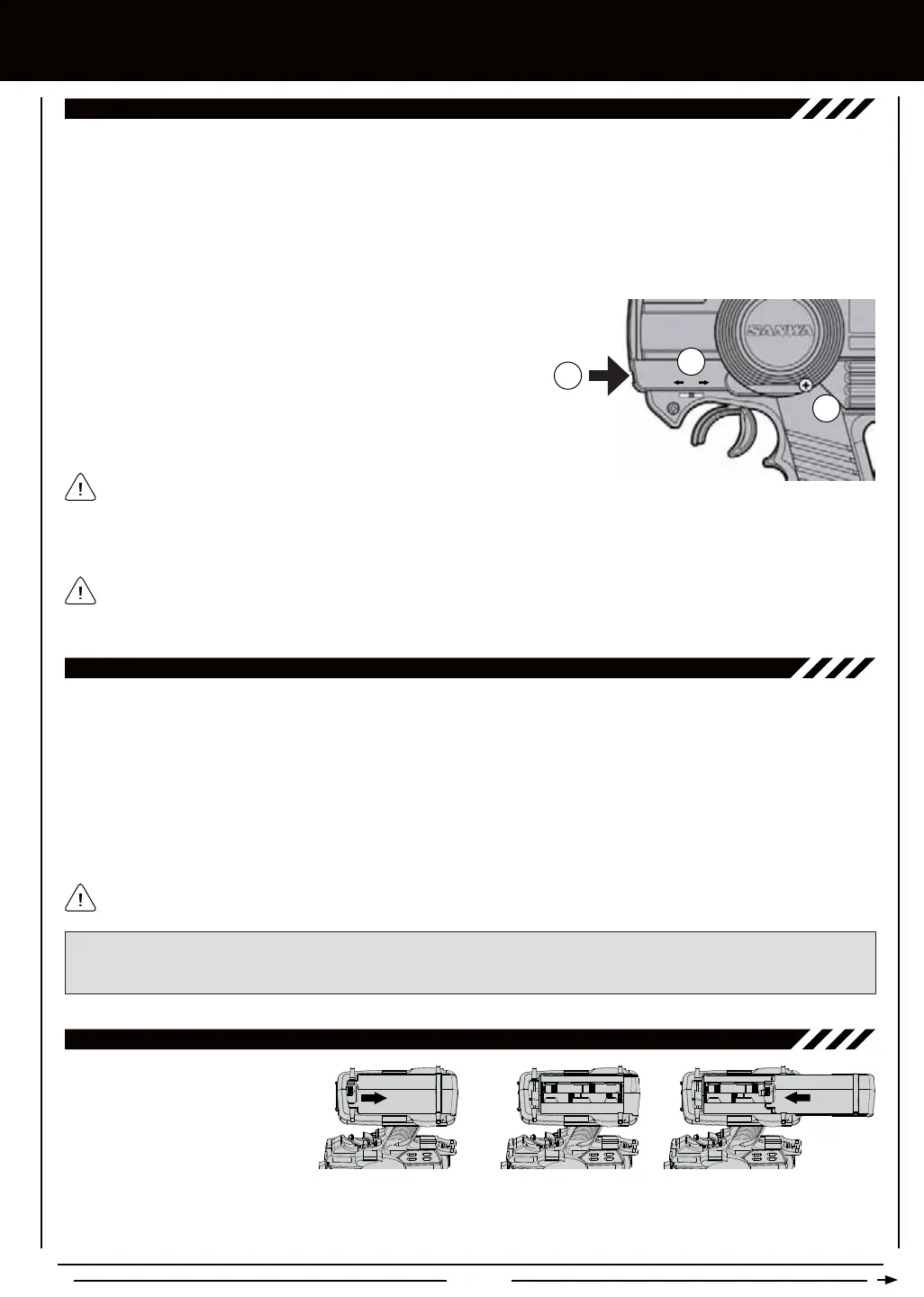
To adjust the throttle trigger neutral position, follow the steps below:
1) Using a # 1 philips head screwdriver, loosen the Throttle Trigger
Adjustment Lock Screw (A) on the back of the transmitter.
2) To move the throttle trigger neutral position forward, use a # 1 philips
head screwdriver to turn the Throttle Trigger Adjustment Screw (B)
clockwise. To move the throttle trigger neutral position backward, turn
the Throttle Trigger Adjustment Screw counter-clockwise.
A
B
C
3) When satised with the adjustment, gently tighten the Throttle Trigger Adjustment Lock Screw (A) to lock the throttle trigger
neutral position.
As you adjust the throttle trigger neutral position, the Throttle Position Adjustment Indicator (C)
will move, indicating the new throttle trigger neutral position.
The MX-3X 2.4GHz FHSS-3 transmitter's Nominal Input Voltage is 4.8v ~ 7.2v. This means that the transmitter can be used with
several different battery types, depending on your preference.
In the default conguration, the transmitter is designed to be powered using 4 'AA' Alkaline batteries (not included).
This results in a transmitter that is lightweight and well-balanced for unmatched comfort.
An optional 6 cell 2200mAh Ni-MH rechargeable battery (available separately) can be used. This option, while adding
slightly more weight, still results in a lightweight, well-balanced transmitter with longer battery life.
A 2 cell Li-Po battery or a 2 cell Li-Fe (A123) battery (both available separately) can be used to power
the transmitter. Please see the warnings on page 11 if you decide to use one of these types of batteries.
TRanSMiTTER BaTTERY OPTiOnS
IMPORTANT In the default conguration, the transmitter is programmed to use 4 'AA' Alkaline cells. If you're using the
optional Airtronics 6 cell 2200mAh Ni-MH rechargeable battery or a 2 cell Li-Po or 2 cell Li-Fe battery, the Battery Cell Count
must be changed in the SETUP menu from 4 Cell to 6 Cell. For more information, see page 46.
Transmitter power output, range, and speed is the same, regardless of the battery type/cell count used.
THROTTLE TRiggER aDjUSTMEnTS
aLkaLinE BaTTERY inSTaLLaTiOn
1) Remove the battery cover on the
bottom of the transmitter by pushing
rmly on the battery cover in the
direction of the arrow.
2) Install four fresh 'AA' Alkaline
batteries into the battery tray,
making sure that the polarity is correct. The direction that each battery should be installed is molded into the battery tray
(+ Positive and - Negative).
3) Slide the battery cover back onto the transmitter and push it rmly until it 'clicks' closed.



 To Next Page