TEMPUS. User Manual
15
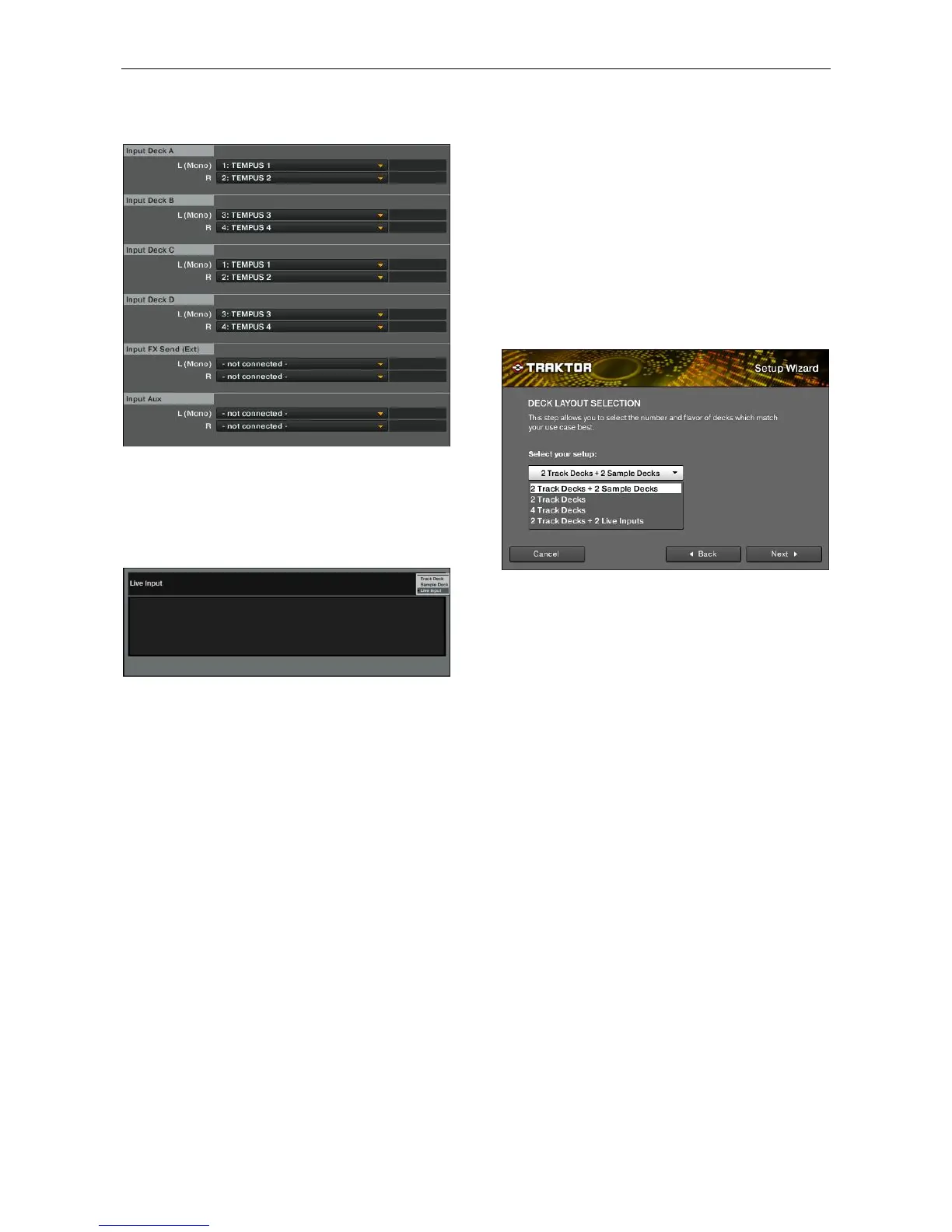
well. In this case you need to select external mixer in the Setup
Wizard. Make sure that inputs are configured as follow:
You can see on the previous point the equivalent names on
MAC.
In this case inputs 1&2 are assigned to deck A and C and
inputs 3&4 to decks B and D. You can assign any input to any
deck.
Make sure to select Live input in the deck you have associated
the inputs you want to apply effects.
NOTE: USB outputs are the channels that go from the PC to
the controller (They could be considered as controller inputs).
USB inputs are the channels that go from the controller to the
PC (They could be considered as controller outputs).
3.2. Track/Sample Deck Mode
In points 4.1-Channel and 4.3.1 it will be explained how the
MIDI channels which messages are sent through can be
changed.
Depending on the selected channels, decks C and D of the
controller will control sample functions (channels 1 to 4) or
Track deck functions (channels 5 to 8).
Traktor 2 LE mapping is compatible with the default mode in
which MIDI messages are sent through channels 1 to 4.
For users using Traktor PRO, make sure that the Deck Layout
Selection step is configured correctly.
When Channels from 1 to 4 are selected (default mode) you
must select the following layouts:
- 2 Track Decks + 2 Sample Decks
When Channels from 5 to 8 are selected you must select one
of the following layouts:
- 2 Track Decks + 2 Live Inputs.
- 4 Track Decks.


 To Next Page