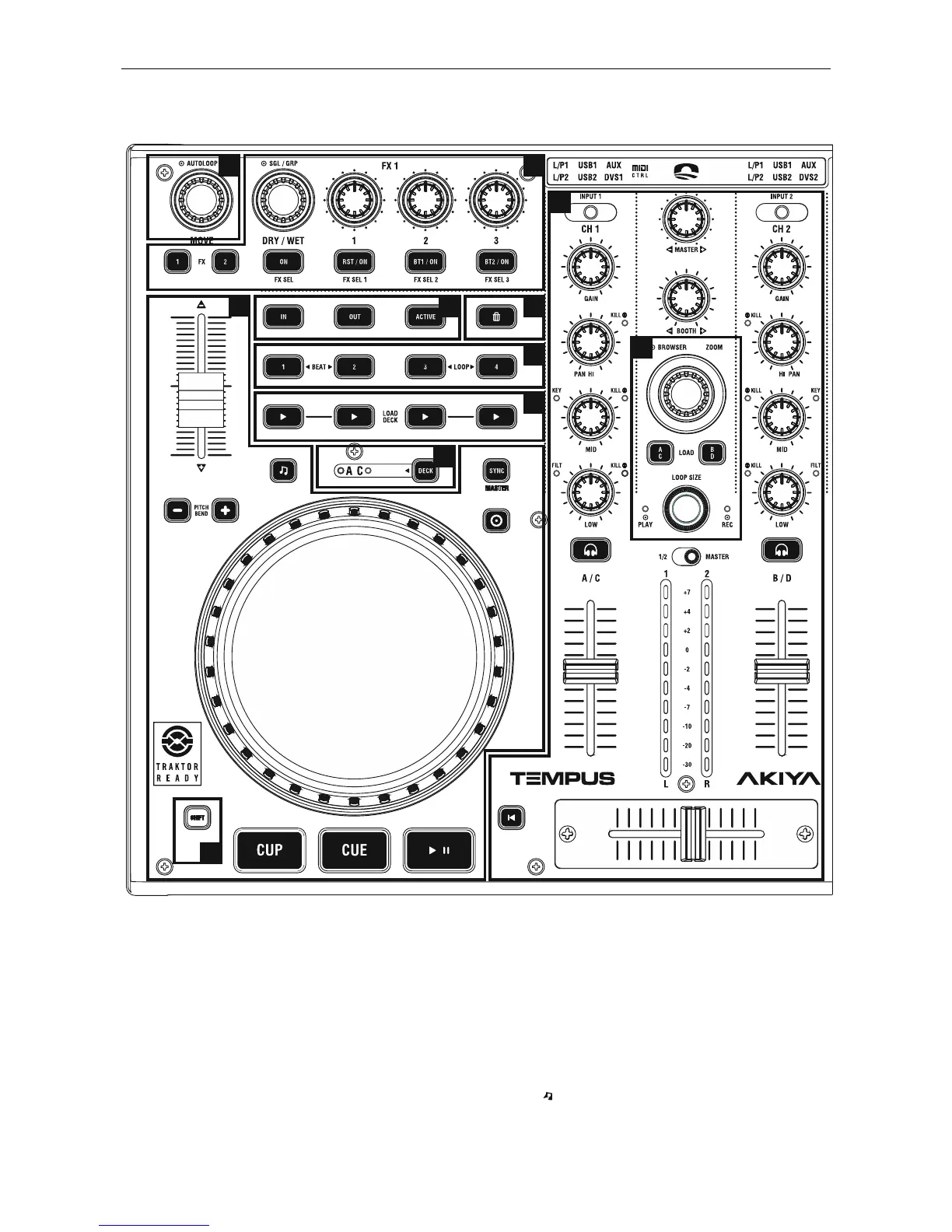
1. AUTOLOOP
- AUTOLOOP: Turn the control to select loop size. Press the
control to set the loop.
2. EFFECTS
This section provides control over Traktor effects.
- DRY/WET: Determines the amount of processed signal (by
the effect) versus original signal that will be played.
Shift (FX Sel.): Turn the control to select one effect of the list.
- ON: Press the button to select one effect of the list.
- 1: Adjusts the level of effect.
- RST/ON: Effect On/Off.
- 2: No function.
- BT1/ON: No function.
- 3: Turn the control to adjust the FILTER parameter.
- BT2/ON: FILTER parameter On/Off.
- FX1 & FX2: No function.
3. TRANSPORT/JOG WHEEL
- PITCH FADER: Modify deck tempo.
- PITCHBEND: Adjusts the tempo of the deck while these
buttons are pressed. When released, the tempo returns to
original value.
- KEY ( ): Push to enable KEY LOCK function.


 To Next Page