TEMPUS. User Manual
12
2.2.3. Traktor 2 LE registration
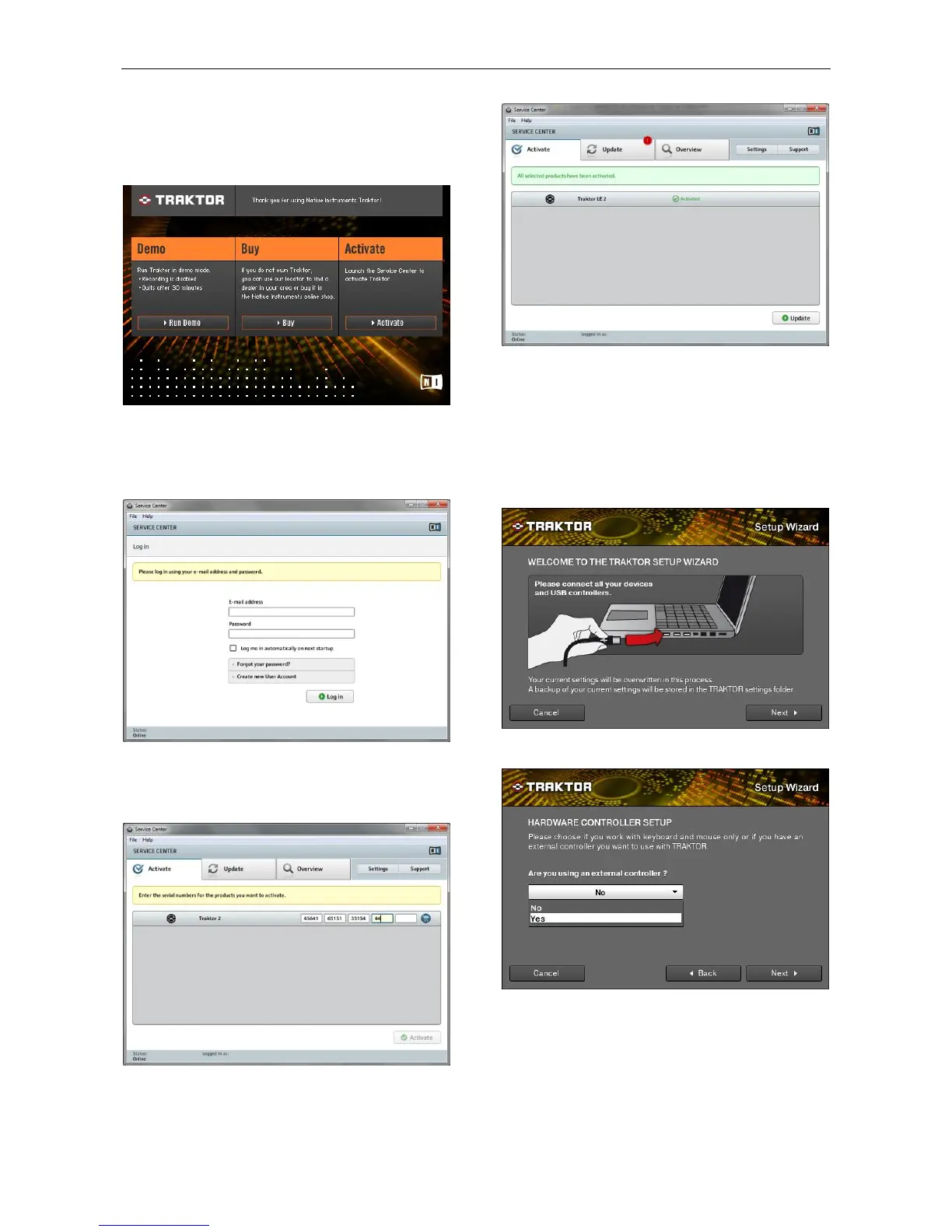
It is compulsory to register Traktor before you start using it.
The first time you start Traktor the following window will pop
up. If it does not, you can open the Service Center.
Select “Activate” to start the Service Center.
The online activation process is explained in this manual.
People who do not have Internet connection will find more
information about off-line activation on Help -> Open Quick
Start Guide … in the Service Center.
Type your e-mail and Password if you already own a user
account. Otherwise you must create a new User Account.
Afterwards, log in and you will see a window with a list of the
products that you should register.
Type the serial number that you will find on the Traktor 2 LE
CD provided with the controller and click “Activate”.
This window shows that you have successfully activated your
Traktor LE 2.
The Service Center can be closed.
2.2.4. Traktor 2 Setup Wizard
When using Traktor 2 LE for the first time the “Setup Wizard”
should start. If this is not the case or you already had Traktor 2
PRO installed please click on “Help” and select “Start Setup
Wizard” and the Welcome window will pop up.
Connect Tempus to your computer and click “Next”.
Answer the first question “Are you using an external
controller?” with “Yes”. Then click on “Next”.


 To Next Page